
Java 8 Stream Tutorial

· 2 min read
Open in Notion

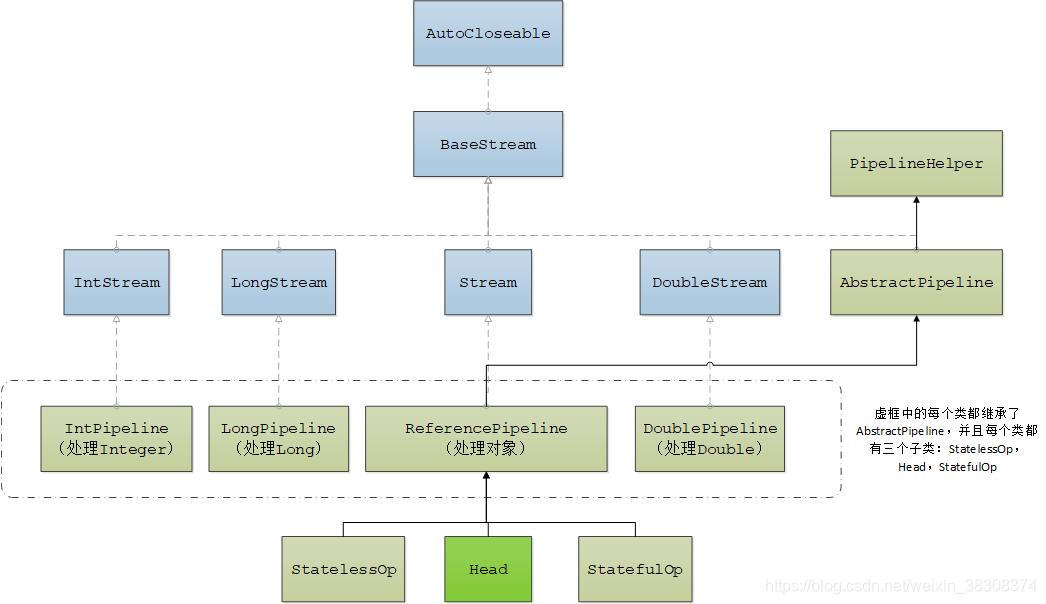
20210116091807985.jpg

List<String> myList =
Arrays.asList("a1", "a2", "b1", "c2", "c1");

myList
.stream()
.filter(s -> s.startsWith("c"))
.map(String::toUpperCase)
.sorted()
.forEach(System.out::println);

// C1
// C2
Arrays.asList("a1", "a2", "a3")
.stream()
.findFirst()
.ifPresent(System.out::println); // a1

Stream.of("a1", "a2", "a3")
.findFirst()
.ifPresent(System.out::println); // a1

IntStream, LongStream, DoubleStream

IntStream.range(1, 4)
.forEach(System.out::println);
// 1
// 2
// 3

IntStream.range(1, 4)
.mapToObj(i -> "a" + i)
.forEach(System.out::println);
// a1
// a2
// a3

Processing Order

Stream.of("d2", "a2", "b1", "b3", "c")
.filter(s -> {
System.out.println("filter: " + s);
return true;
})
.forEach(s -> System.out.println("forEach: " + s));

filter: d2
forEach: d2
filter: a2
forEach: a2
filter: b1
forEach: b1
filter: b3
forEach: b3
filter: c
forEach: c
Stream.of("d2", "a2", "b1", "b3", "c")
.map(s -> {
System.out.println("map: " + s);
return s.toUpperCase();
})
.anyMatch(s -> {
System.out.println("anyMatch: " + s);
return s.startsWith("A");
});

// map: d2
// anyMatch: D2
// map: a2
// anyMatch: A2
Stream.of("d2", "a2", "b1", "b3", "c")
.sorted((s1, s2) -> {
System.out.printf("sort: %s; %s\n", s1, s2);
return s1.compareTo(s2);
})
.filter(s -> {
System.out.println("filter: " + s);
return s.startsWith("a");
})
.map(s -> {
System.out.println("map: " + s);
return s.toUpperCase();
})
.forEach(s -> System.out.println("forEach: " + s));

parallelStream()

List<String> strings = Arrays.asList("abc", "", "bc", "efg", "abcd","", "jkl");
long count = strings.parallelStream().filter(string -> string.isEmpty()).count();

summaryStatistics()

List<Integer> numbers = Arrays.asList(3, 2, 2, 3, 7, 3, 5);

IntSummaryStatistics stats = numbers.stream().mapToInt((x) -> x).summaryStatistics();

System.out.println("Max: " + stats.getMax());
System.out.println("Min: " + stats.getMin());
System.out.println("Sum: " + stats.getSum());
System.out.println("Avg: " + stats.getAverage());

Prototype in JavaScript

· One min read

Open in Notion

All JavaScript objects inherit properties and methods from a prototype.

  • Date objects inherit from Date.prototype
  • Array objects inherit from Array.prototype
  • Person objects inherit from Person.prototype

The Object.prototype is on the top of the prototype inheritance chain:

Date objects, Array objects, and Person objects inherit from Object.prototype

Example

function Person(first, last, age, eyecolor) {
this.firstName = first;
this.lastName = last;
this.age = age;
this.eyeColor = eyecolor;
}

Person.prototype.nationality = "English";

Person.prototype.name = function() {
return this.firstName + " " + this.lastName;
};

var myFather = new Person("John", "Doe", 50, "blue");
var myMother = new Person("Sally", "Rally", 48, "green");

❗Please do not add a new property to an existing object constructor as below. That is a wrong way.

Person.nationality = "English";

CSS, SCSS

· One min read

Open in Notion

Media Examples

/* Small (sm) */
@media (min-width: 640px) { /* ... */ }

/* Medium (md) */
@media (min-width: 768px) { /* ... */ }

/* Large (lg) */
@media (min-width: 1024px) { /* ... */ }

/* Extra Large (xl) */
@media (min-width: 1280px) { /* ... */ }

// SCSS
// A map of breakpoints.
$breakpoints: (
xs: 576px,
sm: 768px,
md: 992px,
lg: 1200px
);
@mixin respond-above($breakpoint) {
@if map-has-key($breakpoints, $breakpoint) {
$breakpoint-value: map-get($breakpoints, $breakpoint);
@media (min-width: $breakpoint-value) {
@content;
}
} @else {
@warn 'Invalid breakpoint: #{$breakpoint}.';
}
}

z-index

$zindex-dropdown: 1000 !default;
$zindex-sticky: 1020 !default;
$zindex-fixed: 1030 !default;
$zindex-modal-backdrop: 1040 !default;
$zindex-modal: 1050 !default;
$zindex-popover: 1060 !default;
$zindex-tooltip: 1070 !default;

Each Examples

$colorset: (
primary: #aaa,
accent: #bbb,
);
:root {
@each $key, $val in $colorset {
--#{$key}: #{$val};
}
}
button {
color: var(--#{$key})
}

Function Definitions

$colorKeys: 'primary', 'accent', 'warn';
@mixin each-colors {
@for $i from 1 through length($colorKeys) {
@content(nth($colorKeys, $i));
}
}
@include each-colors using ($colorKey) {
@if $color!= '' {
button.#{$colorKey} {
color: var(--#{$colorKey});
}
}
}

JS Operations

getComputedStyle(document.querySelector(":root")).getPropertyValue("--dark--primary");
document.querySelector('#id').classList.value.split(' ');

Syntax Tips

· One min read

Open in Notion

?? and ||

a || b // equals: a ? a : b
a ?? b // equals: a != undefined && a != null ? a : b
!'' // output: true
0 ?? 'a' // output: 0
0 || 'a' // output: "a"
'' ?? 'a' // output: ""
'' || 'a' // output: "a"

call, apply, bind

These methods can change the this point.

function test(arg1, arg2) {};

test.call(null, a1, a2);
test.apply(null, [a1, a2]);

var t = test.bind(null);
t();

Commit Message Format

· One min read

Open in Notion

<type>[optional scope]: <description>

[optional body]

[optional footer(s)]

type as below:

  • feat: a new feature
  • fix: a bug fix
  • docs: changes to documentation
  • style: formatting, missing semi colons, etc; no code change
  • refactor: refactoring production code
  • test: adding tests, refactoring test; no production code change
  • chore: updating build tasks, package manager configs, etc; no production code change
  • ci: about ci
  • perf: performance change
  • WIP: work in progress

Variables in ng-container/ng-template

· One min read

Open in Notion

<div>
<ng-container *ngTemplateOutlet="viewTemplate; content: {$implicit: {name: 'Bing'}}"></ng-container>
</div>
@Component({
selector: 'sub',
})
export class SubComponent {
@Input() viewTemplate: TemplateRef<any>;
}

bookmark

How to use:

<sub [viewTemplate]="view"></sub>

<ng-template #view let-data>
Your name {{data.name}}
</ng-template>

bookmark

APT-GET

· One min read

Open in Notion

sudo cp /etc/apt/sources.list /etc/apt/sources.list.bak
sudo vim /etc/apt/sources.list

Remove sources.list content using below instead.

deb http://mirrors.aliyun.com/ubuntu/ xenial main
deb-src http://mirrors.aliyun.com/ubuntu/ xenial main

deb http://mirrors.aliyun.com/ubuntu/ xenial-updates main
deb-src http://mirrors.aliyun.com/ubuntu/ xenial-updates main

deb http://mirrors.aliyun.com/ubuntu/ xenial universe
deb-src http://mirrors.aliyun.com/ubuntu/ xenial universe
deb http://mirrors.aliyun.com/ubuntu/ xenial-updates universe
deb-src http://mirrors.aliyun.com/ubuntu/ xenial-updates universe

deb http://mirrors.aliyun.com/ubuntu/ xenial-security main
deb-src http://mirrors.aliyun.com/ubuntu/ xenial-security main
deb http://mirrors.aliyun.com/ubuntu/ xenial-security universe
deb-src http://mirrors.aliyun.com/ubuntu/ xenial-security universe
sudo apt-get update
sudo apt-get -f install
sudo apt-get -y upgrade

Use aptitude instead of apt-get

sudo apt-get install aptitude

aptitude issues

W: Unable to read /etc/apt/preferences.d/ - DirectoryExists (2: No such file or directory)

To fix

mkdir /etc/apt/preferences.d
E: The method driver /usr/lib/apt/methods/https could not be found.

To fix

sudo wget http://archive.ubuntu.com/ubuntu/pool/universe/a/apt/apt-transport-https_1.6.1_all.debb
sudo dpkg -i apt-transport-https_1.6.1_all.deb

Symbols

· One min read

Open in Notion

★☆✦✤❅

➠➥

✓✗✔✘☓√

☑☐

●◔◕◓◒◐◑◉◎◌○❍

◜◝◞◟◠◡

Docker Usage

· 3 min read

Open in Notion

docker build -t <image-name> --build-arg YOUR_ARG="<arg-value>" .

# -d: as deamon
# --rm: exit and remove
docker run -d -p 80:80 -p 443:443 --name <container-name> -v /opt/websites/app:/usr/share/nginx/html <image-name>

# enter the terminal
docker exec -it <container-name> /bin/bash

docker image remove <image-name>

docker container rm <container-name>


##
docker container rename <container-name> <new-container-name>
docker rm -f <container-name>

# build from github
docker build -t <image-name> https://github.com/bndynet/docker.nginx.git[#<branch/tag>:<dir-for-context>]


# Copy & Move
## Export and import containers
docker export container-name | gzip > container-name.gz
zcat container-name.gz | docker import - container-name
## Container image migration - Using this method, the data volumes will not be migrated, but it preserves the data of the application created inside the container.
docker commit container-id image-name
## Save and load images
docker save image-name > image-name.tar
cat image-name.tar | docker load
## copy files from container into host which does not need a running container
docker cp your-file-path-in-container your-host-location

# Publish
docker build -t bndynet/image-name:1.0 .
docker push bndynet/image-name:1.0

Networking

bookmark

# bridge: The default network driver
# host: use the host’s networking directly
docker --network bridge|host|overlay|ipvlan

Change the port for the existing container

You can change the port mapping by directly editing the hostconfig.json file at /var/lib/docker/containers/[hash_of_the_container]/hostconfig.json or /var/snap/docker/common/var-lib-docker/containers/[hash_of_the_container]/hostconfig.json, I believe, if You installed Docker as a snap.

You can determine the [hash_of_the_container] via the docker inspect <container_name> command and the value of the "Id" field is the hash.

  1. Stop the container (docker stop <container_name>).
  2. Stop docker service (per Tacsiazuma's comment)
  3. Change the file.
  4. Restart your docker engine (to flush/clear config caches).
  5. Start the container (docker start <container_name>).

Clear

docker system df # show disk space about docker
docker image prune -f # clear all images which is not used
# print the log for container
docker logs -f <container-name> 1>/dev/null

Example:

IMAGE_NAME = "bndynet/nginx"
CONTAINER_NAME = "web"

docker rm -f $CONTAINER_NAME || true
docker image rm $IMAGE_NAME || true
docker build -t $IMAGE_NAME .

docker run -d -p 80:80 -p 443:443 --name $CONTAINER_NAME -v /opt/website:/usr/share/nginx/html -v /etc/ssl:/etc/ssl $IMAGE_NAME

Mirrors

{
"registry-mirrors": [
"https://registry.docker-cn.com",
"http://hub-mirror.c.163.com",
"https://docker.mirrors.ustc.edu.cn"
]
}

nodejs and npm

· 2 min read

Open in Notion

Installation on CentOS 7

curl -sL https://rpm.nodesource.com/setup_12.x | sudo bash -
sudo yum install nodejs
node --version

Installation via NVM

curl -o- https://raw.githubusercontent.com/nvm-sh/nvm/v0.35.3/install.sh | bash
nvm --version. # restart terminal
nvm install node

nvm install --lts
nvm install 8.12.0
nvm ls
nvm use 10.13.0
nvm alias default 10.13.0
nvm ls-remote

Mirrors

npm config set registry https://registry.npm.taobao.org # or
npm install -g cnpm --registry=https://registry.npm.taobao.org

or via alias:

alias cnpm="npm --registry=https://registry.npm.taobao.org \
--cache=$HOME/.npm/.cache/cnpm \
--disturl=https://npm.taobao.org/dist \
--userconfig=$HOME/.cnpmrc"

# Or alias it in .bashrc or .zshrc
$ echo '\n#alias for cnpm\nalias cnpm="npm --registry=https://registry.npm.taobao.org \
--cache=$HOME/.npm/.cache/cnpm \
--disturl=https://npm.taobao.org/dist \
--userconfig=$HOME/.cnpmrc"' >> ~/.zshrc && source ~/.zshrc

Install development tools

To be able to build native modules from npm we will need to install the development tools and libraries:

sudo yum install gcc-c++ make

NPM commands

npm start --prefix subapp # run `start` in subapp folder

# publish your package to npmjs
npm adduser
npm publish

Test package locally

Run the following commands to generate a package.

npm run build
npm pack --pack-destination ~ # it will pack all files under `files` section in package.json file

Above will output a file.

~/your-package-1.0.0.tgz

Install this package on your other project.

"dependencies": {
"your-package": "file:~/your-package-1.0.0.tgz"
}

and then install.

npm install

Alternatively, you can use the following way to debug in real-time.

cd ~/your-pkg-source
npm link // creates global link

cd ~/your-work
npm link your-pkg

You may also shortcut the two steps in one. For example, to do the above use-case in a shorter way:

cd ~/projects/your-project # go into the dir of your main project
npm link ../your-pkg-dir # link the dir of your dependency

Update all package versions

npm install -g npm-check-updates # global to install the tool
ncu # check updates
ncu -u # update the versions for all packages in package.json file
npm install