
15 posts tagged with "Backend"

View All Tags

PostgreSQL

· 3 min read

Open in Notion

Installing

bookmark

# default
docker run --name my-postgres -e POSTGRES_PASSWORD=your-pass -d postgres

# advance
docker run -d --name my-postgres \
-v /my-dockers/my-postgres/my-postgres.conf:/etc/postgresql/postgresql.conf \
-v /my-dockers/my-postgres/data:/var/lib/postgresql/data \
-e PGDATA=/var/lib/postgresql/data/pgdata \
-e POSTGRES_PASSWORD=your-pass \
-e POSTGRES_USER=postgres \
-e POSTGRES_DB=my-db \
-c ssl=on \
-p 5432:5432 \
postgres -c 'config_file=/etc/postgresql/postgresql.conf'

via psql:

$ docker run -it --rm --network some-network postgres psql -h my-postgres -U postgres
psql (14.3)
Type "help" for help.

postgres=# SELECT 1;
?column?
----------
1
(1 row)

Generate SSL Certificates for PostgreSQL server

  1. Go to data folder

    cd /var/lib/postgresql/data/pgdata
  2. Generate a private key by entering a pass phrase:

    openssl genrsa -des3 -out server.key 2048
  3. Remove the pass phrase to automatically start up the server using the following command

    openssl rsa -in server.key -out server.key
  4. Run the following command to remove group and other’s permission from the private key file

    chmod og-rwx server.key
  5. Run the following command to create a self-signed certificate

    openssl req -new -key server.key -days 3650 -out server.crt -x509

    Note that: You will be asked to enter information that will be incorporated into your certificate request. For some fields, there will be a default value. If you enter ‘.’, the field will be left blank.

    Country Name (2 letter code) [XX]:IN
    State or Province Name (full name) []:.
    Locality Name (eg, city) [Default City]:CH
    Organization Name (eg, company) [Default Company Ltd]:francium tech Organizational Unit Name (eg, section) []:.
    Common Name (eg, your name or your server's hostname) []:.
    Email Address []:kumaresan@francium.tech
  6. For self-signed certificates, use the server certificate as the trusted root certificate:

    cp server.crt root.crt

Prepare PostgreSQL standalone for SSL authentication

  1. Edit the postgresql.conf file to activate SSL:

    cd /usr/local/var/postgres
    vi postgresql.conf
  2. Uncomment and change the following parameters:

    ssl = on
    ssl_ciphers = 'HIGH:MEDIUM:+3DES:!aNULL'
    ssl_prefer_server_ciphers = on
    ssl_cert_file = 'server.crt'
    ssl_key_file = 'server.key'
    ssl_ca_file = 'root.crt'
    ssl_crl_file = ''
  3. Add the following entry to the client machine in /var/lib/postgresql/data/pgdata/pg_hba.conf file:

    local all all trust
    hostssl all all 127.0.0.1/32 cert
    hostnossl all all 0.0.0.0/0 reject
    hostnossl all all ::/0 reject
  4. To verify if SSL is enabled on standalone Postgres, run the following command:

    psql 'host=\<hostname\> port=5432 dbname=\<name\> user=\<user\> sslmode=verify-full sslcert=/tmp/postgresql.crt sslkey=/tmp/postgresql.key sslrootcert=/tmp/root.crt'
  5. Once the database has restarted, login by specifying localhost to make sure the database is being connected over TCP/IP:

    psql -h localhost -U postgres
Setup

· One min read

Open in Notion

Mirrors

Add mirror in conf/setting.xml file in Maven root folder:

<mirrors>
<mirror>
<id>alimaven</id>
<name>aliyun maven</name>
<url>http://maven.aliyun.com/nexus/content/groups/public/</url>
<mirrorOf>central</mirrorOf>
</mirror>
</mirrors>

MySql

· One min read

Open in Notion

$ docker pull
$ docker run --name mysql-default -p 3306:3306 -e MYSQL_ROOT_HOST=% -e MYSQL_ROOT_PASSWORD=123456 -d mysql
$ docker exec -it mysql-default mysql -u root -p
ALTER USER 'root'@'localhost' IDENTIFIED BY '123456';

Problem solving for remotely access

If you got the same problem like this while connect to MySQL server from another host (It depends on which version of MySQL you are using):

java.sql.SQLNonTransientConnectionException: Public Key Retrieval is not allowed

You should change your password of root user by using the native password hashing method to fix it:

ALTER USER 'root'@'localhost' IDENTIFIED WITH mysql_native_password BY '123456';
ALTER USER 'root'@'%' IDENTIFIED WITH mysql_native_password BY '123456';

Java Versions and JDK Versions

· One min read

Open in Notion

Versions and JDK

Java SE VersionJDK VersionClass VersionReleased Date
Java SE 6 (Mustang)1.650December 2006
Java SE 7 (Dolphin)1.751July 2011
Java SE 81.852March 2014
Java SE 9953September, 21st 2017
Java SE 101054March, 20th 2018
Java SE 111155September, 25th 2018

Install on CentOS

yum list *openjdk*
yum install java-<version here>-openjdk # e.g java-11-openjdk
update-alternatives --config java # choose the default java version
java -version

Install via sdkman

curl -s https://get.sdkman.io | bash
sdk list java
sdk install java <version> // for example `sdk install java 11.0.12-open`

sdk current
sdk current java

Monitor File Changes

· One min read

Open in Notion

public static void main(String[] args) throws Exception {

WatchService watchService = FileSystems.getDefault().newWatchService();

Path path = Paths.get("G:\\");

path.register(
watchService,
StandardWatchEventKinds.ENTRY_CREATE,
StandardWatchEventKinds.ENTRY_DELETE,
StandardWatchEventKinds.ENTRY_MODIFY);

WatchKey key;
while ((key = watchService.take()) != null) {
for (WatchEvent<?> event : key.pollEvents()) {
System.out.println("Event:" + event.kind() + ", File:" + event.context());
}
key.reset();
}
}

WatchService added in Java7 for NIO solution.

Monitor Spring Boot Application

· One min read

Open in Notion

bookmark

Host Your Sentry

git clone https://github.com/getsentry/onpremise.git
cd onpremise
./install.sh

Once your Sentry is ready, you need to create your project with Spring Boot or Java platform in your Sentry.

Set up Spring Boot Application

Get Started

<dependency>
<groupId>io.sentry</groupId>
<artifactId>sentry-spring-boot-starter</artifactId>
<version>3.1.1</version>
</dependency>
sentry.dsn=https://key@host/id

Who send the exception?

You can use SentryUserProvider to build a Java Bean:

@Bean
public SentryUserProvider sentryUserProvider(){
return () -> {
// TODO: get your current user
User user = new User();
user.setId("userId");
user.setUsername("Bendy");
user.setEmail("zb@bndy.net");

return user;
};
}

Custom Tags

@Bean
public SentryOptions.BeforeSendCallback beforeSendCallback(){
return (event, hint) -> {
event.setTag("name","zhangsan");
return event;
};
}

Integration with Logback

<dependency>
<groupId>io.sentry</groupId>
<artifactId>sentry-logback</artifactId>
<version>3.1.1</version>
</dependency>
@RestController
public class HelloController {
private static Logger logger = LoggerFactory.getLogger(HelloController.class);

@RequestMapping("/")
public void test(){
logger.error("Logback error!");
}
}

Spring Boot with Keycloak

· 4 min read

Open in Notion

bookmark

The Keycloak Spring Boot adapter capitalizes on Spring Boot’s auto-configuration, so all we need to do is add the Keycloak Spring Boot starter to our project.

Within the dependencies XML element, we need the following to run Keycloak with Spring Boot:

<dependency>
<groupId>org.keycloak</groupId>
<artifactId>keycloak-spring-boot-starter</artifactId>
</dependency>

After the dependencies XML element, we need to specify dependencyManagement for Keycloak:

<dependencyManagement>
<dependencies>
<dependency>
<groupId>org.keycloak.bom</groupId>
<artifactId>keycloak-adapter-bom</artifactId>
<version>11.0.2</version>
<type>pom</type>
<scope>import</scope>
</dependency>
</dependencies>
</dependencyManagement>

The following embedded containers are supported now and don't require any extra dependencies if using Spring Boot Keycloak Starter:

  • Tomcat
  • Undertow
  • Jetty

Keycloak Configuration

Here's the basic, mandatory configuration:

keycloak.realm = <REALM_NAME>
keycloak.auth-server-url = http://127.0.0.1:8080/auth
keycloak.ssl-required = external
keycloak.resource = <CLIENT_ID>
keycloak.credentials.secret = <CLIENT_SECRET>
keycloak.use-resource-role-mappings = true
keycloak.bearer-only = true

You can disable the Keycloak Spring Boot Adapter (for example in tests) by setting keycloak.enabled = false.

To configure a Policy Enforcer, unlike keycloak.json, policy-enforcer-config must be used instead of just policy-enforcer.

You also need to specify the Java EE security config that would normally go in the web.xml. The Spring Boot Adapter will set the login-method to KEYCLOAK and configure the security-constraints at startup time. Here’s an example configuration:

keycloak.securityConstraints[0].authRoles[0] = admin
keycloak.securityConstraints[0].authRoles[1] = user
keycloak.securityConstraints[0].securityCollections[0].name = insecure stuff
keycloak.securityConstraints[0].securityCollections[0].patterns[0] = /insecure

keycloak.securityConstraints[1].authRoles[0] = admin
keycloak.securityConstraints[1].securityCollections[0].name = admin stuff
keycloak.securityConstraints[1].securityCollections[0].patterns[0] = /admin

If you plan to deploy your Spring Application as a WAR then you should not use the Spring Boot Adapter and use the dedicated adapter for the application server or servlet container you are using. Your Spring Boot should also contain a web.xml file.

KeycloakSecurityConfig.java

@Configuration
@EnableWebSecurity
@EnableGlobalMethodSecurity(jsr250Enabled = true)
public class KeycloakSecurityConfig extends KeycloakWebSecurityConfigurerAdapter {

@Override
protected void configure(HttpSecurity http) throws Exception {
super.configure(http);
http.authorizeRequests()
.anyRequest()
.permitAll();
http.csrf().disable();
}

@Autowired
public void configureGlobal(AuthenticationManagerBuilder auth) throws Exception {
KeycloakAuthenticationProvider keycloakAuthenticationProvider = keycloakAuthenticationProvider();
keycloakAuthenticationProvider.setGrantedAuthoritiesMapper(new SimpleAuthorityMapper());
auth.authenticationProvider(keycloakAuthenticationProvider);
}

@Bean
@Override
protected SessionAuthenticationStrategy sessionAuthenticationStrategy() {
return new RegisterSessionAuthenticationStrategy(new SessionRegistryImpl());
}

@Bean
public KeycloakConfigResolver KeycloakConfigResolver() {
return new KeycloakSpringBootConfigResolver();
}
}

configureGlobal: Registers the KeycloakAuthenticationProvider with the authentication manager.

sessionAuthenticationStrategy: Defines the session authentication strategy.

KeycloakConfigResolver : By Default, the Spring Security Adapter looks for a keycloak.json configuration file. You can make sure it looks at the configuration provided by the Spring Boot Adapter by adding this bean

@EnableGlobalMethodSecurity: The jsr250Enabled property allows us to use the @RoleAllowed annotation. We’ll explore more about this annotation in the next section.

TestController.java

@RestController
@RequestMapping("/test")
public class TestController {

@RequestMapping(value = "/anonymous", method = RequestMethod.GET)
public ResponseEntity<String> getAnonymous() {
return ResponseEntity.ok("Hello Anonymous");
}

@RequestMapping(value = "/user", method = RequestMethod.GET)
public ResponseEntity<String> getUser() {
return ResponseEntity.ok("Hello User");
}

@RequestMapping(value = "/admin", method = RequestMethod.GET)
public ResponseEntity<String> getAdmin() {
return ResponseEntity.ok("Hello Admin");
}

@RequestMapping(value = "/all-user", method = RequestMethod.GET)
public ResponseEntity<String> getAllUser() {
return ResponseEntity.ok("Hello All User");
}
}

Run the Spring Boot Application. Make sure Maven is installed and configured.

mvn spring-boot:run

As defined in the TestController, let’s invoke the REST APIs with CURL one by one.

curl -X GET 'http://localhost:8000/test/anonymous'
curl -X GET 'http://localhost:8000/test/user'
curl -X GET 'http://localhost:8000/test/admin'
curl -X GET 'http://localhost:8000/test/all-user'

As you see all APIs don’t require any authentication or authorization. Now let’s try to secure these API endpoints.

Define Role-Based Access with @RolesAllowed Annotation

@RolesAllowed("user")
@RequestMapping(value = "/user", method = RequestMethod.GET)
public ResponseEntity<String> getUser(@RequestHeader String Authorization) {
return ResponseEntity.ok("Hello User");
}

@RolesAllowed("admin")
@RequestMapping(value = "/admin", method = RequestMethod.GET)
public ResponseEntity<String> getAdmin(@RequestHeader String Authorization) {
return ResponseEntity.ok("Hello Admin");
}

@RolesAllowed({ "admin", "user" })
@RequestMapping(value = "/all-user", method = RequestMethod.GET)
public ResponseEntity<String> getAllUser(@RequestHeader String Authorization) {
return ResponseEntity.ok("Hello All User");
}

Define Role-Based Access with Security Configuration

Rather than using @RolesAllowed annotation, the same configuration can be made in KeycloakSecurityConfig class as below.

@Override
protected void configure(HttpSecurity http) throws Exception {
super.configure(http);
http.authorizeRequests()
.antMatchers("/test/anonymous").permitAll()
.antMatchers("/test/user").hasAnyRole("user")
.antMatchers("/test/admin").hasAnyRole("admin")
.antMatchers("/test/all-user").hasAnyRole("user","admin")
.anyRequest()
.permitAll();
http.csrf().disable();
}

Java 8 Stream Tutorial

· 2 min read

Open in Notion

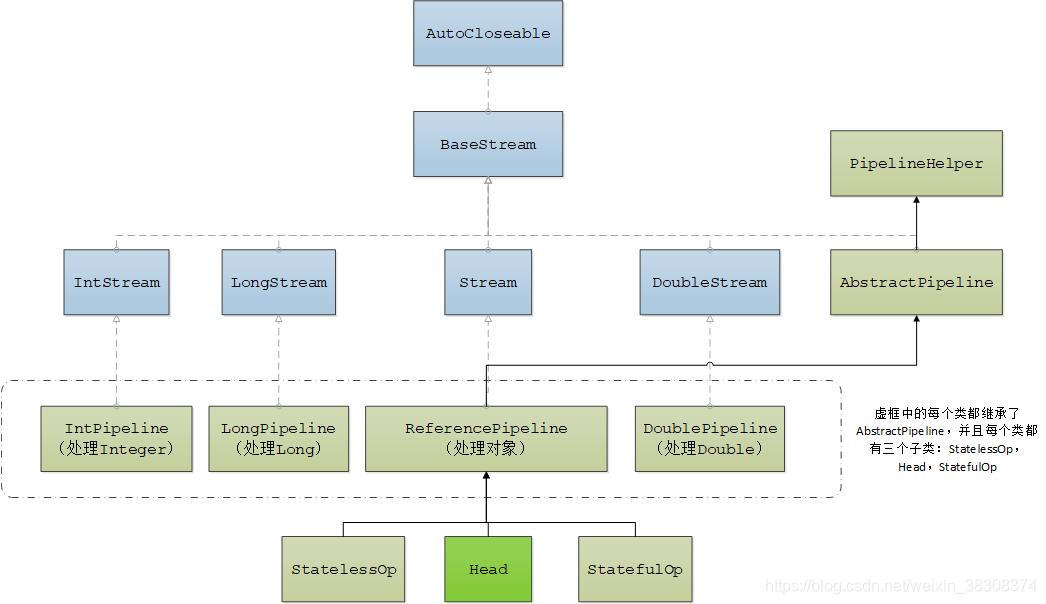
20210116091807985.jpg

List<String> myList =
Arrays.asList("a1", "a2", "b1", "c2", "c1");

myList
.stream()
.filter(s -> s.startsWith("c"))
.map(String::toUpperCase)
.sorted()
.forEach(System.out::println);

// C1
// C2
Arrays.asList("a1", "a2", "a3")
.stream()
.findFirst()
.ifPresent(System.out::println); // a1

Stream.of("a1", "a2", "a3")
.findFirst()
.ifPresent(System.out::println); // a1

IntStream, LongStream, DoubleStream

IntStream.range(1, 4)
.forEach(System.out::println);
// 1
// 2
// 3

IntStream.range(1, 4)
.mapToObj(i -> "a" + i)
.forEach(System.out::println);
// a1
// a2
// a3

Processing Order

Stream.of("d2", "a2", "b1", "b3", "c")
.filter(s -> {
System.out.println("filter: " + s);
return true;
})
.forEach(s -> System.out.println("forEach: " + s));

filter: d2
forEach: d2
filter: a2
forEach: a2
filter: b1
forEach: b1
filter: b3
forEach: b3
filter: c
forEach: c
Stream.of("d2", "a2", "b1", "b3", "c")
.map(s -> {
System.out.println("map: " + s);
return s.toUpperCase();
})
.anyMatch(s -> {
System.out.println("anyMatch: " + s);
return s.startsWith("A");
});

// map: d2
// anyMatch: D2
// map: a2
// anyMatch: A2
Stream.of("d2", "a2", "b1", "b3", "c")
.sorted((s1, s2) -> {
System.out.printf("sort: %s; %s\n", s1, s2);
return s1.compareTo(s2);
})
.filter(s -> {
System.out.println("filter: " + s);
return s.startsWith("a");
})
.map(s -> {
System.out.println("map: " + s);
return s.toUpperCase();
})
.forEach(s -> System.out.println("forEach: " + s));

parallelStream()

List<String> strings = Arrays.asList("abc", "", "bc", "efg", "abcd","", "jkl");
long count = strings.parallelStream().filter(string -> string.isEmpty()).count();

summaryStatistics()

List<Integer> numbers = Arrays.asList(3, 2, 2, 3, 7, 3, 5);

IntSummaryStatistics stats = numbers.stream().mapToInt((x) -> x).summaryStatistics();

System.out.println("Max: " + stats.getMax());
System.out.println("Min: " + stats.getMin());
System.out.println("Sum: " + stats.getSum());
System.out.println("Avg: " + stats.getAverage());

AOP – Aspect-oriented programming

· 4 min read

Open in Notion

It does so by adding additional behavior to existing code (an advice) without modifying the code itself, instead separately specifying which code is modified via a “pointcut” specification, such as “log all function calls when the function’s name begins with ‘set’”. This allows behaviors that are not central to the business logic (such as logging) to be added to a program without cluttering the code, core to the functionality. AOP forms a basis for aspect-oriented software development.

Define an Aspect by using @Aspect annotations – which is natively understood by Spring:

import org.aspectj.lang.ProceedingJoinPoint;
import org.aspectj.lang.annotation.After;
import org.aspectj.lang.annotation.Around;
import org.aspectj.lang.annotation.Aspect;
import org.aspectj.lang.annotation.Before;
import org.aspectj.lang.annotation.Pointcut;
import org.slf4j.Logger;
import org.slf4j.LoggerFactory;

@Aspect
public class AuditAspect {

private static Logger logger = LoggerFactory.getLogger(AuditAspect.class);

@Pointcut("execution(* net.bndy.service.*.*(..))")
public void serviceMethods(JoinPoint jp){ }

// Intercept all calls to methods annotated with @PerLog
// @Pointcut("execution(@net.bndy.annotations.PerfLog * *.*(..))")
public void performanceTargets(JoinPoint jp, PerLog perLog){ }
// Pass annotation to AOP advices
@Pointcut(value = "@annotation(perLog)", argNames = "perfLog")
public void performanceTargets(JoinPoint jp, PerLog perLog){ }

// Using annotations and parameters in AOP advices
@Before(value = "com.byteslounge.spring.aop.PointcutDefinition.serviceLayer() && args(account,..) && @annotation(auditable)")
public void audit(Account account, Auditable auditable) {
System.out.println("Audit account access: "
+ account.getAccountNumber() + ". Audit destination: "
+ auditable.value());
}

// If the first parameter is of the JoinPoint, ProceedingJoinPoint, or JoinPoint.StaticPart type, you may leave out the name of the parameter from the value of the "argNames" attribute. For example, if you modify the preceding advice to receive the join point object, the "argNames" attribute need not include it:
@Before(value="com.xyz.lib.Pointcuts.anyPublicMethod() && target(bean) && @annotation(auditable)", argNames="bean,auditable")
public void audit(JoinPoint jp, Object bean, Auditable auditable) {
AuditCode code = auditable.value();
// ... use code, bean, and jp
}

@Before("serviceMethods()")
public void beforeMethod(JoinPoint jp) {
String methodName = jp.getSignature().getName();
logger.info("before method:" + methodName);
}

@Around("serviceMethods()")
public Object aroundMethod(ProceedingJoinPoint jp) {
try {
long start = System.nanoTime();
// execute target method
Object result = jp.proceed();
long end = System.nanoTime();
logger.info(String.format("%s took %d ns", jp.getSignature(), (end - start)));
return result;
} catch (Throwable e) {
throw new RuntimeException(e);
}
}

// Always run if method completed
@After("serviceMethods()")
public void afterMethod(JoinPoint jp) {
logger.info("after method");
}

// Run when the method returns normally.
@AfterReturning(value="execution(* net.bndy.service.*.*(..))",returning="result")
public void afterReturningMethod(JoinPoint jp, Object result){ }

// Run if an exception has benn thrown in method
@AfterThrowing(value="execution(* net.bndy.service.*.*(..))",throwing="e")
public void afterThorwingMethod(JoinPoint jp, NullPointerException e){ }
}

@Pointcut

// Any return type | package | class | method | any type and number of arguments
@Pointcut("execution(* net.bndy.service . *. *( .. ))")
@Pointcut("execution(* net.bndy.service.*.*(.. ))")

// examples
@Pointcut("within(*..*Test)") // support for sub packages is provided with ".."
@Pointcut("within(net.bndy.service..*Test)") // ends with Test inside the "net.bndy.service" package
@Pointcut("!within(net.bndy.service..*Test)" // expects that ends with Test inside the "net.bndy.service" package
@Pointcut("execution(void *..service.Service+.*(..))") // all methods in the Service class or a subtype of it

@Pointcut("!withincode(@org.junit.Test * *(..))") //Finds all statements that’s not inside a method marked with @Test

// other Pointcuts
//execution(void Point.setX(int))
//call(void Point.setX(int))
//handler(ArrayOutOfBoundsException)
//this(SomeType)
//target(SomeType)
//within(MyClass)
//cflow(call(void Test.main()))
//call(* *(..)) &amp;&amp; (within(Line) || within(Point))
//execution(!static * *(..))
//execution(public !static * *(..))

Why to use argNames

public class HelloApi {

public void aspectTest(String a,String b){
System.out.println("in aspectTest:" + "a:" + a + ",b:" + b);
}
}
@Pointcut(value="execution(* bean.HelloApi.aspectTest(..)) && args(a1,b2)",argNames="a1,b2")
public void pointcut1(String a1,String b2){}

@Before(value="pointcut1(a,b)",argNames="a,b")
public void beforecase1(String a,String b){
System.out.println("1 a:" + a +" b:" + b);
}

// NOTE: a and p locations
@Before(value="pointcut1(a,b)",argNames="b,a")
public void beforecase2(String a,String b){
System.out.println("2 a:" + a +" b:" + b);
}
HelloApi helloapi1 = beanFactory.getBean("helloapi1",HelloApi.class);
helloapi1.aspectTest("a", "b");

Output

1 a:a b:b
2 a:b b:a
in aspectTest:a:a,b:b