BNDY-NET
I'm code Porter, but I produce codes.
💯 Frequently Used
Frontend
Libraries
AmCharts
ECharts
Step by Step to Guide (driver.js)
import Driver from 'driver.js';
import 'driver.js/dist/driver.min.css';

const driver = new Driver({
  className: 'scoped-class',
  animate: true,
  opacity: 0.75,
  padding: 10,
  allowClose: true,
  overlayClickNext: false,
  doneBtnText: 'Done',
  closeBtnText: 'Close',
  stageBackground: '#ffffff',
  nextBtnText: 'Next',
  prevBtnText: 'Previous',
  showButtons: false,
  keyboardControl: true,
  scrollIntoViewOptions: {},
  onHighlightStarted: (Element) => {},
  onHighlighted: (Element) => {},
  onDeselected: (Element) => {},
  onReset: (Element) => {},
  onNext: (Element) => {},
  onPrevious: (Element) => {},
});

driver.defineSteps([
  {
    element: '#first-element-introduction',
    popover: {
      className: 'first-step-popover-class',
      title: 'Title on Popover',
      description: 'Body of the popover',
      position: 'left'
    }
  },
  {
    element: '#second-element-introduction',
    popover: {
      title: 'Title on Popover',
      description: 'Body of the popover',
      position: 'top'
    }
  },
  {
    element: '#third-element-introduction',
    popover: {
      title: 'Title on Popover',
      description: 'Body of the popover',
      position: 'right'
    }
  },
]);

driver.start();
Just highlight some elements like below.
const driver = new Driver();
driver.highlight({
  element: '#some-element',
  popover: {
    title: 'Title for the Popover',
    description: 'Description for it',
    position: 'left',
    offset: 20,
  }
});
React
Package your React Component for distribution via NPM
1. MAKE A PACKAGE NPM PUBLISHABLE
npm init
In the package.json, make sure these fields are populated: package.json
{
  "name": "myUnflappableComponent",
  "version": "0.0.29",
  "main": "dist/index.js",
  "publishConfig": {
    "access": "restricted"
  },
  ...
}
2. DON’T BUNDLE REACT. USE THE PARENT’S REACT AND REACT-DOM.
In package.json, add React and react-dom in the project’s peerDependencies (And remove it from dependencies, but add it to devDependencies for development)
...
"peerDependencies": {
  "react": ">=15.0.1",
  "react-dom": ">=15.0.1"
},
"devDependencies": {
  "react": ">=15.0.1",
  "react-dom": ">=15.0.1"
},
...
In your webpack configuration, create a UMD bundle
...
module.exports = {
  ...
  output: {
    path: path.join(__dirname, './dist'),
    filename: 'myUnflappableComponent.js',
    library: libraryName,
    libraryTarget: 'umd',
    publicPath: '/dist/',
    umdNamedDefine: true
  },
  plugins: {...},
  module: {...},
  resolve: {...},
  externals: {...}
}
And super-duper important, don’t bundle React
module.exports = {
  output: {...},
  plugins: {...},
  module: {...},
  resolve: {
    alias: {
      'react': path.resolve(__dirname, './node_modules/react'),
      'react-dom': path.resolve(__dirname, './node_modules/react-dom'),
    }
  },
  externals: {
    // Don't bundle react or react-dom
    react: {
      commonjs: "react",
      commonjs2: "react",
      amd: "React",
      root: "React"
    },
    "react-dom": {
      commonjs: "react-dom",
      commonjs2: "react-dom",
      amd: "ReactDOM",
      root: "ReactDOM"
    }
  }
}
3. SET UP YOUR .NPMIGNORE FILE
If you don’t set up a .npmignore file, npm uses your .gitignore file and bad things will happen. An empty .npmignore file is allowed. This is what mine looks like:
webpack.local.config.js
webpack.production.config.js .eslintrc .gitignore
React and JSX Style Guide
https://github.com/airbnb/javascript/tree/master/react
Web Components in React
Events of Web Components in React
An improvement would be to extract the event listener callback function in order to remove the listener when the component unmounts.
import React from 'react';

import 'road-dropdown';

const Dropdown = ({ label, option, options, onChange }) => {
  const ref = React.useRef();

  React.useLayoutEffect(() => {
    const handleChange = customEvent => onChange(customEvent.detail);

    const { current } = ref;

    current.addEventListener('onChange', handleChange);

    // returning the callback in order to remove the listener when the component unmounts.
    return () => current.removeEventListener('onChange', handleChange);
  }, [ref]);

  return (
    <road-dropdown
      ref={ref}
      label={label}
      option={option}
      options={JSON.stringify(options)}
    />
  );
};
That's it for adding an event listener for
React to Web Components
Below works with the useCustomElement React Hook which can be installed via npm install use-custom-element:
import React from 'react';

import 'road-dropdown';

import useCustomElement from 'use-custom-element';

const Dropdown = props => {
  const [customElementProps, ref] = useCustomElement(props);

  return <road-dropdown {...customElementProps} ref={ref} />;
};
Angular
CLI
ng generate component|directive|pipe|service|class|guard|interface|enum|module --module=app
ng g directive ./src/app/directives/your-directive  --module=shared


ng test --include path/to/your-spec-file
ng test --include src/**/*.spec.ts
ng test your-module --code-coverage
Install Error
internal/modules/cjs/loader.js:638
throw err;
^

Error: Cannot find module '/usr/lib/node_modules/@angular/cli/bin/postinstall/script.js'
sudo npm install -g @angular/cli --unsafe-perm=true --allow-root
Cache for HttpClient
@Injectable()
class CacheInterceptor implements HttpInterceptor {
  private cache: Map<HttpRequest, HttpResponse> = new Map()
  intercept(req: HttpRequest<any>, next: HttpHandler): Observable<HttpEvent<any>>{
    if(req.method !== "GET") {
        return next.handle(req)
    }
    if(req.headers.get("reset")) {
        this.cache.delete(req)
    }
    const cachedResponse: HttpResponse = this.cache.get(req)
    if(cachedResponse) {
        return of(cachedResponse.clone())
    }else {
        return next.handle(req).pipe(
            do(stateEvent => {
                if(stateEvent instanceof HttpResponse) {
                    this.cache.set(req, stateEvent.clone())
                }
            })
        ).share()
    }
  }
}
According to above code, if you do not want to get the data from cache. you just pass a head parameter as below:
public fetchDogs(reset: boolean = false) {
    return this.httpClient.get("api/dogs", new HttpHeaders({reset}))
}
And lastly, you must add the interceptor to module.
@NgModule({
    ...
    providers: {
        provide: HTTP_INTERCEPTORS,
        useClass: CacheInterceptor,
        multi: true
    }
})
...
Events of Component
Outside Click
import { Directive, Input, Output, EventEmitter, ElementRef, HostListener } from '@angular/core';

@Directive({
  selector: '[clickOutside]',
})
export class ClickOutsideDirective {

  @Output() clickOutside = new EventEmitter<void>();

  constructor(private elementRef: ElementRef) { }

  @HostListener('document:click', ['$event.target'])
  public onClick(target) {
    const clickedInside = this.elementRef.nativeElement.contains(target);
    if (!clickedInside) {
      this.clickOutside.emit();
    }
  }
}
<div (clickOutside)="someHandler()"></div>
Keydown of Component
@HostListener('document: keydown', ['$event'])
  public onEnter(event: KeyboardEvent): void {
    if (this.elementRef.nativeElement.contains(event.target)) {
      if (event.code === 'Enter') {
        // TODO:
      }
    }
  }
‼️Tips
If the element contains *ngIf, this.overlay.nativeElement.contains(event.target); always return false. Because of the angular directive *ngIf
<div #overlay>
	<div *ngIf="show" class="item">
		Click here
  </div>
</div>
@ViewChild('overlay', { static: false }) overlay: ElementRef;

//...
this.overlay.nativeElement.contains(event.target);  // always return false
How to solve it?
You can check the event.target
Object.keys(event.target.classList).includes('item');
Or use [hidden] instead.
<div [hidden]="!show" class="item">
		Click here
  </div>
Preloading
Lazy loading for modules
https://angular.io/guide/lazy-loading-ngmodules#preloading-modules
import { PreloadAllModules } from '@angular/router';
RouterModule.forRoot(
  appRoutes,
  {
    preloadingStrategy: PreloadAllModules
  }
)
Preloading component data
import { Resolve } from '@angular/router';

...

/* An interface that represents your data model */
export interface Crisis {
  id: number;
  name: string;
}

export class CrisisDetailResolverService implements Resolve {
  resolve(route: ActivatedRouteSnapshot, state: RouterStateSnapshot): Observable {
    // your logic goes here
  }
}
import { CrisisDetailResolverService } from './crisis-detail-resolver.service';
{
  path: '/your-path',
  component: YourComponent,
  resolve: {
    crisis: CrisisDetailResolverService
  }
}
import { ActivatedRoute } from '@angular/router';

@Component({ ... })
class YourComponent {
  constructor(private route: ActivatedRoute) {}

  ngOnInit() {
    this.route.data
      .subscribe(data => {
        const crisis: Crisis = data.crisis;
        // ...
      });
  }
}
Preloading Strategies
Available Preloading strategies
- Build-in preloading strategies — NoPreloading (default) or PreloadAllModules.
- Custom preloading strategies — Preload after some time, preload based on network quality, load required modules first, frequently used second, and others lazy load/last.
Preloading all the modules (PreloadAllModules)
Custom preloading strategies
app-routing.module.ts
import {NgModule} from '@angular/core';
import {Routes, RouterModule} from '@angular/router';
import {CustomPreloadingStrategyService} from './custom-preloading-strategy.service';
const routes: Routes = [
  {path: 'about', data: {preload: true}, loadChildren: () => import('./about/about.module').then(m => m.AboutModule)},
  {path: 'users', loadChildren: () => import('./users/users.module').then(m => m.UsersModule)},
  {path: '', redirectTo: '', pathMatch: 'full'}
];
@NgModule({
  imports: [RouterModule.forRoot(routes, {preloadingStrategy: CustomPreloadingStrategyService})],
  exports: [RouterModule]
})
export class AppRoutingModule {
}
custom-preloading-strategy.service.ts
import {Injectable} from '@angular/core';
import {PreloadingStrategy, Route} from '@angular/router';
import {Observable, of} from 'rxjs';
@Injectable({
  providedIn: 'root'
})
export class CustomPreloadingStrategyService implements PreloadingStrategy {
preload(route: Route, fn: () => Observable<any>): Observable<any> {
    if (route.data && route.data.preload) {
	      return fn();  // Proceeds with preloading
    }
    return of(null);  // Proceeds without preloading
  }
}
Fix Circular Dependency issue
@Injectable({
  providedIn: 'root',
})
export class AppService {

	constructor(
    private injector: Injector,
    // public status: StatusService, // do not do it if this leads to circular dependency issue
  ) { }

  // use below instead
  getStatusSerice() {
    return this.injector.get<StatusSerice>(StatusSerice);
  }
}
AngularJS with TypeScript
Components
class HerosComponentController implements ng.IComponentController {
  public static $inject = ['$log', '$scope', '$document', '$element'];
  public title: string;
  public heros: IHero[];
  public onItemSelect: any;

  constructor(
    private $log: ng.ILogService,
    private $scope: ng.IScope,
    private $document: ng.IDocumentService,
    private $element: ng.IRootElementService,
  ) { }

  public $onInit () { }

  public $onChanges(changes: angular.IOnChangesObject): void { }

  public selectItem(item: IHero, event: any) {
    if (this.onItemSelect && typeof this.onItemSelect === 'function') {
      this.onItemSelect({
        data: item,
      });
    }
  }
}

class HerosComponent implements ng.IComponentOptions {

  public controller: ng.Injectable<ng.IControllerConstructor>;
  public controllerAs: string;
  public template: string;
  public bindings: any;

  constructor() {
    this.controller = HerosComponentController;
    this.controllerAs = "$ctrl";
    this.template = `
      <ul>
        <li>{{$ctrl.title}}</li>
        <li ng-click="$ctrl.selectItem(hero, $event)" ng-repeat="hero in $ctrl.heros">{{ hero.name }}</li>
      </ul>
    `;
    this.bindins = {
      title: '@',
      heros: '<',
      onItemSelect: '&',
    };
  }
}

angular
  .module("mySuperAwesomeApp", [])
  .component("heros", new HerosComponent());

angular.element(document).ready(function() {
  angular.bootstrap(document, ["mySuperAwesomeApp"]);
});
<heros title="Title" heros="$ctrl.heros" on-item-select="$ctrl.select(data)"></heros>
Unit Test
Http Mock
import {HttpTestingController} from '@angular/common/http/testing';

describe('DataService', () => {
    let service: DataService;
    let httpMock: HttpTestingController;
    beforeEach(() => {
        TestBed.configureTestingModule({
            imports: [HttpClientModule],
            providers: [DataService]
        });
        service = TestBed.get(DataService);
        httpMock = TestBed.get(HttpTestingController);
    });
		afterEach(() => {
		    httpMock.verify();
		});

		it('be able to retrieve posts from the API bia GET', () => {
			const dummyPosts: Post[] = [{
			    userId: '1',
			    id: 1,
			    body: 'Hello World',
			    title: 'testing Angular'
			    }, {
			    userId: '2',
			    id: 2,
			    body: 'Hello World2',
			    title: 'testing Angular2'
			}];
			service.getPost().subscribe(posts => {
			    expect(posts.length).toBe(2);
			    expect(posts).toEqual(dummyPosts);
			});
			const request = httpMock.expectOne( `${service.ROOT_URl}/posts`);
			expect(request.request.method).toBe('GET');
			request.flush(dummyPosts);
		});
});
Injector in Console
// Get the injector
var injector = angular.element($0/*'[data-ng-app], [ng-app]'*/).injector();
// Get the service
var service = injector.get('Service');
NGRX
Variables in ng-container/ng-template
<div>
  <ng-container *ngTemplateOutlet="viewTemplate; content: {$implicit: {name: 'Bing'}}"></ng-container>
</div>
@Component({
	selector: 'sub',
})
export class SubComponent {
	@Input() viewTemplate: TemplateRef<any>;
}
How to use:
<sub [viewTemplate]="view"></sub>

<ng-template #view let-data>
   Your name {{data.name}}
</ng-template>
Global Error Handling
global-error-handler.ts
import { HttpErrorResponse } from '@angular/common/http';
import { ErrorHandler, Injectable, NgZone } from '@angular/core';

@Injectable()
export class GlobalErrorHandler implements ErrorHandler {
  constructor() {}

  public handleError(error: any): void {
    // Check if it's an error from an HTTP response
    const isServerError = error instanceof HttpErrorResponse;

    if (!isServerError) {
       // TODO
    }

    console.error('Error from Global Error Handler', error);
  }
}
app.module.ts
@NgModule({
  declarations: [AppComponent],
  imports: [
    CommonModule,
    HttpClientModule,
  ],
  providers: [
    { provide: ErrorHandler, useClass: GlobalErrorHandler },
  ],
  bootstrap: [AppComponent],
})
export class AppModule {}
Service Provided in a Lazy Loaded Module
Unlike providers of the modules loaded at launch, providers of lazy-loaded modules are module-scoped.
When the Angular router lazy-loads a module, it creates a new execution context. That context has its own injector, which is a direct child of the application injector.
The router adds the lazy module's providers and the providers of its imported NgModules to this child injector.
These providers are insulated from changes to application providers with the same lookup token. When the router creates a component within the lazy-loaded context, Angular prefers service instances created from these providers to the service instances of the application root injector.
JavaScript
Use @semantic to release package to NPM and publish docs to gh-pages automatically
-
Install requisite dependencies
# run local scripts for executing ts file for deploying docsnpm i -D @types/nodenpm i -D ts-node# semantic-release and plugin for attaching version number to package.jsonnpm i -D semantic-releasenpm i -D @semantic-release/git# git hooks and validate commit messagesnpm i -D huskynpm i -D @commitlint/cli -
Add content to package.json
\{"scripts": \{"deploy-docs": "ts-node tools/gh-pages-publish.ts","semantic-release": "semantic-release"\},"files": ["dist"],// if package scoped like @bndynet/ui, by default private, so..."publishConfig": \{"access": "public"\},"husky": \{"hooks": \{"commit-msg": "commitlint -E HUSKY_GIT_PARAMS"\}\}\} -
New file .releaserc (Release Configurations)
\{"branch": "master","prepare": ["@semantic-release/npm",\{"path": "@semantic-release/git","assets": ["package.json","package-lock.json"],"message": "chore(release): $\{nextRelease.version\} by CI\n\n$\{nextRelease.notes\}"\}],"plugins": ["@semantic-release/commit-analyzer","@semantic-release/release-notes-generator","@semantic-release/npm","@semantic-release/github","@semantic-release/git"]\} -
New file .travis.yml (CI configurations for publishing docs and releasing package)
language: node_jscache:directories:- ~/.npmnotifications:email: falsenode_js:- '10'script:- npm run buildafter_success:- if [ "$TRAVIS_BRANCH" = "master" -a "$TRAVIS_PULL_REQUEST" = "false" ]; then npm run deploy-docs; fi- if [ "$TRAVIS_BRANCH" = "master" -a "$TRAVIS_PULL_REQUEST" = "false" ]; then npm run semantic-release; fibranches:except:- /^v\d+\.\d+\.\d+$/ -
New file tools/gh-pages-publish.ts (Scripts to upload docs to gh-pages branch)
import \{ cd, exec, echo, touch \} from "shelljs";import \{ readFileSync \} from "fs";import \{ parse \} from "url";let repoUrllet pkg = JSON.parse(readFileSync("package.json"))if (typeof pkg.repository === "object") \{if (!pkg.repository.hasOwnProperty("url")) \{throw new Error("URL does not exist in repository section")\}repoUrl = pkg.repository.url\} else \{repoUrl = pkg.repository\}let parsedUrl = parse(repoUrl)let repository = (parsedUrl.host || "") + (parsedUrl.path || "")let ghToken = process.env.GH_TOKENecho("Deploying docs!!!")cd("docs")touch(".nojekyll")exec("git init")exec("git add .")exec('git config user.name "Bendy Zhang"')exec('git config user.email "zb@bndy.net"')exec('git commit -m "docs(docs): update gh-pages"')exec(`git push --force --quiet "https://${ghToken}@${repository}" master:gh-pages`)echo("Docs deployed!!") -
Add environment variables to CI (Travis CI)
- GH_TOKEN or GITHUB_TOKEN: your token generated in GitHub and has repo scopes
- NPM_TOKEN: your token generated in NPM
Download File via AJAX
$('#GetFile').on('click', function () {
  $.ajax({
    url: 'https://s3-us-west-2.amazonaws.com/s.cdpn.io/172905/test.pdf',
    method: 'GET',
    xhrFields: {
        responseType: 'blob'
    },
    success: function (response) {
        var blob = response.data;
        var a = document.createElement('a');
        var fileUrl = window.URL.createObjectURL(blob);
        var filename = 'myfile.pdf';
        /* you can also use below to get filename from backend */
        // var contentDisposition = response.headers('Content-Disposition');
        // var matches = /filename=\\"(.+?)\\"/g.exec(contentDisposition);
        // var filename = matches && matches.length > 1 ? matches\[1\] : '';
        /* but need add backend code like below, otherwise you cannot get Content-Disposition header */
        // + response.setHeader("Content-Disposition", "attachment; filename=\\"myfile.csv\\"");
        // + response.setHeader("Content-type", "application/octet-stream;charset=utf-8");
        // + response.setHeader("Access-Control-Expose-Headers","Content-Disposition");
        // work in IE
        if (window.navigator && window.navigator.msSaveBlob) {
            window.navigator.msSaveBlob(blob, filename);
            return;
        }
        a.href = fileUrl;
        a.download = filename;
        a.dispatchEvent(new MouseEvent('click'));
        setTimeout(function() {
            a.remove();
            window.URL.revokeObjectURL.bind(window.URL, fileUrl);
        });
    }
  });
});
AMD、CMD、UMD、CommonJS
AMD(Asynchromous Module Definition)
Asynchronous Module Definition (AMD) has gained traction on the frontend, with RequireJS being the most popular implementation.
Here’s module foo with a single dependency on jquery:
// filename: foo.js
define(['jquery'], function ($) {
  // methods
  function myFunc(){};

  // exposed public methods
  return myFunc;
});
And a little more complicated example with multiple dependencies and multiple exposed methods:
// filename: foo.js
define(['jquery', 'underscore'], function ($, _) {
  // methods
  function a(){};    //    private because it's not returned (see below)
  function b(){};    //    public because it's returned
  function c(){};    //    public because it's returned

  // exposed public methods
  return {
    b: b,
    c: c
  }
});
CMD(Common Module Definition)
Standard locates at https://github.com/seajs/seajs/issues/242. It keeps more compatibilities with CommonJS and Node.js Modules.
- Published by Chinese people who is developing SeaJS.
- It is like AMD.
define((require, exports, module) => {
  module.exports = {
    fun1: () => {
      var $ = require('jquery');
      return $('#test');
    }
  };
});
CommonJS
CommonJS is a style you may be familiar with if you’re written anything in Node (which uses a slight variant). It’s also been gaining traction on the frontend with Browserify.
Using the same format as before, here’s what our foo module looks like in CommonJS:
// filename: foo.js

// dependencies
var $ = require('jquery');

// methods
function myFunc(){};

// exposed public method (single)
module.exports = myFunc;
And our more complicate example, with multiple dependencies and multiple exposed methods:
// filename: foo.js
var $ = require('jquery');
var _ = require('underscore');

// methods
function a(){};    //    private because it's omitted from module.exports (see below)
function b(){};    //    public because it's defined in module.exports
function c(){};    //    public because it's defined in module.exports

// exposed public methods
module.exports = {
  b: b,
  c: c
};
UMD(Universal Module Definition)
Since CommonJS and AMD styles have both been equally popular, it seems there’s yet no consensus. This has brought about the push for a “universal” pattern that supports both styles, which brings us to none other than the Universal Module Definition.
The pattern is admittedly ugly, but is both AMD and CommonJS compatible, as well as supporting the old-style “global” variable definition:
(function (root, factory) {
  if (typeof define === 'function' && define.amd) {
    // AMD
    define(['jquery'], factory);
  } else if (typeof exports === 'object') {
    // Node, CommonJS-like
    module.exports = factory(require('jquery'));
  } else {
    // Browser globals (root is window)
    root.returnExports = factory(root.jQuery);
  }
}(this, function ($) {
    // methods
    function myFunc(){};

    // exposed public method
    return myFunc;
}));
And keeping in the same pattern as the above examples, the more complicated case with multiple dependencies and multiple exposed methods:
(function (root, factory) {
  if (typeof define === 'function' && define.amd) {
    // AMD
    define(['jquery', 'underscore'], factory);
  } else if (typeof exports === 'object') {
    // Node, CommonJS-like
    module.exports = factory(require('jquery'), require('underscore'));
  } else {
    // Browser globals (root is window)
    root.returnExports = factory(root.jQuery, root._);
  }
}(this, function ($, _) {
  // methods
  function a(){};    //    private because it's not returned (see below)
  function b(){};    //    public because it's returned
  function c(){};    //    public because it's returned

  // exposed public methods
  return {
    b: b,
    c: c
  }
}));
Prototype in JavaScript
All JavaScript objects inherit properties and methods from a prototype.
Dateobjects inherit fromDate.prototypeArrayobjects inherit fromArray.prototypePersonobjects inherit fromPerson.prototype
The Object.prototype is on the top of the prototype inheritance chain:
Date objects, Array objects, and Person objects inherit from Object.prototype
Example
function Person(first, last, age, eyecolor) {
  this.firstName = first;
  this.lastName = last;
  this.age = age;
  this.eyeColor = eyecolor;
}

Person.prototype.nationality = "English";

Person.prototype.name = function() {
  return this.firstName + " " + this.lastName;
};

var myFather = new Person("John", "Doe", 50, "blue");
var myMother = new Person("Sally", "Rally", 48, "green");
❗Please do not add a new property to an existing object constructor as below. That is a wrong way.
Person.nationality = "English";
Syntax Tips
?? and ||
a || b    // equals: a ? a : b
a ?? b    // equals: a != undefined && a != null ? a : b
!''       // output: true
0 ?? 'a'  // output: 0
0 || 'a'  // output: "a"
'' ?? 'a' // output: ""
'' || 'a' // output: "a"
call, apply, bind
These methods can change the this point.
function test(arg1, arg2) {};

test.call(null, a1, a2);
test.apply(null, [a1, a2]);

var t = test.bind(null);
t();
Marble testing for rxjs
Examples
'-' or '------': Equivalent to [NEVER](<https://rxjs.dev/api/index/const/NEVER>), or an observable that never emits or errors or completes.
|: Equivalent to [EMPTY](<https://rxjs.dev/api/index/const/EMPTY>), or an observable that never emits and completes immediately.
#: Equivalent to [throwError](<https://rxjs.dev/api/index/function/throwError>), or an observable that never emits and errors immediately.
'--a--': An observable that waits 2 "frames", emits value a on frame 2 and then never completes.
'--a--b--|': On frame 2 emit a, on frame 5 emit b, and on frame 8, complete.
'--a--b--#': On frame 2 emit a, on frame 5 emit b, and on frame 8, error.
'-a-^-b--|': In a hot observable, on frame -2 emit a, then on frame 2 emit b, and on frame 5, complete.
'--(abc)-|': on frame 2 emit a, b, and c, then on frame 8, complete.
'-----(a|)': on frame 5 emit a and complete.
'a 9ms b 9s c|': on frame 0 emit a, on frame 10 emit b, on frame 9,011 emit c, then on frame 9,012 complete.
'--a 2.5m b': on frame 2 emit a, on frame 150,003 emit b and never complete.
import { TestScheduler } from 'rxjs/testing';
import { throttleTime } from 'rxjs';

const testScheduler = new TestScheduler((actual, expected) => {
  // asserting the two objects are equal - required
  // for TestScheduler assertions to work via your test framework
  // e.g. using chai.
  expect(actual).deep.equal(expected);
});

// This test runs synchronously.
it('generates the stream correctly', () => {
  testScheduler.run((helpers) => {
    const { cold, time, expectObservable, expectSubscriptions } = helpers;
    const e1 = cold(' -a--b--c---|');
    const e1subs = '  ^----------!';
    const t = time('   ---|       '); // t = 3
    const expected = '-a-----c---|';

    expectObservable(e1.pipe(throttleTime(t))).toBe(expected);
    expectSubscriptions(e1.subscriptions).toBe(e1subs);
  });

  testScheduler.run((helpers) => {
	  const { time, cold } = helpers;
	  const source = cold('---a--b--|');
	  const t = time('        --|    ');
	  //                         --|
	  const expected = '   -----a--b|';
	  const result = source.pipe(delay(t));
	  expectObservable(result).toBe(expected);
	});

  testScheduler.run((helpers) => {
	  const { animate, cold } = helpers;
	  animate('              ---x---x---x---x');
	  const requests = cold('-r-------r------');
	  /* ... */
	  const expected = '     ---a-------b----';
	});
});
Check Theme of Browser
Theme of the browser
const theme = window.matchMedia("(prefers-color-scheme: dark)").matches ? "dark" : "light",
CSS, SCSS
Media Examples
/* Small (sm) */
@media (min-width: 640px) { /* ... */ }

/* Medium (md) */
@media (min-width: 768px) { /* ... */ }

/* Large (lg) */
@media (min-width: 1024px) { /* ... */ }

/* Extra Large (xl) */
@media (min-width: 1280px) { /* ... */ }

// SCSS
// A map of breakpoints.
$breakpoints: (
  xs: 576px,
  sm: 768px,
  md: 992px,
  lg: 1200px
);
@mixin respond-above($breakpoint) {
  @if map-has-key($breakpoints, $breakpoint) {
    $breakpoint-value: map-get($breakpoints, $breakpoint);
    @media (min-width: $breakpoint-value) {
      @content;
    }
  } @else {
    @warn 'Invalid breakpoint: #{$breakpoint}.';
  }
}
z-index
$zindex-dropdown:          1000 !default;
$zindex-sticky:            1020 !default;
$zindex-fixed:             1030 !default;
$zindex-modal-backdrop:    1040 !default;
$zindex-modal:             1050 !default;
$zindex-popover:           1060 !default;
$zindex-tooltip:           1070 !default;
Each Examples
$colorset: (
    primary: #aaa,
    accent: #bbb,
);
:root {
    @each $key, $val in $colorset {
        --#{$key}: #{$val};
    }
}
button {
	color: var(--#{$key})
}
Function Definitions
$colorKeys: 'primary', 'accent', 'warn';
@mixin each-colors {
  @for $i from 1 through length($colorKeys) {
    @content(nth($colorKeys, $i));
  }
}
@include each-colors using ($colorKey) {
  @if $color!= '' {
		button.#{$colorKey} {
			color: var(--#{$colorKey});
		}
  }
}
JS Operations
getComputedStyle(document.querySelector(":root")).getPropertyValue("--dark--primary");
document.querySelector('#id').classList.value.split(' ');
Web Components
HTMLSlotElement
The HTMLSlotElement interface of the Shadow DOM API enables access to the name and assigned nodes of an HTML <slot> element.
Life Cycle Callbacks
Special callback functions defined inside the custom element's class definition, which affect its behavior:
connectedcallback
Invoked when the custom element is first connected to the document's DOM.
disconnectedcallback
Invoked when the custom element is disconnected from the document's DOM.
adoptedcallback
Invoked when the custom element is moved to a new document.
attributechangedcallback
Invoked when one of the custom element's attributes is added, removed, or changed.
CSS pseudo-classes
:defined {}
:host {}
:host() {}
:host-context() {}
Access parent element
<wc-parent>
	<wc-child>
	  <wc-subchild>
	  </wc-subchild>
	</wc-child>
<wc-parent>
function findParent(startElement: Element | ShadowRoot, selector: string): Element | null {
  let result: Element | null;
  if (startElement instanceof HTMLElement) {
    result = startElement.closest(selector);
    if (result) {
      return result;
    }
  }
  const r = startElement.getRootNode();
  if (r instanceof ShadowRoot) {
    return findParent((r as ShadowRoot).host, selector);
  }
  return null;
}

// wc-subchild component
findParent(this.shadowRoot, 'wc-parent');
Testing
Install Xvfb on CentOS
Xvfb, or X virtual frame buffer is needed by selenium and chromedriver or gekodriver, so it can run via cron with your PC locked, or without your script taking focus from the user section.
Installing
yum install xorg-x11-server-Xvfb
Copy below to /etc/systemd/system/Xvfb.service
[Unit]
Description=X Virtual Frame Buffer Service
After=network.target

[Service]
ExecStart=/usr/bin/Xvfb :99 -screen 0 1024x768x24

[Install]
WantedBy=multi-user.target
chmod +x /etc/systemd/system/Xvfb.service
systemctl enable Xvfb.service
systemctl start Xvfb.service
Playwright - Automate Chromium, Firefox and WebKit with a single API
Playwright is a Node.js library to automate Chromium, Firefox and WebKit with a single API. Playwright is built to enable cross-browser web automation that is ever-green, capable, reliable and fast.
Page screenshot
const playwright = require('playwright');

(async () => {
  for (const browserType of ['chromium', 'firefox', 'webkit']) {
    const browser = await playwright[browserType].launch();
    const context = await browser.newContext();
    const page = await context.newPage();
    await page.goto('http://whatsmyuseragent.org/');
    await page.screenshot({ path: `example-${browserType}.png` });
    await browser.close();
  }
})();
Mobile and geolocation
const { webkit, devices } = require('playwright');
const iPhone11 = devices['iPhone 11 Pro'];

(async () => {
  const browser = await webkit.launch();
  const context = await browser.newContext({
    ...iPhone11,
    locale: 'en-US',
    geolocation: { longitude: 12.492507, latitude: 41.889938 },
    permissions: ['geolocation']
  });
  const page = await context.newPage();
  await page.goto('https://maps.google.com');
  await page.click('text="Your location"');
  await page.waitForRequest(/.*preview\/pwa/);
  await page.screenshot({ path: 'colosseum-iphone.png' });
  await browser.close();
})();
Evaluate in browser context
const { firefox } = require('playwright');

(async () => {
  const browser = await firefox.launch();
  const context = await browser.newContext();
  const page = await context.newPage();
  await page.goto('https://www.example.com/');
  const dimensions = await page.evaluate(() => {
    return {
      width: document.documentElement.clientWidth,
      height: document.documentElement.clientHeight,
      deviceScaleFactor: window.devicePixelRatio
    }
  });
  console.log(dimensions);

  await browser.close();
})();
Intercept network requests
const { webkit } = require('playwright');

(async () => {
  const browser = await webkit.launch();
  const context = await browser.newContext();
  const page = await context.newPage();

  // Log and continue all network requests
  page.route('**', route => {
    console.log(route.request().url());
    route.continue();
  });

  await page.goto('http://todomvc.com');
  await browser.close();
})();
Jest - Issues
Configurations for DOM Support
Use document object and methods like document.querySelectorAll…
_setup.ts
import "jsdom-global/register";
jest.config.js
module.exports = {
  verbose: true,
  transform: {
    ".(ts|tsx)": "<rootdir>/node_modules/ts-jest/preprocessor.js",
    ".+\\.(css|styl|less|sass|scss|png|jpg|ttf|woff|woff2)$": "jest-transform-stub",
  },
  testEnvironment: "node",
  testRegex: "(/__tests__/.*|\\.(test|spec))\\.(ts|tsx|js)$",
  setupTestFrameworkScriptFile: "./test/_setup.ts",
  moduleFileExtensions: ["ts", "tsx", "js"],
  coveragePathIgnorePatterns: ["/node_modules/", "/test/", "src/index.ts"],
  coverageThreshold: {
    global: {
      branches: 0,
      functions: 0,
      lines: 0,
      statements: 0,
    },
  },
  collectCoverageFrom: ["src/**/*.{js,ts,tsx}"],
};
UT Example for Promise
// ut passed requires `done` called
it("should return a promise with callback and title", done => {
  confirm("Promise confirm").then(() => {
    done();
  });
  document.querySelectorAll<htmlelement>(".btn")[1].click();
});

// reject promise
it("test reject promise", async () => {
  // do not use `Promise.reject`, because returns Promise immediately
  const mockP = jest.fn(() => Promise.reject("err"));
  await delay(1, mockP()).catch(() => {
    // nothing
  });
  expect(mockP.mock.calls.length).toBe(1);
});
Jest - Async
Async Example
import * as user from '../user';

// The assertion for a promise must be returned.
it('works with promises', () => {
  expect.assertions(1);
  return user.getUserName(4).then(data => expect(data).toEqual('Mark'));
});

it('works with resolves', () => {
  expect.assertions(1);
  return expect(user.getUserName(5)).resolves.toEqual('Paul');
});

// async/await can be used.
it('works with async/await', async () => {
  expect.assertions(1);
  const data = await user.getUserName(4);
  expect(data).toEqual('Mark');
});

// async/await can also be used with `.resolves`.
it('works with async/await and resolves', async () => {
  expect.assertions(1);
  await expect(user.getUserName(5)).resolves.toEqual('Paul');
});
Error handling
// Testing for async errors using Promise.catch.
it('tests error with promises', () => {
  expect.assertions(1);
  return user.getUserName(2).catch(e =>
    expect(e).toEqual({
      error: 'User with 2 not found.',
    }),
  );
});

// Or using async/await.
it('tests error with async/await', async () => {
  expect.assertions(1);
  try {
    await user.getUserName(1);
  } catch (e) {
    expect(e).toEqual({
      error: 'User with 1 not found.',
    });
  }
});

// Testing for async errors using `.rejects`.
it('tests error with rejects', () => {
  expect.assertions(1);
  return expect(user.getUserName(3)).rejects.toEqual({
    error: 'User with 3 not found.',
  });
});

// Or using async/await with `.rejects`.
it('tests error with async/await and rejects', async () => {
  expect.assertions(1);
  await expect(user.getUserName(3)).rejects.toEqual({
    error: 'User with 3 not found.',
  });
});
Jest - Timer Mocks
// timerGame.js
'use strict';

function timerGame(callback) {
  console.log('Ready....go!');
  setTimeout(() => {
    console.log("Time's up -- stop!");
    callback && callback();
  }, 1000);
}

module.exports = timerGame;
// __tests__/timerGame-test.js
'use strict';

jest.useFakeTimers();

test('waits 1 second before ending the game', () => {
  const timerGame = require('../timerGame');
  timerGame();

  expect(setTimeout).toHaveBeenCalledTimes(1);
  expect(setTimeout).toHaveBeenLastCalledWith(expect.any(Function), 1000);
});
While you can call jest.useFakeTimers() or jest.useRealTimers() from anywhere (top level, inside an it block, etc.), it is a global operation and will affect other tests within the same file. Additionally, you need to call jest.useFakeTimers() to reset internal counters before each test. If you plan to not use fake timers in all your tests, you will want to clean up manually, as otherwise the faked timers will leak across tests:
afterEach(() => {
  jest.useRealTimers();
});

test('do something with fake timers', () => {
  jest.useFakeTimers();
  // ...
});

test('do something with real timers', () => {
  // ...
});
Run All Timers
test('calls the callback after 1 second', () => {
  const timerGame = require('../timerGame');
  const callback = jest.fn();

  timerGame(callback);

  // At this point in time, the callback should not have been called yet
  expect(callback).not.toBeCalled();

  // Fast-forward until all timers have been executed
  jest.runAllTimers();

  // Now our callback should have been called!
  expect(callback).toBeCalled();
  expect(callback).toHaveBeenCalledTimes(1);
});
Run Pending Timers
// infiniteTimerGame.js
'use strict';

function infiniteTimerGame(callback) {
  console.log('Ready....go!');

  setTimeout(() => {
    console.log("Time's up! 10 seconds before the next game starts...");
    callback && callback();

    // Schedule the next game in 10 seconds
    setTimeout(() => {
      infiniteTimerGame(callback);
    }, 10000);
  }, 1000);
}

module.exports = infiniteTimerGame;
// __tests__/infiniteTimerGame-test.js
'use strict';

jest.useFakeTimers();

describe('infiniteTimerGame', () => {
  test('schedules a 10-second timer after 1 second', () => {
    const infiniteTimerGame = require('../infiniteTimerGame');
    const callback = jest.fn();

    infiniteTimerGame(callback);

    // At this point in time, there should have been a single call to
    // setTimeout to schedule the end of the game in 1 second.
    expect(setTimeout).toHaveBeenCalledTimes(1);
    expect(setTimeout).toHaveBeenLastCalledWith(expect.any(Function), 1000);

    // Fast forward and exhaust only currently pending timers
    // (but not any new timers that get created during that process)
    jest.runOnlyPendingTimers();

    // At this point, our 1-second timer should have fired it's callback
    expect(callback).toBeCalled();

    // And it should have created a new timer to start the game over in
    // 10 seconds
    expect(setTimeout).toHaveBeenCalledTimes(2);
    expect(setTimeout).toHaveBeenLastCalledWith(expect.any(Function), 10000);
  });
});
Advance Timers by Time
// timerGame.js
'use strict';

function timerGame(callback) {
  console.log('Ready....go!');
  setTimeout(() => {
    console.log("Time's up -- stop!");
    callback && callback();
  }, 1000);
}

module.exports = timerGame;
it('calls the callback after 1 second via advanceTimersByTime', () => {
  const timerGame = require('../timerGame');
  const callback = jest.fn();

  timerGame(callback);

  // At this point in time, the callback should not have been called yet
  expect(callback).not.toBeCalled();

  // Fast-forward until all timers have been executed
  jest.advanceTimersByTime(1000);

  // Now our callback should have been called!
  expect(callback).toBeCalled();
  expect(callback).toHaveBeenCalledTimes(1);
});
Jest - For Angular
npm i --dev jest jest-preset-angular @types/jest
You need to add this entry to package.json
"jest": {
  "preset": "jest-preset-angular",
  "setupFilesAfterEnv": ["<rootDir>/src/setupJest.ts"]
}
You’re now ready to add this to your npm scripts:
"test": "jest",
"test:watch": "jest --watch",
Oh, one more thing. Forget about installing PhantomJS on your CI:
"test:ci": "jest --runInBand",
Backend
Databases
MySql
Docker
$ docker pull
$ docker run --name mysql-default -p 3306:3306 -e MYSQL_ROOT_HOST=% -e MYSQL_ROOT_PASSWORD=123456 -d mysql
$ docker exec -it mysql-default mysql -u root -p
ALTER USER 'root'@'localhost' IDENTIFIED BY '123456';
Problem solving for remotely access
If you got the same problem like this while connect to MySQL server from another host (It depends on which version of MySQL you are using):
java.sql.SQLNonTransientConnectionException: Public Key Retrieval is not allowed
You should change your password of root user by using the native password hashing method to fix it:
ALTER USER 'root'@'localhost' IDENTIFIED WITH mysql_native_password BY '123456';
ALTER USER 'root'@'%' IDENTIFIED WITH mysql_native_password BY '123456';
PostgreSQL
Installing
# default
docker run --name my-postgres -e POSTGRES_PASSWORD=your-pass -d postgres

# advance
docker run -d --name my-postgres \
	-v /my-dockers/my-postgres/my-postgres.conf:/etc/postgresql/postgresql.conf  \
	-v /my-dockers/my-postgres/data:/var/lib/postgresql/data \
	-e PGDATA=/var/lib/postgresql/data/pgdata \
	-e POSTGRES_PASSWORD=your-pass \
	-e POSTGRES_USER=postgres  \
	-e POSTGRES_DB=my-db  \
	-c ssl=on \
	-p 5432:5432 \
	postgres -c 'config_file=/etc/postgresql/postgresql.conf'
via psql:
$ docker run -it --rm --network some-network postgres psql -h my-postgres -U postgres
psql (14.3)
Type "help" for help.

postgres=# SELECT 1;
 ?column?
----------
        1
(1 row)
Generate SSL Certificates for PostgreSQL server
-
Go to data folder
cd /var/lib/postgresql/data/pgdata -
Generate a private key by entering a pass phrase:
openssl genrsa -des3 -out server.key 2048 -
Remove the pass phrase to automatically start up the server using the following command
openssl rsa -in server.key -out server.key -
Run the following command to remove group and other’s permission from the private key file
chmod og-rwx server.key -
Run the following command to create a self-signed certificate
openssl req -new -key server.key -days 3650 -out server.crt -x509Note that: You will be asked to enter information that will be incorporated into your certificate request. For some fields, there will be a default value. If you enter ‘.’, the field will be left blank.
Country Name (2 letter code) [XX]:INState or Province Name (full name) []:.Locality Name (eg, city) [Default City]:CHOrganization Name (eg, company) [Default Company Ltd]:francium tech Organizational Unit Name (eg, section) []:.Common Name (eg, your name or your server's hostname) []:.Email Address []:kumaresan@francium.tech -
For self-signed certificates, use the server certificate as the trusted root certificate:
cp server.crt root.crt
Prepare PostgreSQL standalone for SSL authentication
-
Edit the postgresql.conf file to activate SSL:
cd /usr/local/var/postgresvi postgresql.conf -
Uncomment and change the following parameters:
ssl = onssl_ciphers = 'HIGH:MEDIUM:+3DES:!aNULL'ssl_prefer_server_ciphers = onssl_cert_file = 'server.crt'ssl_key_file = 'server.key'ssl_ca_file = 'root.crt'ssl_crl_file = '' -
Add the following entry to the client machine in /var/lib/postgresql/data/pgdata/pg_hba.conf file:
local all all trusthostssl all all 127.0.0.1/32 certhostnossl all all 0.0.0.0/0 rejecthostnossl all all ::/0 reject -
To verify if SSL is enabled on standalone Postgres, run the following command:
psql 'host=\<hostname\> port=5432 dbname=\<name\> user=\<user\> sslmode=verify-full sslcert=/tmp/postgresql.crt sslkey=/tmp/postgresql.key sslrootcert=/tmp/root.crt' -
Once the database has restarted, login by specifying localhost to make sure the database is being connected over TCP/IP:
psql -h localhost -U postgres
Java
Setup
Mirrors
Add mirror in conf/setting.xml file in Maven root folder:
<mirrors>
    <mirror>
      <id>alimaven</id>
      <name>aliyun maven</name>
      <url>http://maven.aliyun.com/nexus/content/groups/public/</url>
      <mirrorOf>central</mirrorOf>
    </mirror>
</mirrors>
Error Handling in Spring Boot
Custom Error
Disabling the Whitelabel Error Page
S1: In application.properties server.error.whitelabel.enabled=false
S2: Excluding the ErrorMvcAutoConfiguration bean
spring.autoconfigure.exclude=org.springframework.boot.autoconfigure.web.ErrorMvcAutoConfiguration
#for Spring Boot 2.0
#spring.autoconfigure.exclude=org.springframework.boot.autoconfigure.web.servlet.error.ErrorMvcAutoConfiguration
Or by adding this annotation to the main class:
@EnableAutoConfiguration(exclude = {ErrorMvcAutoConfiguration.class})
Custom ErrorController
@Controller
public class MyErrorController implements ErrorController  {
    @RequestMapping("/error")
    public String handleError() {
        Object status = request.getAttribute(RequestDispatcher.ERROR_STATUS_CODE);
        // get the errors
        Object exception = request.getAttribute(RequestDispatcher.ERROR_EXCEPTION);

        if (status != null) {
            Integer statusCode = Integer.valueOf(status.toString());

            if(statusCode == HttpStatus.NOT_FOUND.value()) {
                return "error-404";
            } else if(statusCode == HttpStatus.INTERNAL_SERVER_ERROR.value()) {
                return "error-500";
            }
        }
        return "error";
    }

    @Override
    public String getErrorPath() {
        return "/error";
    }
}
在 Spring 中常见的全局异常处理,主要有三种:
(1)注解 ExceptionHandler
(2)继承 HandlerExceptionResolver 接口
(3)注解 ControllerAdvice
@Controller
@RequestMapping("c")
public class Controller1 {
    // **/c/query   ->   response 400
    @ResponseBody
    @ResponseMapping(value = "/query", produces = "appliation/json;charset=UTF-8")
    public String query(@RequestParam("id") Long id) {
        return id;
    }

    // **/c/calc   -> response 500
    @ResponseBody
    @ResponseMapping(value = "/calc", produces = "application/json;charset=UTF-8")
    public String calc() {
        int a = 2/0;
        return "":
    }
}
注解 ExceptionHandler
注解 ExceptionHandler 作用对象为方法,最简单的使用方法就是放在 controller 文件中,详细的注解定义不再介绍。如果项目中有多个 controller 文件,通常可以在 baseController 中实现 ExceptionHandler 的异常处理,而各个 contoller 继承 basecontroller 从而达到统一异常处理的目的。因为比较常见,简单代码如下:
@ExceptionHandler(Exception.class)
@ResponseBody
public String exception(Exception ex) {
    return this.getClass().getSimpleName() + ": " + ex.getMessage();
}
优点:ExceptionHandler 简单易懂,并且对于异常处理没有限定方法格式; 缺点:由于 ExceptionHandler 仅作用于方法,对于多个 controller 的情况,仅为了一个方法,所有需要异常处理的 controller 都继承这个类,明明不相关的东西,强行给他们找个爹,不太好。
注解 ControllerAdvice
这里虽说是 ControllerAdvice 注解,其实是其与 ExceptionHandler 的组合使用。在上文中可以看到,单独使用 @ExceptionHandler 时,其必须在一个 Controller 中,然而当其与 ControllerAdvice 组合使用时就完全没有了这个限制。换句话说,二者的组合达到的全局的异常捕获处理。 这种方法将所有的异常处理整合到一处,去除了 Controller 中的继承关系,并且达到了全局捕获的效果,推荐使用此类方式; Controller 中单独 @ExceptionHandle 异常处理排在了首位,@ControllerAdvice 排在了第二位。
@ControllerAdvice
public class ExceptionHandlerAdvice {
    @ExceptionHandler(Exception.class)
    @ResponseBody
    public String exceptionHandler(Exception ex) {
        return "";
    }
}
实现 HandlerExceptionResolver 接口
HandlerExceptionResolver 本身 SpringMVC 内部的接口,其内部只有 resolveException 一个方法,通过实现该接口我们可以达到全局异常处理的目的。
@Component
public class MyHandlerExcptionResolver implements HandlerExceptionResolver {
    @Override
    public ModelAndView resolveException(HttpServletRequest request,
        HttpServletResponse response, Object handler, Exception ex) {
        PrintWriter writer = response.getWriter();
        writer.write(ex.getMessage());
        writer.flush();
        writer.close();

        return new ModelAndView();
    }
}
可以看到 500 的异常处理已经生效了,但是 400 的异常处理却没有生效,并且根没有异常前的返回结果一样。这是怎么回事呢?不是说可以做到全局异常处理的么?
经过DefaultHandlerExceptionResolver异常处理源码分析,可以看到我们的自定义类 MyHandlerExceptionResolver 确实可以做到全局处理异常,只不过对于 query 请求的异常,中间被 DefaultHandlerExceptionResolver 插了一脚,所以就跳过了 MyHandlerExceptionResolver 类的处理,从而出现 400 的返回结果。
Enable https in Spring Boot
-
Create Self Signed SSL Certificate
keytool -genkeypair -alias filenameAlias -keyalg RSA -keysize 2048 -storetype PKCS12 -keystore filename.p12 -validity 3650And use below code to view certificate details.
keytool -list -keystore filename.p12 -
Enabling HTTPS in Spring Boot application.propreties
# The format used for the keystore. for JKS, set it as JKSserver.ssl.key-store-type=PKCS12# The path to the keystore containing the certificateserver.ssl.key-store=classpath:keystore/javadevjournal.p12# The password used to generate the certificateserver.ssl.key-store-password=use the same password which we added during certificate creation# The alias mapped to the certificateserver.ssl.key-alias=javadevjournal# Run Spring Boot on HTTPS only, default 443 like no https 80 portserver.port=8443
Note that you need copy filename.p12 to src/main/resources/keystore folder
Build Spring Boot Starter Project
Two Java Files
@ConfigurationProperties(prefix = "spring.ftsi")
public class IndexServiceAutoConfigurationProperties {

}

@Configuration
@EnableConfigurationProperties(IndexServiceAutoConfigurationProperties.class)
@ConditionalOnClass(IndexService.class)
@ConditionalOnProperty(prefix = "spring.ftsi", name = "enabled", matchIfMissing = true)
public class IndexServiceAutoConfiguration {

    @Autowired
    private IndexServiceAutoConfigurationProperties properties;

    @Bean
    @ConditionalOnMissingBean(IndexService.class)
    public IndexService indexService() throws ClassNotFoundException, IllegalAccessException, InstantiationException {
        IndexService service = new IndexService();
        return service;
    }
}
File: /src/main/resources/META-INF/spring.factories
org.springframework.boot.autoconfigure.EnableAutoConfiguration=\
net.bndy.ftsi.starter.IndexServiceAutoConfiguration
Usage
application.yml
spring:
  ftsi:
    property1: ...
    property2: ...
java
@SpringBootApplication
public class Application {

    @Autowried
    IndexService indexService;

    public static void main(String[] args) {
        SpringApplication.run(Application.class, args);
    }
}
AOP – Aspect-oriented programming
It does so by adding additional behavior to existing code (an advice) without modifying the code itself, instead separately specifying which code is modified via a “pointcut” specification, such as “log all function calls when the function’s name begins with ‘set’”. This allows behaviors that are not central to the business logic (such as logging) to be added to a program without cluttering the code, core to the functionality. AOP forms a basis for aspect-oriented software development.
Define an Aspect by using @Aspect annotations – which is natively understood by Spring:
import org.aspectj.lang.ProceedingJoinPoint;
import org.aspectj.lang.annotation.After;
import org.aspectj.lang.annotation.Around;
import org.aspectj.lang.annotation.Aspect;
import org.aspectj.lang.annotation.Before;
import org.aspectj.lang.annotation.Pointcut;
import org.slf4j.Logger;
import org.slf4j.LoggerFactory;

@Aspect
public class AuditAspect {

    private static Logger logger = LoggerFactory.getLogger(AuditAspect.class);

    @Pointcut("execution(* net.bndy.service.*.*(..))")
    public void serviceMethods(JoinPoint jp){ }

    // Intercept all calls to methods annotated with @PerLog
    // @Pointcut("execution(@net.bndy.annotations.PerfLog * *.*(..))")
    public void performanceTargets(JoinPoint jp, PerLog perLog){ }
    // Pass annotation to AOP advices
    @Pointcut(value = "@annotation(perLog)", argNames = "perfLog")
    public void performanceTargets(JoinPoint jp, PerLog perLog){ }

    // Using annotations and parameters in AOP advices
    @Before(value = "com.byteslounge.spring.aop.PointcutDefinition.serviceLayer() && args(account,..) && @annotation(auditable)")
    public void audit(Account account, Auditable auditable) {
        System.out.println("Audit account access: "
            + account.getAccountNumber() + ". Audit destination: "
            + auditable.value());
    }

    // If the first parameter is of the JoinPoint, ProceedingJoinPoint, or JoinPoint.StaticPart type, you may leave out the name of the parameter from the value of the "argNames" attribute. For example, if you modify the preceding advice to receive the join point object, the "argNames" attribute need not include it:
    @Before(value="com.xyz.lib.Pointcuts.anyPublicMethod() && target(bean) && @annotation(auditable)", argNames="bean,auditable")
    public void audit(JoinPoint jp, Object bean, Auditable auditable) {
        AuditCode code = auditable.value();
        // ... use code, bean, and jp
    }

    @Before("serviceMethods()")
    public void beforeMethod(JoinPoint jp) {
        String methodName = jp.getSignature().getName();
        logger.info("before method:" + methodName);
    }

    @Around("serviceMethods()")
    public Object aroundMethod(ProceedingJoinPoint jp) {
        try {
            long start = System.nanoTime();
            // execute target method
            Object result = jp.proceed();
            long end = System.nanoTime();
            logger.info(String.format("%s took %d ns", jp.getSignature(), (end - start)));
            return result;
        } catch (Throwable e) {
            throw new RuntimeException(e);
        }
    }

    // Always run if method completed
    @After("serviceMethods()")
    public void afterMethod(JoinPoint jp) {
        logger.info("after method");
    }

    // Run when the method returns normally.
    @AfterReturning(value="execution(* net.bndy.service.*.*(..))",returning="result")
    public void afterReturningMethod(JoinPoint jp, Object result){ }

    // Run if an exception has benn thrown in method
    @AfterThrowing(value="execution(* net.bndy.service.*.*(..))",throwing="e")
    public void afterThorwingMethod(JoinPoint jp, NullPointerException e){ }
}
@Pointcut
//                   Any return type | package          | class | method | any type and number of arguments
@Pointcut("execution(*                 net.bndy.service . *.      *(       ..                                  ))")
@Pointcut("execution(* net.bndy.service.*.*(.. ))")

// examples
@Pointcut("within(*..*Test)")                   // support for sub packages is provided with ".."
@Pointcut("within(net.bndy.service..*Test)")    // ends with Test inside the "net.bndy.service" package
@Pointcut("!within(net.bndy.service..*Test)"    // expects that ends with Test inside the "net.bndy.service" package
@Pointcut("execution(void *..service.Service+.*(..))")  // all methods in the Service class or a subtype of it

@Pointcut("!withincode(@org.junit.Test * *(..))")    //Finds all statements that’s not inside a method marked with @Test

// other Pointcuts
//execution(void Point.setX(int))
//call(void Point.setX(int))
//handler(ArrayOutOfBoundsException)
//this(SomeType)
//target(SomeType)
//within(MyClass)
//cflow(call(void Test.main()))
//call(* *(..)) && (within(Line) || within(Point))
//execution(!static * *(..))
//execution(public !static * *(..))
Why to use argNames
public class HelloApi {

    public void aspectTest(String a,String b){
        System.out.println("in aspectTest:" + "a:" + a + ",b:" + b);
    }
}
@Pointcut(value="execution(* bean.HelloApi.aspectTest(..)) && args(a1,b2)",argNames="a1,b2")
public void pointcut1(String a1,String b2){}

@Before(value="pointcut1(a,b)",argNames="a,b")
public void beforecase1(String a,String b){
    System.out.println("1 a:" + a +" b:" + b);
}

// NOTE: a and p locations
@Before(value="pointcut1(a,b)",argNames="b,a")
public void beforecase2(String a,String b){
    System.out.println("2 a:" + a +" b:" + b);
}
HelloApi helloapi1 = beanFactory.getBean("helloapi1",HelloApi.class);
helloapi1.aspectTest("a", "b");
Output
1 a:a b:b
2 a:b b:a
in aspectTest:a:a,b:b
Publishing Repo to Maven Central
Create an account on oss.sonatype.org
Create an account and create an ISSUE about Repo. And waiting approved.
Generate and share a PGP signature
Installing GnuPG
gpg --version
Generating a Key Pair and Sharing Key
gpg --generate-key
gpg --list-keys --keyid-format short
gpg --list-secret-keys --keyid-format short
gpg --keyserver hkp://pool.sks-keyservers.net --send-keys <pubkeyid>
// gpg --keyserver hkp://pool.sks-keyservers.net --recv-keys <pubkeyid>
Delete Key or Sub Key
gpg2 –edit-key A6BAB25
gpg> 1
gpg> save
gpg> key 2
gpg> delkey
Local GPG
Add ~/.gradle/gradle.properties with following content:
signing.keyId=<pubkeyid>
signing.password=<passwordgpg>
// For new version GPG, secring.gpg does not be used.
// But you can still use `gpg --export-secret-keys > ~/.gnupg/secring.gpg` to generate
// On windows, you can use `C:/Users/<yourname>/.gnupg/secring.gpg` instead.
signing.secretKeyRingFile=/Users/<yourname>/.gnupg/secring.gpg

ossrhUsername=<name>
ossrhPassword=<password>
Project Configuration
build.gradle example:
group ‘net.bndy’
version ‘1.0’

apply plugin: ‘java’
apply plugin: ‘maven’
apply plugin: ‘signing’

sourceCompatibility = 1.8

repositories {
  mavenCentral()
}

dependencies {
  testCompile group: ‘junit’, name: ‘junit’, version: ‘4.12’
  compile group: ‘com.fasterxml.jackson.core’, name: ‘jackson-core’, version: ‘2.9.3’
  compile group: ‘com.fasterxml.jackson.core’, name: ‘jackson-databind’, version: ‘2.9.3’
  compile group: ‘commons-codec’, name: ‘commons-codec’, version: ‘1.11’
  compile group: ‘javax.mail’, name: ‘javax.mail-api’, version: ‘1.6.0’
  compile group: ‘org.apache.directory.studio’, name: ‘org.apache.commons.io’, version: ‘2.4’
  compile group: ‘javax.servlet’, name: ‘servlet-api’, version: ‘2.5’
}

task javadocJar(type: Jar) {
  classifier = ‘javadoc’
  from javadoc
}

task sourcesJar(type: Jar) {
  classifier = ‘sources’
  from sourceSets.main.allSource
}

artifacts {
  archives javadocJar, sourcesJar
}

signing {
  sign configurations.archives
}

uploadArchives {
  repositories {
    mavenDeployer {
      beforeDeployment {
        MavenDeployment deployment -> signing.signPom(deployment)
      }

    repository(url: “https://oss.sonatype.org/service/local/staging/deploy/maven2/”) {
      authentication(userName: ossrhUsername, password: ossrhPassword)
    }

    snapshotRepository(url: “https://oss.sonatype.org/content/repositories/snapshots/”) {
      authentication(userName: ossrhUsername, password: ossrhPassword)
    }

    pom.project {
      name ‘Jlib’
      packaging ‘jar’

      // optionally artifactId can be defined here
      description ‘A Java Library’
      url ‘https://github.com/bndynet/Jlib’

      scm {
        url ‘https://github.com/bndynet/Jlib’
        connection ‘scm:git:git://github.com/bndynet/Jlib.git’
        developerConnection ‘scm:git:git@github.com:bndynet/Jlib.git’
      }

      licenses {
        license {
          name ‘The Apache License, Version 2.0’
          url ‘http://www.apache.org/licenses/LICENSE-2.0.txt’
        }
      }

      developers {
        developer {
          id ‘bndynet’
          name ‘Bendy Zhang’
          email ‘zb@bndy.net’
          url ‘http://bndy.net’
        }
      }
    }
  }
}
Deployment
gradle uploadArchives- Go to
https://oss.sonatype.org/#stagingRepositoriesto close your repo. If closed successfully, you can release it. Otherwise, drop it and regradle it again.
TimeZone in Spring Boot
@SpringBootApplication
public class Application {
    @PostConstruct
    public void init(){
        // Setting Spring Boot SetTimeZone
        TimeZone.setDefault(TimeZone.getTimeZone("UTC"));
    }

    public static void main(String[] args) {
        SpringApplication.run(Application.class, args);
    }
}
In application.properties
spring.jackson.time-zone= # Time zone used when formatting dates. For instance, "America/Los_Angeles" or "GMT+10".
Java 8 Stream Tutorial
List<String> myList =
    Arrays.asList("a1", "a2", "b1", "c2", "c1");

myList
    .stream()
    .filter(s -> s.startsWith("c"))
    .map(String::toUpperCase)
    .sorted()
    .forEach(System.out::println);

// C1
// C2
Arrays.asList("a1", "a2", "a3")
    .stream()
    .findFirst()
    .ifPresent(System.out::println);  // a1

Stream.of("a1", "a2", "a3")
    .findFirst()
    .ifPresent(System.out::println);  // a1
IntStream, LongStream, DoubleStream
IntStream.range(1, 4)
    .forEach(System.out::println);
// 1
// 2
// 3

IntStream.range(1, 4)
    .mapToObj(i -> "a" + i)
    .forEach(System.out::println);
// a1
// a2
// a3
Processing Order
Stream.of("d2", "a2", "b1", "b3", "c")
    .filter(s -> {
        System.out.println("filter: " + s);
        return true;
    })
    .forEach(s -> System.out.println("forEach: " + s));

filter:  d2
forEach: d2
filter:  a2
forEach: a2
filter:  b1
forEach: b1
filter:  b3
forEach: b3
filter:  c
forEach: c
Stream.of("d2", "a2", "b1", "b3", "c")
    .map(s -> {
        System.out.println("map: " + s);
        return s.toUpperCase();
    })
    .anyMatch(s -> {
        System.out.println("anyMatch: " + s);
        return s.startsWith("A");
    });

// map:      d2
// anyMatch: D2
// map:      a2
// anyMatch: A2
Stream.of("d2", "a2", "b1", "b3", "c")
    .sorted((s1, s2) -> {
        System.out.printf("sort: %s; %s\n", s1, s2);
        return s1.compareTo(s2);
    })
    .filter(s -> {
        System.out.println("filter: " + s);
        return s.startsWith("a");
    })
    .map(s -> {
        System.out.println("map: " + s);
        return s.toUpperCase();
    })
    .forEach(s -> System.out.println("forEach: " + s));
parallelStream()
List<String> strings = Arrays.asList("abc", "", "bc", "efg", "abcd","", "jkl");
long count = strings.parallelStream().filter(string -> string.isEmpty()).count();
summaryStatistics()
List<Integer> numbers = Arrays.asList(3, 2, 2, 3, 7, 3, 5);

IntSummaryStatistics stats = numbers.stream().mapToInt((x) -> x).summaryStatistics();

System.out.println("Max: " + stats.getMax());
System.out.println("Min: " + stats.getMin());
System.out.println("Sum: " + stats.getSum());
System.out.println("Avg: " + stats.getAverage());
Monitor File Changes
public static void main(String[] args) throws Exception {

   WatchService watchService = FileSystems.getDefault().newWatchService();

   Path path = Paths.get("G:\\");

   path.register(
       watchService,
       StandardWatchEventKinds.ENTRY_CREATE,
       StandardWatchEventKinds.ENTRY_DELETE,
       StandardWatchEventKinds.ENTRY_MODIFY);

   WatchKey key;
   while ((key = watchService.take()) != null) {
       for (WatchEvent<?> event : key.pollEvents()) {
          System.out.println("Event:" + event.kind() + ", File:" + event.context());
       }
       key.reset();
   }
}
WatchService added in Java7 for NIO solution.
Monitor Spring Boot Application
Host Your Sentry
git clone https://github.com/getsentry/onpremise.git
cd onpremise
./install.sh
Once your Sentry is ready, you need to create your project with Spring Boot or Java platform in your Sentry.
Set up Spring Boot Application
Get Started
<dependency>
  <groupId>io.sentry</groupId>
  <artifactId>sentry-spring-boot-starter</artifactId>
  <version>3.1.1</version>
</dependency>
sentry.dsn=https://key@host/id
Who send the exception?
You can use SentryUserProvider to build a Java Bean:
@Bean
    public SentryUserProvider sentryUserProvider(){
        return () -> {
            // TODO: get your current user
            User user = new User();
            user.setId("userId");
            user.setUsername("Bendy");
            user.setEmail("zb@bndy.net");

            return user;
        };
    }
Custom Tags
@Bean
    public SentryOptions.BeforeSendCallback beforeSendCallback(){
        return (event, hint) -> {
            event.setTag("name","zhangsan");
            return event;
        };
    }
Integration with Logback
<dependency>
  <groupId>io.sentry</groupId>
  <artifactId>sentry-logback</artifactId>
  <version>3.1.1</version>
</dependency>
@RestController
public class HelloController {
    private static Logger logger = LoggerFactory.getLogger(HelloController.class);

    @RequestMapping("/")
    public void test(){
        logger.error("Logback error!");
    }
}
Spring Boot with Keycloak
Dependencies
The Keycloak Spring Boot adapter capitalizes on Spring Boot’s auto-configuration, so all we need to do is add the Keycloak Spring Boot starter to our project.
Within the dependencies XML element, we need the following to run Keycloak with Spring Boot:
<dependency>
    <groupId>org.keycloak</groupId>
    <artifactId>keycloak-spring-boot-starter</artifactId>
</dependency>
After the dependencies XML element, we need to specify dependencyManagement for Keycloak:
<dependencyManagement>
    <dependencies>
        <dependency>
            <groupId>org.keycloak.bom</groupId>
            <artifactId>keycloak-adapter-bom</artifactId>
            <version>11.0.2</version>
            <type>pom</type>
            <scope>import</scope>
        </dependency>
    </dependencies>
</dependencyManagement>
The following embedded containers are supported now and don't require any extra dependencies if using Spring Boot Keycloak Starter:
- Tomcat
- Undertow
- Jetty
Keycloak Configuration
Here's the basic, mandatory configuration:
keycloak.realm = <REALM_NAME>
keycloak.auth-server-url = http://127.0.0.1:8080/auth
keycloak.ssl-required = external
keycloak.resource = <CLIENT_ID>
keycloak.credentials.secret = <CLIENT_SECRET>
keycloak.use-resource-role-mappings = true
keycloak.bearer-only = true
You can disable the Keycloak Spring Boot Adapter (for example in tests) by setting keycloak.enabled = false.
To configure a Policy Enforcer, unlike keycloak.json, policy-enforcer-config must be used instead of just policy-enforcer.
You also need to specify the Java EE security config that would normally go in the web.xml. The Spring Boot Adapter will set the login-method to KEYCLOAK and configure the security-constraints at startup time. Here’s an example configuration:
keycloak.securityConstraints[0].authRoles[0] = admin
keycloak.securityConstraints[0].authRoles[1] = user
keycloak.securityConstraints[0].securityCollections[0].name = insecure stuff
keycloak.securityConstraints[0].securityCollections[0].patterns[0] = /insecure

keycloak.securityConstraints[1].authRoles[0] = admin
keycloak.securityConstraints[1].securityCollections[0].name = admin stuff
keycloak.securityConstraints[1].securityCollections[0].patterns[0] = /admin
If you plan to deploy your Spring Application as a WAR then you should not use the Spring Boot Adapter and use the dedicated adapter for the application server or servlet container you are using. Your Spring Boot should also contain a web.xml file.
KeycloakSecurityConfig.java
@Configuration
@EnableWebSecurity
@EnableGlobalMethodSecurity(jsr250Enabled = true)
public class KeycloakSecurityConfig extends KeycloakWebSecurityConfigurerAdapter {

    @Override
    protected void configure(HttpSecurity http) throws Exception {
        super.configure(http);
        http.authorizeRequests()
            .anyRequest()
            .permitAll();
        http.csrf().disable();
    }

    @Autowired
    public void configureGlobal(AuthenticationManagerBuilder auth) throws Exception {
        KeycloakAuthenticationProvider keycloakAuthenticationProvider = keycloakAuthenticationProvider();
        keycloakAuthenticationProvider.setGrantedAuthoritiesMapper(new SimpleAuthorityMapper());
        auth.authenticationProvider(keycloakAuthenticationProvider);
    }

    @Bean
    @Override
    protected SessionAuthenticationStrategy sessionAuthenticationStrategy() {
        return new RegisterSessionAuthenticationStrategy(new SessionRegistryImpl());
    }

    @Bean
    public KeycloakConfigResolver KeycloakConfigResolver() {
        return new KeycloakSpringBootConfigResolver();
    }
}
configureGlobal: Registers the KeycloakAuthenticationProvider with the authentication manager.
sessionAuthenticationStrategy: Defines the session authentication strategy.
KeycloakConfigResolver : By Default, the Spring Security Adapter looks for a keycloak.json configuration file. You can make sure it looks at the configuration provided by the Spring Boot Adapter by adding this bean
@EnableGlobalMethodSecurity: The jsr250Enabled property allows us to use the @RoleAllowed annotation. We’ll explore more about this annotation in the next section.
TestController.java
@RestController
@RequestMapping("/test")
public class TestController {

    @RequestMapping(value = "/anonymous", method = RequestMethod.GET)
    public ResponseEntity<String> getAnonymous() {
        return ResponseEntity.ok("Hello Anonymous");
    }

    @RequestMapping(value = "/user", method = RequestMethod.GET)
    public ResponseEntity<String> getUser() {
        return ResponseEntity.ok("Hello User");
    }

    @RequestMapping(value = "/admin", method = RequestMethod.GET)
    public ResponseEntity<String> getAdmin() {
        return ResponseEntity.ok("Hello Admin");
    }

    @RequestMapping(value = "/all-user", method = RequestMethod.GET)
    public ResponseEntity<String> getAllUser() {
        return ResponseEntity.ok("Hello All User");
    }
}
Run the Spring Boot Application. Make sure Maven is installed and configured.
mvn spring-boot:run
As defined in the TestController, let’s invoke the REST APIs with CURL one by one.
curl -X GET 'http://localhost:8000/test/anonymous'
curl -X GET 'http://localhost:8000/test/user'
curl -X GET 'http://localhost:8000/test/admin'
curl -X GET 'http://localhost:8000/test/all-user'
As you see all APIs don’t require any authentication or authorization. Now let’s try to secure these API endpoints.
Define Role-Based Access with @RolesAllowed Annotation
@RolesAllowed("user")
@RequestMapping(value = "/user", method = RequestMethod.GET)
public ResponseEntity<String> getUser(@RequestHeader String Authorization) {
    return ResponseEntity.ok("Hello User");
}

@RolesAllowed("admin")
@RequestMapping(value = "/admin", method = RequestMethod.GET)
public ResponseEntity<String> getAdmin(@RequestHeader String Authorization) {
    return ResponseEntity.ok("Hello Admin");
}

@RolesAllowed({ "admin", "user" })
@RequestMapping(value = "/all-user", method = RequestMethod.GET)
public ResponseEntity<String> getAllUser(@RequestHeader String Authorization) {
    return ResponseEntity.ok("Hello All User");
}
Define Role-Based Access with Security Configuration
Rather than using @RolesAllowed annotation, the same configuration can be made in KeycloakSecurityConfig class as below.
@Override
protected void configure(HttpSecurity http) throws Exception {
    super.configure(http);
    http.authorizeRequests()
        .antMatchers("/test/anonymous").permitAll()
        .antMatchers("/test/user").hasAnyRole("user")
        .antMatchers("/test/admin").hasAnyRole("admin")
        .antMatchers("/test/all-user").hasAnyRole("user","admin")
        .anyRequest()
        .permitAll();
    http.csrf().disable();
}
Java Versions and JDK Versions
Versions and JDK
| Java SE Version | JDK Version | Class Version | Released Date |
|---|---|---|---|
| Java SE 6 (Mustang) | 1.6 | 50 | December 2006 |
| Java SE 7 (Dolphin) | 1.7 | 51 | July 2011 |
| Java SE 8 | 1.8 | 52 | March 2014 |
| Java SE 9 | 9 | 53 | September, 21st 2017 |
| Java SE 10 | 10 | 54 | March, 20th 2018 |
| Java SE 11 | 11 | 55 | September, 25th 2018 |
Install on CentOS
yum list *openjdk*
yum install java-<version here>-openjdk    # e.g java-11-openjdk
update-alternatives --config java    # choose the default java version
java -version
Install via sdkman
curl -s https://get.sdkman.io | bash
sdk list java
sdk install java <version>  // for example `sdk install java 11.0.12-open`

sdk current
sdk current java
Spring Boot Logging
Logging Level
- TRACE
- DEBUG
- INFO
- WARN
- ERROR
- FATAL
🎯 Directory
Standard
API Design Guide
Use RESTful service URLs
Under REST principles, a URL identifies a resource. The following URL design patterns are considered REST best practices:
- URLs should include nouns, not verbs.
- Use plural nouns only for consistency (no singular nouns).
- Use HTTP methods (HTTP/1.1) to operate on these resources:
- Use HTTP response status codes to represent the outcome of operations on resources.
Response Http Status Code
- 200 OK
- 400 Bad Request
- 500 Internal Server Error
Other commonly seen codes include:
- 201 Created
- 204 No Content
- 401 Unauthorized
- 403 Forbidden
- 404 Not Found
jQuery Ajax Request
- type: ‘GET’ —- dataType: ‘xml|json|script|text|html’ -> response http status code: 200 / 404
- type: ‘POST’ —– dataType: ‘xml|json’ -> response http status code: 201 (created) / 405 (Method Not Allowed)
- type: ‘PUT’ —— dataType: ‘xml|json’ -> response http status code: 200 / 404
- type: ‘DELETE’ —— if return 204, dataType should not be ‘json’ -> response http status code: 200 / 404
Good RESTful URL examples
List of magazines:
GET /api/v1/magazines.json HTTP/1.1
Host: www.example.gov.au
Accept: application/json, text/javascript
Filtering and sorting are server-side operations on resources:
GET /api/v1/magazines.json?year=2011&sort=desc HTTP/1.1
Host: www.example.gov.au
Accept: application/json, text/javascript
A single magazine in JSON format:
GET /api/v1/magazines/1234.json HTTP/1.1
Host: www.example.gov.au
Accept: application/json, text/javascript
All articles in (or belonging to) this magazine:
GET /api/v1/magazines/1234/articles.json HTTP/1.1
Host: www.example.gov.au
Accept: application/json, text/javascript
All articles in this magazine in XML format:
GET /api/v1/magazines/1234/articles.xml HTTP/1.1
Host: www.example.gov.au
Accept: application/json, text/javascript
Specify query parameters in a comma separated list:
GET /api/v1/magazines/1234.json?fields=title,subtitle,date HTTP/1.1
Host: www.example.gov.au
Accept: application/json, text/javascript
Add a new article to a particular magazine:
POST /api/v1/magazines/1234/articles.json HTTP/1.1
Host: www.example.gov.au
Accept: application/json, text/javascript
Commit Message Format
<type>[optional scope]: <description>

[optional body]

[optional footer(s)]
type as below:
- feat: a new feature
- fix: a bug fix
- docs: changes to documentation
- style: formatting, missing semi colons, etc; no code change
- refactor: refactoring production code
- test: adding tests, refactoring test; no production code change
- chore: updating build tasks, package manager configs, etc; no production code change
- ci: about ci
- perf: performance change
- WIP: work in progress
OAuth2
Let’s see how this Oauth2 workflow looks like:
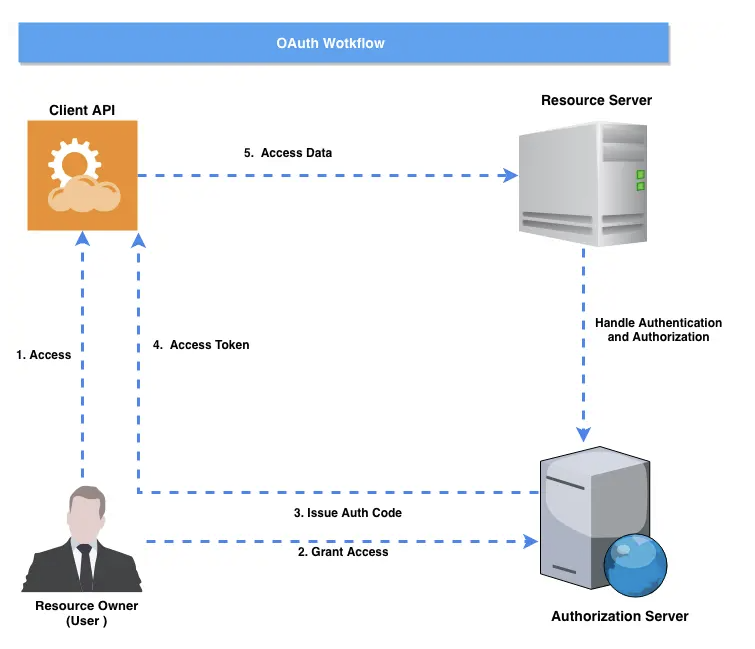
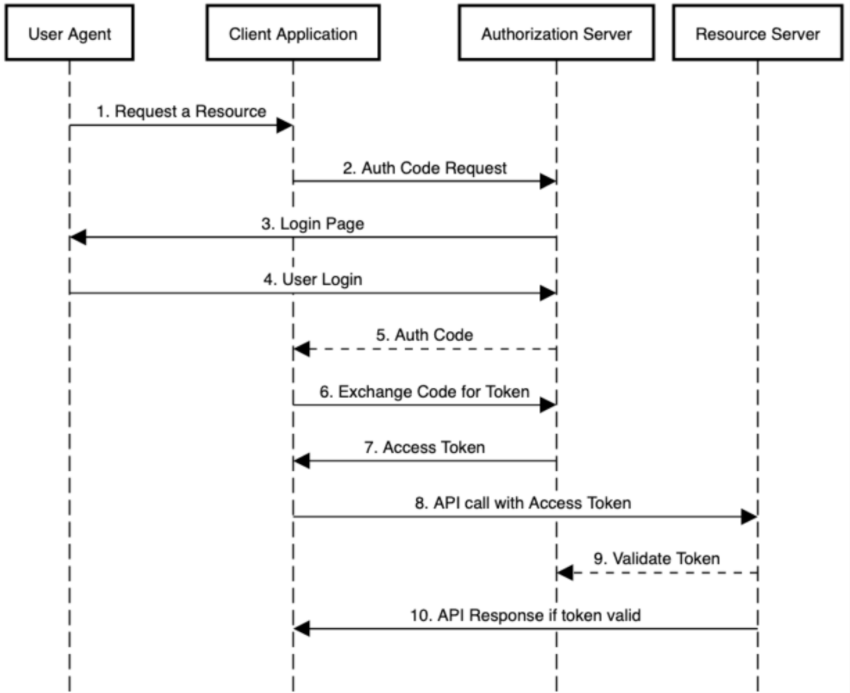
SSO/OAuth2.0
$ npm install oidc-client-ts --save
import { UserManager } from "oidc-client-ts";

const mgr = new UserManager({
  authority: "https://idp.example.com",
  client_id: "your-client-id",
  redirect_uri: "https://app.example.com/auth/callback",
  post_logout_redirect_uri: "https://app.example.com/",
  response_type: "code",
  scope: "openid profile email api.read",
});

// Redirect to signin page
await mgr.signinRedirect();

// callback
const user = await mgr.signinRedirectCallback();
Languages
Ruby
Installing
gem sources -l
gem sources --remove https://ruby.taobao.org/
gem sources --add https://gems.ruby-china.com/
Installing on M1 Apple for macOS 13 Ventura
brew install chruby ruby-install
Next, if you’re on an Apple Silicon Mac (M1 or M2), you need to check which version of the Apple Command Line Tools (CLT) or Xcode you have:
brew config
Look for the lines at the bottom that start with CLT:
and Xcode:
. If either one of them starts with 14
, then you’ll need to install Ruby like this:
ruby-install ruby -- --enable-shared
Otherwise, don’t use any extra options:
ruby-install ruby
Resources
Symbols
★☆✦✤❅
➠➥
✓✗✔✘☓√
☑☐
●◔◕◓◒◐◑◉◎◌○❍
◜◝◞◟◠◡
Color Definitions
const colorScheme = {
  background: '#1F2D3D',
  primary: '#3498DB',
  secondary: '#2ECC71',
  highlight: '#E74C3C',
  accent: '#F1C40F',
  textPrimary: '#FFFFFF',
  textSecondary: '#BDC3C7',
};
Popular Colors
Retro Metro
[“#ea5545”, “#f46a9b”, “#ef9b20”, “#edbf33”, “#ede15b”, “#bdcf32”, “#87bc45”, “#27aeef”, “#b33dc6”]

Dutch Field
[#e60049″, “#0bb4ff”, “#50e991”, “#e6d800”, “#9b19f5”, “#ffa300”, “#dc0ab4”, “#b3d4ff”, “#00bfa0”]

River Nights
[“#b30000”, “#7c1158”, “#4421af”, “#1a53ff”, “#0d88e6”, “#00b7c7”, “#5ad45a”, “#8be04e”, “#ebdc78”]

Spring Pastels
[“#fd7f6f”, “#7eb0d5”, “#b2e061”, “#bd7ebe”, “#ffb55a”, “#ffee65”, “#beb9db”, “#fdcce5”, “#8bd3c7”]

Sequential palettes
Blue to Yellow

[“#115f9a”, “#1984c5”, “#22a7f0”, “#48b5c4”, “#76c68f”, “#a6d75b”, “#c9e52f”, “#d0ee11”, “#f4f100”]
Grey to Red

[“#d7e1ee”, “#cbd6e4”, “#bfcbdb”, “#b3bfd1”, “#a4a2a8”, “#df8879”, “#c86558”, “#b04238”, “#991f17”]
Black to Pink

[“#2e2b28”, “#3b3734”, “#474440”, “#54504c”, “#6b506b”, “#ab3da9”, “#de25da”, “#eb44e8”, “#ff80ff”]
Blues

[“#0000b3”, “#0010d9”, “#0020ff”, “#0040ff”, “#0060ff”, “#0080ff”, “#009fff”, “#00bfff”, “#00ffff”]
More Colors
export const gray = {
    gray1: "hsl(0, 0%, 99.0%)",
    gray2: "hsl(0, 0%, 97.5%)",
    gray3: "hsl(0, 0%, 94.6%)",
    gray4: "hsl(0, 0%, 92.0%)",
    gray5: "hsl(0, 0%, 89.5%)",
    gray6: "hsl(0, 0%, 86.8%)",
    gray7: "hsl(0, 0%, 83.0%)",
    gray8: "hsl(0, 0%, 73.2%)",
    gray9: "hsl(0, 0%, 55.2%)",
    gray10: "hsl(0, 0%, 50.3%)",
    gray11: "hsl(0, 0%, 39.3%)",
    gray12: "hsl(0, 0%, 12.5%)",
  };

  export const mauve = {
    mauve1: "hsl(300, 26.0%, 99.0%)",
    mauve2: "hsl(270, 20.0%, 98.0%)",
    mauve3: "hsl(267, 13.8%, 95.3%)",
    mauve4: "hsl(265, 12.2%, 92.7%)",
    mauve5: "hsl(263, 11.6%, 90.3%)",
    mauve6: "hsl(261, 11.1%, 87.7%)",
    mauve7: "hsl(257, 10.8%, 84.3%)",
    mauve8: "hsl(249, 10.4%, 75.5%)",
    mauve9: "hsl(252, 6.0%, 57.3%)",
    mauve10: "hsl(250, 5.0%, 52.3%)",
    mauve11: "hsl(252, 5.0%, 40.7%)",
    mauve12: "hsl(260, 10.0%, 13.5%)",
  };

  export const slate = {
    slate1: "hsl(240, 22.0%, 99.0%)",
    slate2: "hsl(240, 20.0%, 98.0%)",
    slate3: "hsl(239, 13.4%, 95.4%)",
    slate4: "hsl(238, 11.8%, 92.9%)",
    slate5: "hsl(237, 11.1%, 90.5%)",
    slate6: "hsl(236, 10.6%, 87.9%)",
    slate7: "hsl(234, 10.4%, 84.4%)",
    slate8: "hsl(231, 10.2%, 75.1%)",
    slate9: "hsl(230, 6.0%, 57.0%)",
    slate10: "hsl(227, 5.2%, 51.8%)",
    slate11: "hsl(220, 6.0%, 40.0%)",
    slate12: "hsl(210, 12.0%, 12.5%)",
  };

  export const sage = {
    sage1: "hsl(155, 30.0%, 98.8%)",
    sage2: "hsl(150, 14.3%, 97.3%)",
    sage3: "hsl(150, 8.0%, 94.5%)",
    sage4: "hsl(150, 6.0%, 92.0%)",
    sage5: "hsl(150, 4.9%, 89.5%)",
    sage6: "hsl(150, 4.3%, 86.7%)",
    sage7: "hsl(150, 3.7%, 82.8%)",
    sage8: "hsl(150, 2.9%, 72.9%)",
    sage9: "hsl(155, 3.5%, 54.2%)",
    sage10: "hsl(158, 2.9%, 49.3%)",
    sage11: "hsl(155, 3.0%, 38.5%)",
    sage12: "hsl(155, 12.0%, 11.5%)",
  };

  export const olive = {
    olive1: "hsl(110, 20.0%, 99.0%)",
    olive2: "hsl(120, 16.7%, 97.6%)",
    olive3: "hsl(118, 8.4%, 94.8%)",
    olive4: "hsl(116, 6.0%, 92.1%)",
    olive5: "hsl(115, 4.9%, 89.4%)",
    olive6: "hsl(113, 4.2%, 86.5%)",
    olive7: "hsl(111, 3.6%, 82.6%)",
    olive8: "hsl(105, 2.9%, 72.9%)",
    olive9: "hsl(110, 3.0%, 54.5%)",
    olive10: "hsl(105, 2.7%, 49.4%)",
    olive11: "hsl(110, 3.0%, 38.5%)",
    olive12: "hsl(110, 8.0%, 12.0%)",
  };

  export const sand = {
    sand1: "hsl(50, 20.0%, 99.0%)",
    sand2: "hsl(60, 7.7%, 97.5%)",
    sand3: "hsl(59, 5.8%, 94.5%)",
    sand4: "hsl(58, 5.3%, 91.8%)",
    sand5: "hsl(57, 5.1%, 89.0%)",
    sand6: "hsl(56, 5.0%, 86.0%)",
    sand7: "hsl(54, 4.9%, 81.8%)",
    sand8: "hsl(51, 5.0%, 72.4%)",
    sand9: "hsl(60, 3.0%, 53.9%)",
    sand10: "hsl(60, 2.6%, 49.0%)",
    sand11: "hsl(50, 2.5%, 38.0%)",
    sand12: "hsl(50, 8.0%, 12.0%)",
  };

  export const tomato = {
    tomato1: "hsl(10, 100%, 99.4%)",
    tomato2: "hsl(8, 100%, 98.4%)",
    tomato3: "hsl(8, 100%, 96.6%)",
    tomato4: "hsl(8, 100%, 94.3%)",
    tomato5: "hsl(8, 92.8%, 91.0%)",
    tomato6: "hsl(9, 84.7%, 86.3%)",
    tomato7: "hsl(10, 77.3%, 79.5%)",
    tomato8: "hsl(10, 71.6%, 71.0%)",
    tomato9: "hsl(10, 78.0%, 54.0%)",
    tomato10: "hsl(10, 71.4%, 49.4%)",
    tomato11: "hsl(10, 82.0%, 42.0%)",
    tomato12: "hsl(8, 50.0%, 24.0%)",
  };

  export const red = {
    red1: "hsl(359, 100%, 99.4%)",
    red2: "hsl(0, 100%, 98.4%)",
    red3: "hsl(360, 100%, 96.8%)",
    red4: "hsl(360, 97.9%, 94.8%)",
    red5: "hsl(360, 90.2%, 91.9%)",
    red6: "hsl(360, 81.7%, 87.8%)",
    red7: "hsl(359, 74.2%, 81.7%)",
    red8: "hsl(359, 69.5%, 74.3%)",
    red9: "hsl(358, 75.0%, 59.0%)",
    red10: "hsl(358, 67.4%, 54.6%)",
    red11: "hsl(358, 65.0%, 47.0%)",
    red12: "hsl(350, 63.0%, 24.0%)",
  };

  export const ruby = {
    ruby1: "hsl(348, 100%, 99.5%)",
    ruby2: "hsl(345, 100%, 98.4%)",
    ruby3: "hsl(345, 89.9%, 96.7%)",
    ruby4: "hsl(346, 82.6%, 94.4%)",
    ruby5: "hsl(346, 75.8%, 91.4%)",
    ruby6: "hsl(347, 69.3%, 87.1%)",
    ruby7: "hsl(348, 64.3%, 80.9%)",
    ruby8: "hsl(348, 61.5%, 73.5%)",
    ruby9: "hsl(348, 75.0%, 58.5%)",
    ruby10: "hsl(347, 68.6%, 54.1%)",
    ruby11: "hsl(345, 70.0%, 46.5%)",
    ruby12: "hsl(344, 63.0%, 24.0%)",
  };

  export const crimson = {
    crimson1: "hsl(332, 100%, 99.4%)",
    crimson2: "hsl(330, 100%, 98.4%)",
    crimson3: "hsl(331, 85.6%, 96.6%)",
    crimson4: "hsl(331, 78.1%, 94.2%)",
    crimson5: "hsl(332, 72.1%, 91.1%)",
    crimson6: "hsl(333, 67.0%, 86.7%)",
    crimson7: "hsl(335, 63.5%, 80.4%)",
    crimson8: "hsl(336, 62.3%, 72.9%)",
    crimson9: "hsl(336, 80.0%, 57.8%)",
    crimson10: "hsl(336, 71.3%, 52.8%)",
    crimson11: "hsl(336, 75.0%, 45.5%)",
    crimson12: "hsl(332, 63.0%, 23.5%)",
  };

  export const pink = {
    pink1: "hsl(322, 100%, 99.4%)",
    pink2: "hsl(323, 100%, 98.4%)",
    pink3: "hsl(323, 86.3%, 96.5%)",
    pink4: "hsl(323, 78.7%, 94.2%)",
    pink5: "hsl(323, 72.2%, 91.1%)",
    pink6: "hsl(323, 66.3%, 86.6%)",
    pink7: "hsl(323, 62.0%, 80.1%)",
    pink8: "hsl(323, 60.3%, 72.4%)",
    pink9: "hsl(322, 65.0%, 54.5%)",
    pink10: "hsl(322, 62.0%, 49.6%)",
    pink11: "hsl(322, 75.0%, 44.0%)",
    pink12: "hsl(320, 70.0%, 23.2%)",
  };

  export const plum = {
    plum1: "hsl(292, 90.0%, 99.4%)",
    plum2: "hsl(300, 100%, 98.6%)",
    plum3: "hsl(299, 71.2%, 96.4%)",
    plum4: "hsl(299, 62.0%, 93.8%)",
    plum5: "hsl(298, 56.1%, 90.5%)",
    plum6: "hsl(296, 51.3%, 85.8%)",
    plum7: "hsl(295, 48.2%, 78.9%)",
    plum8: "hsl(292, 47.7%, 70.8%)",
    plum9: "hsl(292, 45.0%, 51.0%)",
    plum10: "hsl(292, 50.2%, 46.9%)",
    plum11: "hsl(292, 60.0%, 42.5%)",
    plum12: "hsl(291, 57.0%, 23.2%)",
  };

  export const purple = {
    purple1: "hsl(280, 65.0%, 99.4%)",
    purple2: "hsl(276, 100%, 99.0%)",
    purple3: "hsl(276, 83.1%, 97.0%)",
    purple4: "hsl(275, 76.4%, 94.7%)",
    purple5: "hsl(275, 70.8%, 91.8%)",
    purple6: "hsl(274, 65.4%, 87.8%)",
    purple7: "hsl(273, 61.0%, 81.7%)",
    purple8: "hsl(272, 60.0%, 73.5%)",
    purple9: "hsl(272, 51.0%, 54.0%)",
    purple10: "hsl(272, 46.8%, 50.3%)",
    purple11: "hsl(272, 50.0%, 45.8%)",
    purple12: "hsl(270, 50.0%, 25.0%)",
  };

  export const violet = {
    violet1: "hsl(255, 65.0%, 99.4%)",
    violet2: "hsl(252, 100%, 99.0%)",
    violet3: "hsl(252, 96.9%, 97.4%)",
    violet4: "hsl(252, 91.5%, 95.5%)",
    violet5: "hsl(252, 85.1%, 93.0%)",
    violet6: "hsl(252, 77.8%, 89.4%)",
    violet7: "hsl(252, 71.0%, 83.7%)",
    violet8: "hsl(252, 68.6%, 76.3%)",
    violet9: "hsl(252, 56.0%, 57.5%)",
    violet10: "hsl(251, 48.1%, 53.5%)",
    violet11: "hsl(250, 43.0%, 48.0%)",
    violet12: "hsl(250, 43.0%, 26.0%)",
  };

  export const iris = {
    iris1: "hsl(243, 65.0%, 99.5%)",
    iris2: "hsl(240, 100%, 99.0%)",
    iris3: "hsl(240, 99.9%, 97.7%)",
    iris4: "hsl(240, 93.5%, 95.9%)",
    iris5: "hsl(240, 86.5%, 93.4%)",
    iris6: "hsl(240, 80.2%, 89.8%)",
    iris7: "hsl(239, 75.3%, 84.6%)",
    iris8: "hsl(238, 73.9%, 77.5%)",
    iris9: "hsl(240, 60.0%, 59.8%)",
    iris10: "hsl(240, 55.7%, 56.7%)",
    iris11: "hsl(240, 50.0%, 52.0%)",
    iris12: "hsl(238, 43.0%, 26.8%)",
  };

  export const indigo = {
    indigo1: "hsl(225, 60.0%, 99.4%)",
    indigo2: "hsl(223, 100%, 98.6%)",
    indigo3: "hsl(223, 98.4%, 97.1%)",
    indigo4: "hsl(223, 92.9%, 95.0%)",
    indigo5: "hsl(224, 87.1%, 92.0%)",
    indigo6: "hsl(224, 81.9%, 87.8%)",
    indigo7: "hsl(225, 77.4%, 82.1%)",
    indigo8: "hsl(226, 75.4%, 74.5%)",
    indigo9: "hsl(226, 70.0%, 55.5%)",
    indigo10: "hsl(226, 58.6%, 51.3%)",
    indigo11: "hsl(226, 55.0%, 45.0%)",
    indigo12: "hsl(226, 50.0%, 24.0%)",
  };

  export const blue = {
    blue1: "hsl(206, 100%, 99.2%)",
    blue2: "hsl(210, 100%, 98.0%)",
    blue3: "hsl(209, 100%, 96.5%)",
    blue4: "hsl(210, 98.8%, 94.0%)",
    blue5: "hsl(209, 95.0%, 90.1%)",
    blue6: "hsl(209, 81.2%, 84.5%)",
    blue7: "hsl(208, 77.5%, 76.9%)",
    blue8: "hsl(206, 81.9%, 65.3%)",
    blue9: "hsl(206, 100%, 50.0%)",
    blue10: "hsl(208, 93.5%, 47.4%)",
    blue11: "hsl(211, 90.0%, 42.0%)",
    blue12: "hsl(216, 71.0%, 23.0%)",
  };

  export const cyan = {
    cyan1: "hsl(185, 60.0%, 98.7%)",
    cyan2: "hsl(185, 73.3%, 97.1%)",
    cyan3: "hsl(186, 70.2%, 94.4%)",
    cyan4: "hsl(186, 63.8%, 90.6%)",
    cyan5: "hsl(187, 58.3%, 85.4%)",
    cyan6: "hsl(188, 54.6%, 78.4%)",
    cyan7: "hsl(189, 53.7%, 68.7%)",
    cyan8: "hsl(189, 60.3%, 52.5%)",
    cyan9: "hsl(190, 95.0%, 39.0%)",
    cyan10: "hsl(191, 91.2%, 36.8%)",
    cyan11: "hsl(192, 85.0%, 31.0%)",
    cyan12: "hsl(192, 70.0%, 16.5%)",
  };

  export const teal = {
    teal1: "hsl(165, 60.0%, 98.8%)",
    teal2: "hsl(169, 64.7%, 96.7%)",
    teal3: "hsl(169, 59.8%, 94.0%)",
    teal4: "hsl(169, 53.1%, 90.2%)",
    teal5: "hsl(170, 47.1%, 85.0%)",
    teal6: "hsl(170, 42.6%, 77.9%)",
    teal7: "hsl(170, 39.9%, 68.1%)",
    teal8: "hsl(172, 42.1%, 52.5%)",
    teal9: "hsl(173, 80.0%, 36.0%)",
    teal10: "hsl(173, 83.4%, 32.5%)",
    teal11: "hsl(174, 90.0%, 25.2%)",
    teal12: "hsl(174, 65.0%, 14.5%)",
  };

  export const jade = {
    jade1: "hsl(151, 60.0%, 99.0%)",
    jade2: "hsl(150, 77.8%, 96.5%)",
    jade3: "hsl(151, 65.9%, 93.7%)",
    jade4: "hsl(152, 56.5%, 90.0%)",
    jade5: "hsl(154, 49.1%, 85.0%)",
    jade6: "hsl(156, 43.5%, 78.3%)",
    jade7: "hsl(159, 40.2%, 68.7%)",
    jade8: "hsl(164, 42.0%, 53.3%)",
    jade9: "hsl(164, 60.0%, 40.0%)",
    jade10: "hsl(164, 60.8%, 36.7%)",
    jade11: "hsl(163, 65.0%, 28.9%)",
    jade12: "hsl(160, 34.0%, 17.2%)",
  };

  export const green = {
    green1: "hsl(136, 50.0%, 98.9%)",
    green2: "hsl(138, 62.5%, 96.9%)",
    green3: "hsl(139, 55.2%, 94.5%)",
    green4: "hsl(140, 48.7%, 91.0%)",
    green5: "hsl(141, 43.7%, 86.0%)",
    green6: "hsl(143, 40.3%, 79.0%)",
    green7: "hsl(146, 38.5%, 69.0%)",
    green8: "hsl(151, 40.2%, 54.1%)",
    green9: "hsl(151, 55.0%, 41.5%)",
    green10: "hsl(152, 57.5%, 37.6%)",
    green11: "hsl(153, 67.0%, 28.5%)",
    green12: "hsl(155, 40.0%, 16.5%)",
  };

  export const grass = {
    grass1: "hsl(116, 50.0%, 98.9%)",
    grass2: "hsl(120, 60.0%, 97.1%)",
    grass3: "hsl(120, 53.6%, 94.8%)",
    grass4: "hsl(121, 47.5%, 91.4%)",
    grass5: "hsl(122, 42.6%, 86.5%)",
    grass6: "hsl(124, 39.0%, 79.7%)",
    grass7: "hsl(126, 37.1%, 70.2%)",
    grass8: "hsl(131, 38.1%, 56.3%)",
    grass9: "hsl(131, 41.0%, 46.5%)",
    grass10: "hsl(132, 43.1%, 42.2%)",
    grass11: "hsl(133, 50.0%, 32.5%)",
    grass12: "hsl(131, 30.0%, 18.0%)",
  };

  export const brown = {
    brown1: "hsl(30, 40.0%, 99.1%)",
    brown2: "hsl(30, 50.0%, 97.6%)",
    brown3: "hsl(30, 52.5%, 94.6%)",
    brown4: "hsl(30, 53.0%, 91.2%)",
    brown5: "hsl(29, 52.9%, 86.8%)",
    brown6: "hsl(29, 52.5%, 80.9%)",
    brown7: "hsl(29, 51.5%, 72.8%)",
    brown8: "hsl(28, 50.0%, 63.1%)",
    brown9: "hsl(28, 34.0%, 51.0%)",
    brown10: "hsl(26, 31.7%, 46.9%)",
    brown11: "hsl(25, 30.0%, 39.0%)",
    brown12: "hsl(20, 15.0%, 21.0%)",
  };

  export const bronze = {
    bronze1: "hsl(15, 30.0%, 99.1%)",
    bronze2: "hsl(17, 63.6%, 97.8%)",
    bronze3: "hsl(17, 42.1%, 95.2%)",
    bronze4: "hsl(17, 35.2%, 92.1%)",
    bronze5: "hsl(17, 31.5%, 88.2%)",
    bronze6: "hsl(17, 29.0%, 83.0%)",
    bronze7: "hsl(17, 26.9%, 75.6%)",
    bronze8: "hsl(17, 25.1%, 66.5%)",
    bronze9: "hsl(17, 20.0%, 54.0%)",
    bronze10: "hsl(17, 17.9%, 49.3%)",
    bronze11: "hsl(15, 20.0%, 41.0%)",
    bronze12: "hsl(12, 22.0%, 21.5%)",
  };

  export const gold = {
    gold1: "hsl(50, 20.0%, 99.1%)",
    gold2: "hsl(47, 52.9%, 96.7%)",
    gold3: "hsl(46, 38.2%, 93.7%)",
    gold4: "hsl(44, 32.7%, 90.1%)",
    gold5: "hsl(43, 29.9%, 85.7%)",
    gold6: "hsl(41, 28.3%, 79.8%)",
    gold7: "hsl(39, 27.6%, 71.9%)",
    gold8: "hsl(36, 27.2%, 61.8%)",
    gold9: "hsl(36, 20.0%, 49.5%)",
    gold10: "hsl(36, 19.9%, 44.9%)",
    gold11: "hsl(36, 20.0%, 37.0%)",
    gold12: "hsl(36, 16.0%, 20.0%)",
  };

  export const sky = {
    sky1: "hsl(193, 100%, 98.8%)",
    sky2: "hsl(193, 100%, 97.3%)",
    sky3: "hsl(192, 100%, 94.3%)",
    sky4: "hsl(193, 93.5%, 90.9%)",
    sky5: "hsl(193, 79.3%, 85.9%)",
    sky6: "hsl(194, 66.1%, 78.8%)",
    sky7: "hsl(194, 60.0%, 69.4%)",
    sky8: "hsl(193, 65.2%, 56.1%)",
    sky9: "hsl(193, 98.0%, 74.0%)",
    sky10: "hsl(193, 90.0%, 71.0%)",
    sky11: "hsl(200, 60.0%, 36.0%)",
    sky12: "hsl(195, 50.0%, 20.0%)",
  };

  export const mint = {
    mint1: "hsl(165, 80.0%, 98.8%)",
    mint2: "hsl(164, 88.2%, 96.7%)",
    mint3: "hsl(164, 80.4%, 92.6%)",
    mint4: "hsl(165, 71.6%, 88.4%)",
    mint5: "hsl(165, 61.0%, 83.4%)",
    mint6: "hsl(166, 50.2%, 76.7%)",
    mint7: "hsl(166, 43.3%, 67.2%)",
    mint8: "hsl(168, 45.0%, 52.9%)",
    mint9: "hsl(167, 70.0%, 72.0%)",
    mint10: "hsl(167, 62.0%, 69.0%)",
    mint11: "hsl(172, 50.0%, 30.5%)",
    mint12: "hsl(171, 50.0%, 17.5%)",
  };

  export const lime = {
    lime1: "hsl(85, 50.0%, 98.7%)",
    lime2: "hsl(85, 66.7%, 96.5%)",
    lime3: "hsl(85, 76.8%, 91.7%)",
    lime4: "hsl(84, 71.6%, 86.6%)",
    lime5: "hsl(83, 62.5%, 80.8%)",
    lime6: "hsl(81, 51.6%, 73.6%)",
    lime7: "hsl(79, 41.5%, 64.4%)",
    lime8: "hsl(77, 40.2%, 52.2%)",
    lime9: "hsl(81, 80.0%, 66.0%)",
    lime10: "hsl(81, 75.0%, 60.0%)",
    lime11: "hsl(75, 40.0%, 29.0%)",
    lime12: "hsl(75, 40.0%, 18.0%)",
  };

  export const yellow = {
    yellow1: "hsl(60, 54.0%, 98.5%)",
    yellow2: "hsl(52, 100%, 93.9%)",
    yellow3: "hsl(53, 100%, 88.9%)",
    yellow4: "hsl(53, 93.7%, 83.9%)",
    yellow5: "hsl(52, 84.7%, 78.7%)",
    yellow6: "hsl(51, 73.0%, 72.4%)",
    yellow7: "hsl(48, 59.6%, 64.3%)",
    yellow8: "hsl(46, 55.0%, 52.9%)",
    yellow9: "hsl(53, 96.0%, 58.0%)",
    yellow10: "hsl(52, 95.0%, 52.0%)",
    yellow11: "hsl(42, 50.0%, 31.0%)",
    yellow12: "hsl(42, 40.0%, 20.0%)",
  };

  export const amber = {
    amber1: "hsl(39, 70.0%, 99.0%)",
    amber2: "hsl(40, 100%, 96.5%)",
    amber3: "hsl(45, 100%, 90.8%)",
    amber4: "hsl(44, 100%, 85.8%)",
    amber5: "hsl(40, 100%, 81.5%)",
    amber6: "hsl(39, 83.6%, 75.4%)",
    amber7: "hsl(37, 66.9%, 68.2%)",
    amber8: "hsl(35, 59.8%, 60.0%)",
    amber9: "hsl(42, 100%, 62.0%)",
    amber10: "hsl(42, 100%, 55.0%)",
    amber11: "hsl(25, 50.0%, 38.0%)",
    amber12: "hsl(25, 40.0%, 22.0%)",
  };

  export const orange = {
    orange1: "hsl(24, 70.0%, 99.0%)",
    orange2: "hsl(22, 100%, 97.8%)",
    orange3: "hsl(34, 100%, 91.7%)",
    orange4: "hsl(33, 100%, 86.6%)",
    orange5: "hsl(31, 100%, 82.2%)",
    orange6: "hsl(27, 100%, 78.4%)",
    orange7: "hsl(21, 100%, 74.5%)",
    orange8: "hsl(19, 80.1%, 64.5%)",
    orange9: "hsl(24, 94.0%, 50.0%)",
    orange10: "hsl(24, 100%, 46.5%)",
    orange11: "hsl(16, 45.0%, 41.5%)",
    orange12: "hsl(16, 50.0%, 23.0%)",
  };

  export const grayA = {
    grayA1: "hsla(0, 0%, 0%, 0.012)",
    grayA2: "hsla(0, 0%, 0%, 0.024)",
    grayA3: "hsla(0, 0%, 0%, 0.055)",
    grayA4: "hsla(0, 0%, 0%, 0.078)",
    grayA5: "hsla(0, 0%, 0%, 0.106)",
    grayA6: "hsla(0, 0%, 0%, 0.133)",
    grayA7: "hsla(0, 0%, 0%, 0.169)",
    grayA8: "hsla(0, 0%, 0%, 0.267)",
    grayA9: "hsla(0, 0%, 0%, 0.447)",
    grayA10: "hsla(0, 0%, 0%, 0.498)",
    grayA11: "hsla(0, 0%, 0%, 0.608)",
    grayA12: "hsla(0, 0%, 0%, 0.875)",
  };

  export const mauveA = {
    mauveA1: "hsla(300, 89.3%, 18.3%, 0.012)",
    mauveA2: "hsla(270, 89.3%, 18.3%, 0.024)",
    mauveA3: "hsla(270, 98.8%, 14.4%, 0.055)",
    mauveA4: "hsla(264, 93.8%, 12.6%, 0.083)",
    mauveA5: "hsla(270, 98.4%, 10.9%, 0.110)",
    mauveA6: "hsla(266, 94.9%, 10.5%, 0.138)",
    mauveA7: "hsla(255, 97.2%, 9.3%, 0.173)",
    mauveA8: "hsla(249, 98.4%, 9.6%, 0.271)",
    mauveA9: "hsla(249, 99.9%, 5.7%, 0.451)",
    mauveA10: "hsla(250, 99.8%, 4.7%, 0.502)",
    mauveA11: "hsla(252, 98.8%, 3.2%, 0.612)",
    mauveA12: "hsla(257, 96.0%, 1.6%, 0.879)",
  };

  export const slateA = {
    slateA1: "hsla(240, 89.3%, 18.3%, 0.012)",
    slateA2: "hsla(240, 89.3%, 18.3%, 0.024)",
    slateA3: "hsla(240, 99.7%, 11.6%, 0.051)",
    slateA4: "hsla(240, 93.2%, 10.6%, 0.079)",
    slateA5: "hsla(240, 98.8%, 9.4%, 0.106)",
    slateA6: "hsla(240, 94.6%, 9.3%, 0.134)",
    slateA7: "hsla(233, 97.2%, 9.3%, 0.173)",
    slateA8: "hsla(231, 98.1%, 9.4%, 0.275)",
    slateA9: "hsla(231, 99.6%, 5.6%, 0.455)",
    slateA10: "hsla(230, 99.5%, 4.7%, 0.506)",
    slateA11: "hsla(220, 98.0%, 3.8%, 0.624)",
    slateA12: "hsla(210, 95.1%, 1.9%, 0.891)",
  };

  export const sageA = {
    sageA1: "hsla(150, 92.6%, 26.5%, 0.016)",
    sageA2: "hsla(150, 86.2%, 14.2%, 0.032)",
    sageA3: "hsla(150, 95.7%, 6.9%, 0.059)",
    sageA4: "hsla(160, 89.0%, 7.6%, 0.087)",
    sageA5: "hsla(140, 96.8%, 5.5%, 0.110)",
    sageA6: "hsla(140, 88.8%, 4.8%, 0.138)",
    sageA7: "hsla(140, 91.7%, 3.6%, 0.177)",
    sageA8: "hsla(150, 93.2%, 3.0%, 0.279)",
    sageA9: "hsla(158, 97.0%, 3.4%, 0.475)",
    sageA10: "hsla(163, 97.0%, 2.7%, 0.522)",
    sageA11: "hsla(160, 95.5%, 2.0%, 0.628)",
    sageA12: "hsla(154, 93.5%, 1.6%, 0.899)",
  };

  export const oliveA = {
    oliveA1: "hsla(120, 89.3%, 18.3%, 0.012)",
    oliveA2: "hsla(120, 87.7%, 16.0%, 0.028)",
    oliveA3: "hsla(120, 97.6%, 7.3%, 0.055)",
    oliveA4: "hsla(120, 85.8%, 5.5%, 0.083)",
    oliveA5: "hsla(120, 95.2%, 3.7%, 0.110)",
    oliveA6: "hsla(120, 87.7%, 4.7%, 0.142)",
    oliveA7: "hsla(100, 90.6%, 3.6%, 0.181)",
    oliveA8: "hsla(105, 93.2%, 3.0%, 0.279)",
    oliveA9: "hsla(103, 97.1%, 3.0%, 0.471)",
    oliveA10: "hsla(110, 97.1%, 2.3%, 0.518)",
    oliveA11: "hsla(110, 95.5%, 2.0%, 0.628)",
    oliveA12: "hsla(108, 92.4%, 1.2%, 0.891)",
  };

  export const sandA = {
    sandA1: "hsla(60, 89.3%, 18.3%, 0.012)",
    sandA2: "hsla(60, 78.1%, 9.0%, 0.028)",
    sandA3: "hsla(60, 95.7%, 6.9%, 0.059)",
    sandA4: "hsla(60, 84.4%, 5.3%, 0.087)",
    sandA5: "hsla(60, 93.5%, 3.7%, 0.114)",
    sandA6: "hsla(60, 86.7%, 4.6%, 0.146)",
    sandA7: "hsla(48, 92.1%, 5.5%, 0.193)",
    sandA8: "hsla(51, 94.5%, 5.0%, 0.291)",
    sandA9: "hsla(60, 96.6%, 3.0%, 0.475)",
    sandA10: "hsla(60, 96.5%, 2.3%, 0.522)",
    sandA11: "hsla(60, 94.0%, 1.7%, 0.632)",
    sandA12: "hsla(48, 92.4%, 1.2%, 0.891)",
  };

  export const tomatoA = {
    tomatoA1: "hsla(0, 100%, 51.0%, 0.012)",
    tomatoA2: "hsla(8, 100%, 51.0%, 0.032)",
    tomatoA3: "hsla(7, 100%, 50.2%, 0.067)",
    tomatoA4: "hsla(8, 100%, 50.1%, 0.114)",
    tomatoA5: "hsla(7, 99.5%, 47.9%, 0.173)",
    tomatoA6: "hsla(9, 99.9%, 46.2%, 0.255)",
    tomatoA7: "hsla(10, 99.8%, 43.6%, 0.365)",
    tomatoA8: "hsla(10, 99.5%, 41.8%, 0.499)",
    tomatoA9: "hsla(10, 99.9%, 43.8%, 0.820)",
    tomatoA10: "hsla(10, 100%, 41.1%, 0.859)",
    tomatoA11: "hsla(10, 99.9%, 37.3%, 0.926)",
    tomatoA12: "hsla(8, 99.5%, 13.7%, 0.879)",
  };

  export const redA = {
    redA1: "hsla(0, 100%, 51.0%, 0.012)",
    redA2: "hsla(0, 100%, 51.0%, 0.032)",
    redA3: "hsla(0, 100%, 50.2%, 0.063)",
    redA4: "hsla(0, 100%, 50.0%, 0.102)",
    redA5: "hsla(0, 99.9%, 47.5%, 0.153)",
    redA6: "hsla(0, 99.5%, 44.9%, 0.224)",
    redA7: "hsla(359, 99.7%, 42.7%, 0.318)",
    redA8: "hsla(359, 99.6%, 41.1%, 0.436)",
    redA9: "hsla(358, 99.9%, 42.9%, 0.718)",
    redA10: "hsla(358, 99.9%, 40.2%, 0.761)",
    redA11: "hsla(358, 99.8%, 36.7%, 0.836)",
    redA12: "hsla(351, 99.9%, 16.6%, 0.910)",
  };

  export const rubyA = {
    rubyA1: "hsla(340, 100%, 51.0%, 0.012)",
    rubyA2: "hsla(345, 100%, 51.0%, 0.032)",
    rubyA3: "hsla(344, 99.1%, 47.1%, 0.063)",
    rubyA4: "hsla(348, 99.9%, 46.2%, 0.102)",
    rubyA5: "hsla(346, 99.9%, 43.6%, 0.153)",
    rubyA6: "hsla(347, 99.6%, 41.2%, 0.220)",
    rubyA7: "hsla(348, 99.8%, 39.4%, 0.314)",
    rubyA8: "hsla(348, 99.7%, 38.2%, 0.428)",
    rubyA9: "hsla(348, 99.8%, 43.0%, 0.726)",
    rubyA10: "hsla(347, 99.9%, 40.6%, 0.773)",
    rubyA11: "hsla(345, 99.9%, 37.9%, 0.859)",
    rubyA12: "hsla(344, 99.9%, 16.6%, 0.910)",
  };

  export const crimsonA = {
    crimsonA1: "hsla(340, 100%, 51.0%, 0.012)",
    crimsonA2: "hsla(330, 100%, 51.0%, 0.032)",
    crimsonA3: "hsla(332, 99.1%, 47.1%, 0.063)",
    crimsonA4: "hsla(331, 99.9%, 44.3%, 0.102)",
    crimsonA5: "hsla(333, 99.9%, 42.3%, 0.153)",
    crimsonA6: "hsla(333, 99.5%, 40.5%, 0.224)",
    crimsonA7: "hsla(335, 99.7%, 39.1%, 0.322)",
    crimsonA8: "hsla(336, 99.5%, 38.5%, 0.440)",
    crimsonA9: "hsla(336, 99.9%, 44.3%, 0.761)",
    crimsonA10: "hsla(336, 100%, 41.5%, 0.808)",
    crimsonA11: "hsla(336, 99.8%, 38.5%, 0.887)",
    crimsonA12: "hsla(332, 99.8%, 16.3%, 0.914)",
  };

  export const pinkA = {
    pinkA1: "hsla(320, 100%, 51.0%, 0.012)",
    pinkA2: "hsla(323, 100%, 51.0%, 0.032)",
    pinkA3: "hsla(323, 98.9%, 47.3%, 0.067)",
    pinkA4: "hsla(323, 99.9%, 44.3%, 0.102)",
    pinkA5: "hsla(324, 99.9%, 42.3%, 0.153)",
    pinkA6: "hsla(323, 99.5%, 39.6%, 0.224)",
    pinkA7: "hsla(323, 99.7%, 38.5%, 0.322)",
    pinkA8: "hsla(323, 99.5%, 37.7%, 0.444)",
    pinkA9: "hsla(322, 99.7%, 39.3%, 0.750)",
    pinkA10: "hsla(322, 99.9%, 37.9%, 0.812)",
    pinkA11: "hsla(322, 99.8%, 37.1%, 0.891)",
    pinkA12: "hsla(320, 99.6%, 17.6%, 0.930)",
  };

  export const plumA = {
    plumA1: "hsla(280, 100%, 51.0%, 0.012)",
    plumA2: "hsla(300, 100%, 51.0%, 0.028)",
    plumA3: "hsla(300, 99.0%, 40.9%, 0.063)",
    plumA4: "hsla(300, 99.9%, 38.5%, 0.102)",
    plumA5: "hsla(298, 98.2%, 35.9%, 0.150)",
    plumA6: "hsla(297, 99.6%, 33.7%, 0.216)",
    plumA7: "hsla(295, 99.7%, 32.6%, 0.314)",
    plumA8: "hsla(292, 99.6%, 32.4%, 0.432)",
    plumA9: "hsla(292, 99.9%, 31.0%, 0.710)",
    plumA10: "hsla(292, 99.9%, 30.8%, 0.765)",
    plumA11: "hsla(292, 99.8%, 30.7%, 0.832)",
    plumA12: "hsla(291, 100%, 14.8%, 0.902)",
  };

  export const purpleA = {
    purpleA1: "hsla(300, 94.3%, 34.6%, 0.012)",
    purpleA2: "hsla(276, 100%, 51.0%, 0.020)",
    purpleA3: "hsla(277, 99.6%, 46.5%, 0.055)",
    purpleA4: "hsla(274, 97.9%, 44.3%, 0.095)",
    purpleA5: "hsla(276, 98.6%, 42.0%, 0.142)",
    purpleA6: "hsla(275, 100%, 39.2%, 0.200)",
    purpleA7: "hsla(273, 99.2%, 38.2%, 0.295)",
    purpleA8: "hsla(272, 99.7%, 37.6%, 0.424)",
    purpleA9: "hsla(272, 99.6%, 34.0%, 0.695)",
    purpleA10: "hsla(272, 99.7%, 32.0%, 0.730)",
    purpleA11: "hsla(272, 99.8%, 29.7%, 0.773)",
    purpleA12: "hsla(270, 99.6%, 14.4%, 0.875)",
  };

  export const violetA = {
    violetA1: "hsla(270, 94.3%, 34.6%, 0.012)",
    violetA2: "hsla(252, 100%, 51.0%, 0.020)",
    violetA3: "hsla(254, 100%, 50.0%, 0.051)",
    violetA4: "hsla(251, 98.3%, 48.2%, 0.087)",
    violetA5: "hsla(252, 99.0%, 45.7%, 0.130)",
    violetA6: "hsla(251, 99.1%, 44.0%, 0.189)",
    violetA7: "hsla(252, 99.5%, 41.7%, 0.279)",
    violetA8: "hsla(252, 100%, 40.7%, 0.400)",
    violetA9: "hsla(252, 99.9%, 35.8%, 0.663)",
    violetA10: "hsla(251, 99.6%, 32.5%, 0.691)",
    violetA11: "hsla(250, 99.8%, 28.4%, 0.726)",
    violetA12: "hsla(249, 100%, 13.1%, 0.851)",
  };

  export const irisA = {
    irisA1: "hsla(240, 100%, 51.0%, 0.008)",
    irisA2: "hsla(240, 100%, 51.0%, 0.020)",
    irisA3: "hsla(240, 100%, 51.0%, 0.048)",
    irisA4: "hsla(240, 98.5%, 47.9%, 0.079)",
    irisA5: "hsla(240, 99.2%, 47.0%, 0.122)",
    irisA6: "hsla(240, 99.2%, 44.9%, 0.185)",
    irisA7: "hsla(239, 99.6%, 42.8%, 0.271)",
    irisA8: "hsla(238, 99.5%, 42.6%, 0.393)",
    irisA9: "hsla(240, 99.6%, 37.6%, 0.644)",
    irisA10: "hsla(240, 99.8%, 35.8%, 0.675)",
    irisA11: "hsla(240, 99.8%, 33.5%, 0.722)",
    irisA12: "hsla(238, 99.2%, 13.8%, 0.848)",
  };

  export const indigoA = {
    indigoA1: "hsla(240, 92.6%, 26.5%, 0.008)",
    indigoA2: "hsla(223, 100%, 51.0%, 0.028)",
    indigoA3: "hsla(224, 100%, 50.1%, 0.059)",
    indigoA4: "hsla(223, 98.0%, 48.5%, 0.099)",
    indigoA5: "hsla(225, 98.6%, 46.4%, 0.150)",
    indigoA6: "hsla(224, 99.5%, 44.9%, 0.224)",
    indigoA7: "hsla(225, 99.7%, 43.9%, 0.318)",
    indigoA8: "hsla(226, 99.5%, 43.1%, 0.448)",
    indigoA9: "hsla(226, 100%, 41.2%, 0.757)",
    indigoA10: "hsla(226, 99.8%, 37.1%, 0.773)",
    indigoA11: "hsla(226, 99.6%, 31.1%, 0.797)",
    indigoA12: "hsla(226, 99.5%, 13.7%, 0.879)",
  };

  export const blueA = {
    blueA1: "hsla(210, 100%, 51.0%, 0.016)",
    blueA2: "hsla(210, 100%, 51.0%, 0.040)",
    blueA3: "hsla(210, 100%, 50.3%, 0.071)",
    blueA4: "hsla(210, 100%, 50.1%, 0.118)",
    blueA5: "hsla(209, 99.1%, 49.2%, 0.193)",
    blueA6: "hsla(209, 99.5%, 45.3%, 0.283)",
    blueA7: "hsla(208, 99.9%, 43.8%, 0.412)",
    blueA8: "hsla(206, 99.8%, 45.1%, 0.632)",
    blueA9: "hsla(206, 100%, 50.0%, 1)",
    blueA10: "hsla(208, 99.9%, 45.8%, 0.969)",
    blueA11: "hsla(211, 100%, 39.4%, 0.957)",
    blueA12: "hsla(216, 99.6%, 17.5%, 0.934)",
  };

  export const cyanA = {
    cyanA1: "hsla(195, 95.2%, 41.2%, 0.020)",
    cyanA2: "hsla(185, 99.9%, 42.3%, 0.051)",
    cyanA3: "hsla(186, 97.8%, 42.2%, 0.095)",
    cyanA4: "hsla(186, 99.9%, 38.5%, 0.153)",
    cyanA5: "hsla(187, 99.3%, 36.6%, 0.232)",
    cyanA6: "hsla(188, 99.4%, 35.4%, 0.334)",
    cyanA7: "hsla(189, 99.6%, 35.0%, 0.483)",
    cyanA8: "hsla(189, 99.9%, 37.6%, 0.761)",
    cyanA9: "hsla(190, 99.8%, 37.8%, 0.981)",
    cyanA10: "hsla(191, 99.9%, 34.6%, 0.969)",
    cyanA11: "hsla(192, 100%, 27.6%, 0.953)",
    cyanA12: "hsla(192, 99.2%, 12.3%, 0.950)",
  };

  export const tealA = {
    tealA1: "hsla(165, 95.2%, 41.2%, 0.020)",
    tealA2: "hsla(169, 99.5%, 39.4%, 0.055)",
    tealA3: "hsla(167, 97.6%, 38.1%, 0.095)",
    tealA4: "hsla(168, 98.1%, 34.6%, 0.150)",
    tealA5: "hsla(170, 99.4%, 32.3%, 0.220)",
    tealA6: "hsla(170, 99.7%, 30.1%, 0.314)",
    tealA7: "hsla(170, 99.3%, 28.7%, 0.448)",
    tealA8: "hsla(172, 99.8%, 29.7%, 0.675)",
    tealA9: "hsla(173, 99.8%, 31.1%, 0.930)",
    tealA10: "hsla(173, 99.7%, 28.7%, 0.946)",
    tealA11: "hsla(174, 99.8%, 23.3%, 0.977)",
    tealA12: "hsla(174, 99.0%, 10.0%, 0.950)",
  };

  export const jadeA = {
    jadeA1: "hsla(160, 94.9%, 38.7%, 0.016)",
    jadeA2: "hsla(150, 99.1%, 44.0%, 0.063)",
    jadeA3: "hsla(150, 99.7%, 40.8%, 0.106)",
    jadeA4: "hsla(151, 99.8%, 36.3%, 0.157)",
    jadeA5: "hsla(153, 99.4%, 33.5%, 0.224)",
    jadeA6: "hsla(155, 99.8%, 30.4%, 0.310)",
    jadeA7: "hsla(159, 99.4%, 28.7%, 0.440)",
    jadeA8: "hsla(164, 99.9%, 29.6%, 0.663)",
    jadeA9: "hsla(164, 99.7%, 28.6%, 0.840)",
    jadeA10: "hsla(164, 100%, 25.9%, 0.855)",
    jadeA11: "hsla(163, 99.5%, 21.0%, 0.899)",
    jadeA12: "hsla(160, 98.8%, 6.7%, 0.887)",
  };

  export const greenA = {
    greenA1: "hsla(140, 94.9%, 38.7%, 0.016)",
    greenA2: "hsla(138, 99.9%, 38.5%, 0.051)",
    greenA3: "hsla(139, 97.7%, 36.9%, 0.087)",
    greenA4: "hsla(139, 98.5%, 32.7%, 0.134)",
    greenA5: "hsla(141, 100%, 30.4%, 0.200)",
    greenA6: "hsla(142, 99.0%, 28.9%, 0.295)",
    greenA7: "hsla(146, 99.5%, 27.6%, 0.428)",
    greenA8: "hsla(151, 99.5%, 28.8%, 0.644)",
    greenA9: "hsla(151, 99.9%, 28.0%, 0.812)",
    greenA10: "hsla(152, 99.6%, 25.8%, 0.840)",
    greenA11: "hsla(153, 99.9%, 21.0%, 0.906)",
    greenA12: "hsla(155, 99.9%, 7.4%, 0.902)",
  };

  export const grassA = {
    grassA1: "hsla(120, 94.9%, 38.7%, 0.016)",
    grassA2: "hsla(120, 94.9%, 38.7%, 0.048)",
    grassA3: "hsla(120, 98.0%, 35.5%, 0.079)",
    grassA4: "hsla(120, 98.7%, 31.5%, 0.126)",
    grassA5: "hsla(122, 98.5%, 29.9%, 0.193)",
    grassA6: "hsla(125, 99.2%, 27.9%, 0.283)",
    grassA7: "hsla(125, 99.9%, 27.0%, 0.408)",
    grassA8: "hsla(131, 100%, 27.6%, 0.604)",
    grassA9: "hsla(131, 99.7%, 26.3%, 0.726)",
    grassA10: "hsla(132, 99.9%, 24.0%, 0.761)",
    grassA11: "hsla(133, 99.5%, 19.5%, 0.840)",
    grassA12: "hsla(131, 99.1%, 6.3%, 0.875)",
  };

  export const brownA = {
    brownA1: "hsla(30, 94.3%, 34.6%, 0.012)",
    brownA2: "hsla(30, 94.3%, 34.6%, 0.036)",
    brownA3: "hsla(30, 97.7%, 33.9%, 0.083)",
    brownA4: "hsla(31, 98.5%, 34.2%, 0.134)",
    brownA5: "hsla(29, 100%, 34.3%, 0.200)",
    brownA6: "hsla(28, 99.2%, 34.6%, 0.291)",
    brownA7: "hsla(29, 99.8%, 33.8%, 0.412)",
    brownA8: "hsla(28, 100%, 33.3%, 0.553)",
    brownA9: "hsla(28, 99.9%, 25.5%, 0.655)",
    brownA10: "hsla(26, 99.6%, 22.0%, 0.679)",
    brownA11: "hsla(24, 99.6%, 16.0%, 0.726)",
    brownA12: "hsla(19, 98.8%, 3.9%, 0.820)",
  };

  export const bronzeA = {
    bronzeA1: "hsla(0, 89.3%, 18.3%, 0.012)",
    bronzeA2: "hsla(17, 95.1%, 40.1%, 0.036)",
    bronzeA3: "hsla(18, 98.3%, 29.8%, 0.067)",
    bronzeA4: "hsla(17, 99.6%, 26.0%, 0.106)",
    bronzeA5: "hsla(19, 99.6%, 23.8%, 0.157)",
    bronzeA6: "hsla(17, 99.2%, 22.5%, 0.220)",
    bronzeA7: "hsla(18, 99.7%, 21.6%, 0.310)",
    bronzeA8: "hsla(17, 99.5%, 20.2%, 0.420)",
    bronzeA9: "hsla(18, 99.9%, 16.7%, 0.553)",
    bronzeA10: "hsla(17, 99.0%, 14.9%, 0.597)",
    bronzeA11: "hsla(15, 99.5%, 12.0%, 0.671)",
    bronzeA12: "hsla(12, 98.7%, 5.7%, 0.832)",
  };

  export const goldA = {
    goldA1: "hsla(60, 89.3%, 18.3%, 0.012)",
    goldA2: "hsla(47, 99.9%, 34.6%, 0.051)",
    goldA3: "hsla(45, 97.0%, 27.9%, 0.087)",
    goldA4: "hsla(46, 98.0%, 25.4%, 0.134)",
    goldA5: "hsla(43, 98.4%, 22.6%, 0.185)",
    goldA6: "hsla(41, 99.7%, 22.0%, 0.259)",
    goldA7: "hsla(38, 99.8%, 21.5%, 0.357)",
    goldA8: "hsla(36, 99.3%, 21.5%, 0.487)",
    goldA9: "hsla(36, 99.9%, 16.2%, 0.604)",
    goldA10: "hsla(36, 99.1%, 13.9%, 0.640)",
    goldA11: "hsla(36, 99.8%, 10.6%, 0.706)",
    goldA12: "hsla(38, 98.0%, 3.8%, 0.832)",
  };

  export const skyA = {
    skyA1: "hsla(190, 100%, 51.0%, 0.024)",
    skyA2: "hsla(193, 100%, 50.1%, 0.055)",
    skyA3: "hsla(192, 100%, 50.1%, 0.114)",
    skyA4: "hsla(193, 99.4%, 47.9%, 0.177)",
    skyA5: "hsla(194, 100%, 44.5%, 0.251)",
    skyA6: "hsla(194, 100%, 40.0%, 0.353)",
    skyA7: "hsla(194, 99.6%, 37.7%, 0.491)",
    skyA8: "hsla(193, 99.8%, 39.5%, 0.726)",
    skyA9: "hsla(193, 99.9%, 49.6%, 0.514)",
    skyA10: "hsla(193, 100%, 47.5%, 0.553)",
    skyA11: "hsla(200, 100%, 25.2%, 0.855)",
    skyA12: "hsla(195, 100%, 11.3%, 0.902)",
  };

  export const mintA = {
    mintA1: "hsla(168, 95.4%, 42.8%, 0.024)",
    mintA2: "hsla(164, 99.1%, 47.1%, 0.063)",
    mintA3: "hsla(164, 98.9%, 44.4%, 0.134)",
    mintA4: "hsla(165, 100%, 42.2%, 0.200)",
    mintA5: "hsla(166, 99.7%, 37.6%, 0.267)",
    mintA6: "hsla(166, 99.2%, 33.3%, 0.350)",
    mintA7: "hsla(166, 99.7%, 30.5%, 0.471)",
    mintA8: "hsla(168, 99.7%, 31.1%, 0.683)",
    mintA9: "hsla(167, 99.8%, 41.4%, 0.475)",
    mintA10: "hsla(167, 100%, 38.3%, 0.502)",
    mintA11: "hsla(172, 99.4%, 18.1%, 0.848)",
    mintA12: "hsla(171, 99.7%, 9.7%, 0.914)",
  };

  export const limeA = {
    limeA1: "hsla(80, 93.8%, 31.4%, 0.020)",
    limeA2: "hsla(85, 99.3%, 40.2%, 0.059)",
    limeA3: "hsla(84, 98.6%, 43.6%, 0.146)",
    limeA4: "hsla(83, 99.4%, 41.7%, 0.232)",
    limeA5: "hsla(83, 99.8%, 38.8%, 0.314)",
    limeA6: "hsla(81, 100%, 33.8%, 0.400)",
    limeA7: "hsla(79, 100%, 29.3%, 0.502)",
    limeA8: "hsla(77, 99.8%, 28.7%, 0.671)",
    limeA9: "hsla(81, 99.9%, 44.6%, 0.612)",
    limeA10: "hsla(81, 100%, 43.0%, 0.702)",
    limeA11: "hsla(75, 99.5%, 14.3%, 0.828)",
    limeA12: "hsla(75, 98.9%, 8.0%, 0.891)",
  };

  export const yellowA = {
    yellowA1: "hsla(60, 94.3%, 34.6%, 0.024)",
    yellowA2: "hsla(52, 100%, 50.2%, 0.122)",
    yellowA3: "hsla(53, 100%, 50.1%, 0.224)",
    yellowA4: "hsla(53, 99.8%, 48.2%, 0.314)",
    yellowA5: "hsla(52, 99.5%, 46.1%, 0.393)",
    yellowA6: "hsla(51, 99.7%, 42.3%, 0.479)",
    yellowA7: "hsla(48, 99.8%, 37.3%, 0.569)",
    yellowA8: "hsla(46, 99.8%, 35.5%, 0.730)",
    yellowA9: "hsla(53, 99.9%, 49.1%, 0.824)",
    yellowA10: "hsla(52, 99.8%, 48.8%, 0.938)",
    yellowA11: "hsla(42, 99.4%, 18.5%, 0.844)",
    yellowA12: "hsla(42, 99.3%, 9.0%, 0.879)",
  };

  export const amberA = {
    amberA1: "hsla(40, 94.9%, 38.7%, 0.016)",
    amberA2: "hsla(40, 100%, 50.3%, 0.071)",
    amberA3: "hsla(45, 100%, 50.2%, 0.185)",
    amberA4: "hsla(44, 100%, 50.1%, 0.283)",
    amberA5: "hsla(40, 100%, 50.1%, 0.369)",
    amberA6: "hsla(39, 100%, 45.7%, 0.451)",
    amberA7: "hsla(37, 99.7%, 40.1%, 0.530)",
    amberA8: "hsla(35, 99.7%, 37.5%, 0.640)",
    amberA9: "hsla(42, 100%, 50.0%, 0.761)",
    amberA10: "hsla(42, 100%, 50.1%, 0.899)",
    amberA11: "hsla(25, 99.9%, 23.5%, 0.812)",
    amberA12: "hsla(24, 99.6%, 10.2%, 0.867)",
  };

  export const orangeA = {
    orangeA1: "hsla(20, 94.9%, 38.7%, 0.016)",
    orangeA2: "hsla(22, 100%, 51.0%, 0.044)",
    orangeA3: "hsla(34, 100%, 50.1%, 0.165)",
    orangeA4: "hsla(33, 100%, 50.1%, 0.267)",
    orangeA5: "hsla(31, 100%, 50.0%, 0.357)",
    orangeA6: "hsla(27, 100%, 50.1%, 0.432)",
    orangeA7: "hsla(21, 100%, 50.0%, 0.510)",
    orangeA8: "hsla(19, 99.7%, 44.5%, 0.640)",
    orangeA9: "hsla(24, 99.9%, 48.4%, 0.969)",
    orangeA10: "hsla(24, 100%, 46.5%, 1)",
    orangeA11: "hsla(16, 99.8%, 24.2%, 0.773)",
    orangeA12: "hsla(16, 99.4%, 13.1%, 0.887)",
  };

  export const grayDark = {
  gray1: "hsl(0, 0%, 9.5%)",
  gray2: "hsl(0, 0%, 10.5%)",
  gray3: "hsl(0, 0%, 15.8%)",
  gray4: "hsl(0, 0%, 18.9%)",
  gray5: "hsl(0, 0%, 21.7%)",
  gray6: "hsl(0, 0%, 24.7%)",
  gray7: "hsl(0, 0%, 29.1%)",
  gray8: "hsl(0, 0%, 37.5%)",
  gray9: "hsl(0, 0%, 43.0%)",
  gray10: "hsl(0, 0%, 50.7%)",
  gray11: "hsl(0, 0%, 69.5%)",
  gray12: "hsl(0, 0%, 93.5%)",
};

export const mauveDark = {
  mauve1: "hsl(300, 5.0%, 9.5%)",
  mauve2: "hsl(300, 7.1%, 11.0%)",
  mauve3: "hsl(290, 6.2%, 16.2%)",
  mauve4: "hsl(285, 5.8%, 19.5%)",
  mauve5: "hsl(280, 5.6%, 22.4%)",
  mauve6: "hsl(276, 5.4%, 25.7%)",
  mauve7: "hsl(269, 5.3%, 30.3%)",
  mauve8: "hsl(258, 5.0%, 39.2%)",
  mauve9: "hsl(250, 5.0%, 45.0%)",
  mauve10: "hsl(252, 4.3%, 52.3%)",
  mauve11: "hsl(250, 6.0%, 70.5%)",
  mauve12: "hsl(240, 7.0%, 93.8%)",
};

export const slateDark = {
  slate1: "hsl(240, 5.0%, 9.8%)",
  slate2: "hsl(240, 6.9%, 11.4%)",
  slate3: "hsl(227, 6.7%, 16.4%)",
  slate4: "hsl(222, 6.6%, 19.4%)",
  slate5: "hsl(218, 6.5%, 22.1%)",
  slate6: "hsl(214, 6.4%, 25.1%)",
  slate7: "hsl(209, 6.2%, 29.4%)",
  slate8: "hsl(202, 5.8%, 37.5%)",
  slate9: "hsl(220, 6.0%, 44.0%)",
  slate10: "hsl(218, 5.3%, 51.5%)",
  slate11: "hsl(220, 7.0%, 70.0%)",
  slate12: "hsl(220, 7.0%, 93.5%)",
};

export const sageDark = {
  sage1: "hsl(155, 7.0%, 9.2%)",
  sage2: "hsl(150, 7.7%, 10.2%)",
  sage3: "hsl(151, 5.5%, 15.2%)",
  sage4: "hsl(152, 4.7%, 18.3%)",
  sage5: "hsl(153, 4.2%, 21.1%)",
  sage6: "hsl(153, 3.7%, 24.2%)",
  sage7: "hsl(154, 3.3%, 28.7%)",
  sage8: "hsl(156, 2.6%, 37.1%)",
  sage9: "hsl(155, 6.0%, 41.5%)",
  sage10: "hsl(157, 4.6%, 49.2%)",
  sage11: "hsl(155, 5.0%, 68.3%)",
  sage12: "hsl(155, 7.0%, 93.0%)",
};

export const oliveDark = {
  olive1: "hsl(110, 5.0%, 9.2%)",
  olive2: "hsl(120, 5.7%, 10.4%)",
  olive3: "hsl(120, 4.3%, 15.4%)",
  olive4: "hsl(120, 3.9%, 18.5%)",
  olive5: "hsl(120, 3.6%, 21.2%)",
  olive6: "hsl(120, 3.3%, 24.3%)",
  olive7: "hsl(120, 3.0%, 28.7%)",
  olive8: "hsl(120, 2.6%, 37.1%)",
  olive9: "hsl(110, 6.0%, 41.5%)",
  olive10: "hsl(106, 4.6%, 49.3%)",
  olive11: "hsl(110, 5.0%, 68.8%)",
  olive12: "hsl(110, 7.0%, 93.0%)",
};

export const sandDark = {
  sand1: "hsl(60, 6.0%, 9.0%)",
  sand2: "hsl(60, 1.9%, 10.4%)",
  sand3: "hsl(56, 2.4%, 15.4%)",
  sand4: "hsl(53, 2.7%, 18.4%)",
  sand5: "hsl(51, 2.9%, 21.2%)",
  sand6: "hsl(49, 3.1%, 24.3%)",
  sand7: "hsl(47, 3.3%, 28.7%)",
  sand8: "hsl(43, 3.7%, 37.1%)",
  sand9: "hsl(50, 4.0%, 41.8%)",
  sand10: "hsl(48, 3.5%, 49.5%)",
  sand11: "hsl(50, 5.0%, 68.3%)",
  sand12: "hsl(56, 7.0%, 93.0%)",
};

export const tomatoDark = {
  tomato1: "hsl(10, 23.0%, 9.4%)",
  tomato2: "hsl(10, 39.0%, 11.6%)",
  tomato3: "hsl(9, 48.3%, 15.5%)",
  tomato4: "hsl(9, 53.0%, 18.1%)",
  tomato5: "hsl(9, 57.0%, 20.7%)",
  tomato6: "hsl(9, 61.8%, 24.5%)",
  tomato7: "hsl(9, 68.4%, 31.1%)",
  tomato8: "hsl(10, 80.4%, 43.9%)",
  tomato9: "hsl(10, 78.0%, 54.0%)",
  tomato10: "hsl(10, 88.4%, 64.1%)",
  tomato11: "hsl(10, 100%, 72.0%)",
  tomato12: "hsl(10, 85.0%, 89.0%)",
};

export const redDark = {
  red1: "hsl(353, 23.0%, 9.8%)",
  red2: "hsl(354, 30.2%, 12.4%)",
  red3: "hsl(353, 40.8%, 16.4%)",
  red4: "hsl(353, 46.3%, 19.2%)",
  red5: "hsl(353, 51.2%, 22.1%)",
  red6: "hsl(353, 57.3%, 26.2%)",
  red7: "hsl(354, 65.7%, 33.2%)",
  red8: "hsl(358, 75.0%, 47.1%)",
  red9: "hsl(358, 75.0%, 59.0%)",
  red10: "hsl(359, 84.8%, 67.6%)",
  red11: "hsl(358, 100%, 76.0%)",
  red12: "hsl(350, 100%, 91.0%)",
};

export const rubyDark = {
  ruby1: "hsl(343, 23.0%, 10.0%)",
  ruby2: "hsl(349, 33.3%, 12.4%)",
  ruby3: "hsl(348, 42.2%, 16.4%)",
  ruby4: "hsl(348, 46.8%, 19.1%)",
  ruby5: "hsl(348, 50.7%, 21.7%)",
  ruby6: "hsl(348, 56.0%, 25.7%)",
  ruby7: "hsl(348, 64.3%, 33.0%)",
  ruby8: "hsl(348, 77.0%, 46.1%)",
  ruby9: "hsl(348, 75.0%, 58.5%)",
  ruby10: "hsl(349, 84.1%, 67.1%)",
  ruby11: "hsl(348, 100%, 76.0%)",
  ruby12: "hsl(340, 95.0%, 91.0%)",
};

export const crimsonDark = {
  crimson1: "hsl(335, 20.0%, 9.6%)",
  crimson2: "hsl(336, 32.3%, 12.2%)",
  crimson3: "hsl(336, 40.2%, 16.0%)",
  crimson4: "hsl(336, 44.4%, 18.5%)",
  crimson5: "hsl(336, 48.4%, 21.3%)",
  crimson6: "hsl(336, 53.9%, 25.5%)",
  crimson7: "hsl(336, 62.7%, 32.8%)",
  crimson8: "hsl(336, 80.0%, 45.1%)",
  crimson9: "hsl(336, 80.0%, 57.8%)",
  crimson10: "hsl(339, 87.0%, 67.2%)",
  crimson11: "hsl(341, 100%, 76.0%)",
  crimson12: "hsl(330, 90.0%, 91.0%)",
};

export const pinkDark = {
  pink1: "hsl(318, 25.0%, 9.6%)",
  pink2: "hsl(318, 32.3%, 12.2%)",
  pink3: "hsl(318, 37.1%, 15.7%)",
  pink4: "hsl(319, 39.8%, 18.1%)",
  pink5: "hsl(319, 42.3%, 20.8%)",
  pink6: "hsl(319, 45.8%, 24.9%)",
  pink7: "hsl(320, 51.2%, 32.2%)",
  pink8: "hsl(322, 60.0%, 46.1%)",
  pink9: "hsl(322, 65.0%, 54.5%)",
  pink10: "hsl(324, 71.5%, 63.2%)",
  pink11: "hsl(325, 90.0%, 75.0%)",
  pink12: "hsl(325, 90.0%, 90.5%)",
};

export const plumDark = {
  plum1: "hsl(301, 20.0%, 9.4%)",
  plum2: "hsl(300, 28.8%, 11.6%)",
  plum3: "hsl(299, 31.8%, 15.5%)",
  plum4: "hsl(298, 33.4%, 18.3%)",
  plum5: "hsl(297, 34.6%, 21.0%)",
  plum6: "hsl(296, 36.0%, 25.1%)",
  plum7: "hsl(295, 37.9%, 32.7%)",
  plum8: "hsl(292, 40.2%, 47.8%)",
  plum9: "hsl(292, 45.0%, 51.0%)",
  plum10: "hsl(291, 51.2%, 60.2%)",
  plum11: "hsl(290, 70.0%, 74.0%)",
  plum12: "hsl(300, 60.0%, 89.5%)",
};

export const purpleDark = {
  purple1: "hsl(284, 20.0%, 9.6%)",
  purple2: "hsl(284, 31.1%, 12.0%)",
  purple3: "hsl(282, 35.1%, 16.8%)",
  purple4: "hsl(281, 36.9%, 20.1%)",
  purple5: "hsl(280, 38.1%, 23.0%)",
  purple6: "hsl(278, 39.5%, 27.3%)",
  purple7: "hsl(276, 41.1%, 35.1%)",
  purple8: "hsl(272, 42.7%, 50.0%)",
  purple9: "hsl(272, 51.0%, 54.0%)",
  purple10: "hsl(271, 57.8%, 61.2%)",
  purple11: "hsl(270, 90.0%, 78.0%)",
  purple12: "hsl(275, 75.0%, 91.5%)",
};

export const violetDark = {
  violet1: "hsl(250, 20.0%, 10.2%)",
  violet2: "hsl(255, 30.3%, 12.9%)",
  violet3: "hsl(254, 33.3%, 18.4%)",
  violet4: "hsl(253, 34.6%, 22.1%)",
  violet5: "hsl(253, 35.5%, 25.5%)",
  violet6: "hsl(252, 36.6%, 30.5%)",
  violet7: "hsl(251, 37.8%, 39.0%)",
  violet8: "hsl(250, 46.2%, 54.1%)",
  violet9: "hsl(252, 56.0%, 57.5%)",
  violet10: "hsl(253, 63.2%, 64.1%)",
  violet11: "hsl(255, 100%, 80.0%)",
  violet12: "hsl(250, 93.0%, 93.0%)",
};

export const irisDark = {
  iris1: "hsl(240, 22.0%, 10.5%)",
  iris2: "hsl(243, 30.4%, 13.5%)",
  iris3: "hsl(242, 32.6%, 18.9%)",
  iris4: "hsl(241, 33.5%, 22.6%)",
  iris5: "hsl(241, 34.2%, 26.1%)",
  iris6: "hsl(240, 35.0%, 31.0%)",
  iris7: "hsl(240, 36.0%, 39.4%)",
  iris8: "hsl(240, 45.2%, 54.9%)",
  iris9: "hsl(240, 60.0%, 59.8%)",
  iris10: "hsl(241, 66.4%, 65.7%)",
  iris11: "hsl(242, 100%, 81.0%)",
  iris12: "hsl(242, 92.0%, 93.5%)",
};

export const indigoDark = {
  indigo1: "hsl(229, 24.0%, 10.0%)",
  indigo2: "hsl(230, 36.4%, 12.9%)",
  indigo3: "hsl(228, 42.7%, 18.1%)",
  indigo4: "hsl(227, 45.6%, 21.4%)",
  indigo5: "hsl(227, 47.8%, 24.4%)",
  indigo6: "hsl(226, 50.3%, 28.8%)",
  indigo7: "hsl(226, 53.3%, 36.6%)",
  indigo8: "hsl(226, 60.0%, 52.0%)",
  indigo9: "hsl(226, 70.0%, 55.5%)",
  indigo10: "hsl(230, 73.9%, 63.3%)",
  indigo11: "hsl(235, 100%, 80.0%)",
  indigo12: "hsl(235, 93.0%, 93.0%)",
};

export const blueDark = {
  blue1: "hsl(212, 35.0%, 9.2%)",
  blue2: "hsl(216, 50.0%, 11.8%)",
  blue3: "hsl(214, 57.6%, 15.6%)",
  blue4: "hsl(214, 62.3%, 18.4%)",
  blue5: "hsl(213, 66.6%, 21.1%)",
  blue6: "hsl(212, 72.6%, 25.2%)",
  blue7: "hsl(211, 81.3%, 32.4%)",
  blue8: "hsl(211, 85.2%, 47.8%)",
  blue9: "hsl(206, 100%, 50.0%)",
  blue10: "hsl(206, 100%, 61.8%)",
  blue11: "hsl(205, 100%, 71.0%)",
  blue12: "hsl(205, 100%, 88.0%)",
};

export const cyanDark = {
  cyan1: "hsl(192, 60.0%, 7.2%)",
  cyan2: "hsl(193, 51.1%, 8.8%)",
  cyan3: "hsl(193, 51.9%, 11.9%)",
  cyan4: "hsl(193, 52.6%, 14.1%)",
  cyan5: "hsl(193, 53.4%, 16.5%)",
  cyan6: "hsl(192, 54.6%, 20.1%)",
  cyan7: "hsl(192, 56.6%, 26.5%)",
  cyan8: "hsl(192, 59.8%, 39.0%)",
  cyan9: "hsl(190, 95.0%, 39.0%)",
  cyan10: "hsl(190, 84.0%, 46.0%)",
  cyan11: "hsl(190, 90.0%, 54.0%)",
  cyan12: "hsl(190, 80.0%, 84.0%)",
};

export const tealDark = {
  teal1: "hsl(167, 50.0%, 6.7%)",
  teal2: "hsl(166, 55.0%, 7.8%)",
  teal3: "hsl(167, 52.9%, 10.6%)",
  teal4: "hsl(168, 52.5%, 12.7%)",
  teal5: "hsl(169, 52.6%, 14.8%)",
  teal6: "hsl(169, 53.1%, 18.0%)",
  teal7: "hsl(171, 54.9%, 23.8%)",
  teal8: "hsl(173, 59.8%, 34.1%)",
  teal9: "hsl(173, 80.0%, 36.0%)",
  teal10: "hsl(172, 89.5%, 38.8%)",
  teal11: "hsl(170, 90.0%, 44.5%)",
  teal12: "hsl(163, 70.0%, 81.0%)",
};

export const jadeDark = {
  jade1: "hsl(152, 53.0%, 6.5%)",
  jade2: "hsl(153, 47.6%, 8.2%)",
  jade3: "hsl(154, 46.7%, 11.0%)",
  jade4: "hsl(155, 47.0%, 13.2%)",
  jade5: "hsl(156, 47.7%, 15.3%)",
  jade6: "hsl(158, 49.0%, 18.5%)",
  jade7: "hsl(160, 52.0%, 24.2%)",
  jade8: "hsl(164, 59.8%, 34.1%)",
  jade9: "hsl(164, 60.0%, 40.0%)",
  jade10: "hsl(164, 66.8%, 43.7%)",
  jade11: "hsl(163, 75.0%, 48.4%)",
  jade12: "hsl(155, 70.0%, 81.0%)",
};

export const greenDark = {
  green1: "hsl(146, 30.0%, 7.4%)",
  green2: "hsl(154, 31.8%, 8.6%)",
  green3: "hsl(154, 37.6%, 11.5%)",
  green4: "hsl(154, 41.0%, 13.6%)",
  green5: "hsl(154, 43.7%, 15.7%)",
  green6: "hsl(154, 46.7%, 18.7%)",
  green7: "hsl(153, 50.3%, 24.4%)",
  green8: "hsl(151, 52.2%, 36.1%)",
  green9: "hsl(151, 55.0%, 41.5%)",
  green10: "hsl(151, 55.2%, 46.7%)",
  green11: "hsl(151, 65.0%, 54.0%)",
  green12: "hsl(144, 70.0%, 82.0%)",
};

export const grassDark = {
  grass1: "hsl(146, 30.0%, 7.4%)",
  grass2: "hsl(138, 20.8%, 9.4%)",
  grass3: "hsl(138, 25.8%, 12.5%)",
  grass4: "hsl(138, 28.4%, 14.8%)",
  grass5: "hsl(137, 30.3%, 17.1%)",
  grass6: "hsl(137, 32.3%, 20.6%)",
  grass7: "hsl(135, 34.4%, 27.1%)",
  grass8: "hsl(131, 35.3%, 40.0%)",
  grass9: "hsl(131, 41.0%, 46.5%)",
  grass10: "hsl(131, 41.7%, 55.0%)",
  grass11: "hsl(131, 50.0%, 63.0%)",
  grass12: "hsl(120, 60.0%, 85.0%)",
};

export const brownDark = {
  brown1: "hsl(22, 15.0%, 8.7%)",
  brown2: "hsl(26, 13.2%, 10.4%)",
  brown3: "hsl(26, 17.4%, 13.6%)",
  brown4: "hsl(26, 19.6%, 16.2%)",
  brown5: "hsl(27, 21.3%, 19.0%)",
  brown6: "hsl(27, 23.2%, 23.0%)",
  brown7: "hsl(27, 25.4%, 30.4%)",
  brown8: "hsl(28, 27.8%, 45.1%)",
  brown9: "hsl(28, 34.0%, 51.0%)",
  brown10: "hsl(28, 38.0%, 58.3%)",
  brown11: "hsl(28, 50.0%, 72.0%)",
  brown12: "hsl(35, 60.0%, 87.0%)",
};

export const bronzeDark = {
  bronze1: "hsl(17, 10.0%, 8.8%)",
  bronze2: "hsl(15, 7.7%, 10.2%)",
  bronze3: "hsl(15, 10.2%, 13.9%)",
  bronze4: "hsl(16, 11.5%, 16.8%)",
  bronze5: "hsl(16, 12.4%, 19.7%)",
  bronze6: "hsl(16, 13.4%, 24.1%)",
  bronze7: "hsl(17, 14.7%, 31.9%)",
  bronze8: "hsl(18, 16.0%, 47.6%)",
  bronze9: "hsl(17, 20.0%, 54.0%)",
  bronze10: "hsl(18, 23.6%, 60.8%)",
  bronze11: "hsl(18, 35.0%, 74.0%)",
  bronze12: "hsl(22, 35.0%, 89.0%)",
};

export const goldDark = {
  gold1: "hsl(44, 9.0%, 8.3%)",
  gold2: "hsl(45, 8.0%, 9.8%)",
  gold3: "hsl(44, 9.5%, 13.0%)",
  gold4: "hsl(43, 10.5%, 15.6%)",
  gold5: "hsl(42, 11.2%, 18.5%)",
  gold6: "hsl(41, 12.1%, 22.6%)",
  gold7: "hsl(39, 13.2%, 29.8%)",
  gold8: "hsl(35, 14.8%, 45.1%)",
  gold9: "hsl(36, 20.0%, 49.5%)",
  gold10: "hsl(36, 21.9%, 56.8%)",
  gold11: "hsl(35, 30.0%, 71.0%)",
  gold12: "hsl(35, 25.0%, 88.0%)",
};

export const skyDark = {
  sky1: "hsl(205, 45.0%, 8.6%)",
  sky2: "hsl(202, 49.0%, 10.0%)",
  sky3: "hsl(201, 50.8%, 13.2%)",
  sky4: "hsl(201, 52.1%, 15.8%)",
  sky5: "hsl(201, 53.3%, 18.4%)",
  sky6: "hsl(200, 54.9%, 22.2%)",
  sky7: "hsl(200, 57.2%, 29.3%)",
  sky8: "hsl(200, 60.0%, 44.1%)",
  sky9: "hsl(193, 98.0%, 74.0%)",
  sky10: "hsl(192, 100%, 77.0%)",
  sky11: "hsl(195, 100%, 66.0%)",
  sky12: "hsl(192, 100%, 88.0%)",
};

export const mintDark = {
  mint1: "hsl(173, 50.0%, 6.6%)",
  mint2: "hsl(174, 51.2%, 8.0%)",
  mint3: "hsl(174, 53.5%, 10.6%)",
  mint4: "hsl(174, 55.1%, 12.6%)",
  mint5: "hsl(173, 56.6%, 14.8%)",
  mint6: "hsl(173, 58.3%, 17.9%)",
  mint7: "hsl(172, 60.1%, 23.6%)",
  mint8: "hsl(170, 59.8%, 35.1%)",
  mint9: "hsl(167, 70.0%, 72.0%)",
  mint10: "hsl(163, 80.0%, 77.0%)",
  mint11: "hsl(167, 70.0%, 58.0%)",
  mint12: "hsl(155, 70.0%, 86.5%)",
};

export const limeDark = {
  lime1: "hsl(75, 55.0%, 6.0%)",
  lime2: "hsl(78, 41.5%, 8.0%)",
  lime3: "hsl(81, 38.1%, 11.0%)",
  lime4: "hsl(81, 39.4%, 13.1%)",
  lime5: "hsl(81, 40.8%, 15.3%)",
  lime6: "hsl(80, 42.6%, 18.4%)",
  lime7: "hsl(78, 45.4%, 24.0%)",
  lime8: "hsl(75, 49.7%, 35.1%)",
  lime9: "hsl(81, 80.0%, 66.0%)",
  lime10: "hsl(75, 85.0%, 60.0%)",
  lime11: "hsl(70, 70.0%, 50.0%)",
  lime12: "hsl(80, 80.0%, 85.0%)",
};

export const yellowDark = {
  yellow1: "hsl(45, 100%, 5.5%)",
  yellow2: "hsl(44, 78.9%, 7.5%)",
  yellow3: "hsl(44, 61.9%, 10.6%)",
  yellow4: "hsl(44, 57.5%, 13.0%)",
  yellow5: "hsl(45, 57.0%, 15.2%)",
  yellow6: "hsl(46, 57.5%, 18.3%)",
  yellow7: "hsl(47, 58.5%, 24.0%)",
  yellow8: "hsl(50, 59.8%, 35.1%)",
  yellow9: "hsl(53, 96.0%, 58.0%)",
  yellow10: "hsl(53, 96.8%, 67.5%)",
  yellow11: "hsl(55, 100%, 60.0%)",
  yellow12: "hsl(53, 100%, 84.0%)",
};

export const amberDark = {
  amber1: "hsl(36, 100%, 6.1%)",
  amber2: "hsl(36, 80.5%, 8.0%)",
  amber3: "hsl(35, 63.4%, 11.4%)",
  amber4: "hsl(34, 58.8%, 14.1%)",
  amber5: "hsl(34, 58.1%, 16.7%)",
  amber6: "hsl(35, 58.3%, 20.5%)",
  amber7: "hsl(35, 59.0%, 27.4%)",
  amber8: "hsl(36, 60.2%, 41.4%)",
  amber9: "hsl(42, 100%, 62.0%)",
  amber10: "hsl(43, 100%, 64.0%)",
  amber11: "hsl(43, 100%, 65.0%)",
  amber12: "hsl(41, 100%, 85.0%)",
};

export const orangeDark = {
  orange1: "hsl(30, 70.0%, 7.2%)",
  orange2: "hsl(29, 81.4%, 8.4%)",
  orange3: "hsl(26, 68.4%, 12.0%)",
  orange4: "hsl(25, 64.6%, 14.9%)",
  orange5: "hsl(25, 64.3%, 17.8%)",
  orange6: "hsl(25, 65.7%, 21.9%)",
  orange7: "hsl(25, 67.7%, 29.4%)",
  orange8: "hsl(25, 70.3%, 44.9%)",
  orange9: "hsl(24, 94.0%, 50.0%)",
  orange10: "hsl(24, 100%, 58.5%)",
  orange11: "hsl(24, 100%, 70.0%)",
  orange12: "hsl(30, 100%, 88.0%)",
};

export const grayDarkA = {
  grayA1: "hsla(0, 0%, 100%, 0)",
  grayA2: "hsla(0, 0%, 100%, 0.013)",
  grayA3: "hsla(0, 0%, 100%, 0.069)",
  grayA4: "hsla(0, 0%, 100%, 0.104)",
  grayA5: "hsla(0, 0%, 100%, 0.134)",
  grayA6: "hsla(0, 0%, 100%, 0.169)",
  grayA7: "hsla(0, 0%, 100%, 0.216)",
  grayA8: "hsla(0, 0%, 100%, 0.312)",
  grayA9: "hsla(0, 0%, 100%, 0.372)",
  grayA10: "hsla(0, 0%, 100%, 0.455)",
  grayA11: "hsla(0, 0%, 100%, 0.662)",
  grayA12: "hsla(0, 0%, 100%, 0.926)",
};

export const mauveDarkA = {
  mauveA1: "hsla(300, 100%, 43.9%, 0.005)",
  mauveA2: "hsla(300, 99.7%, 69.7%, 0.026)",
  mauveA3: "hsla(288, 96.3%, 88.3%, 0.087)",
  mauveA4: "hsla(280, 96.6%, 90.3%, 0.126)",
  mauveA5: "hsla(280, 98.8%, 92.4%, 0.156)",
  mauveA6: "hsla(274, 98.7%, 92.9%, 0.195)",
  mauveA7: "hsla(270, 98.6%, 93.6%, 0.247)",
  mauveA8: "hsla(258, 98.4%, 94.3%, 0.351)",
  mauveA9: "hsla(251, 98.3%, 94.7%, 0.416)",
  mauveA10: "hsla(251, 99.3%, 95.6%, 0.498)",
  mauveA11: "hsla(253, 98.2%, 97.4%, 0.693)",
  mauveA12: "hsla(240, 82.2%, 99.5%, 0.936)",
};

export const slateDarkA = {
  slateA1: "hsla(240, 92.7%, 53.0%, 0.009)",
  slateA2: "hsla(240, 92.5%, 72.7%, 0.031)",
  slateA3: "hsla(230, 99.3%, 87.0%, 0.091)",
  slateA4: "hsla(223, 97.1%, 88.8%, 0.126)",
  slateA5: "hsla(223, 99.0%, 91.1%, 0.156)",
  slateA6: "hsla(218, 97.1%, 91.5%, 0.191)",
  slateA7: "hsla(210, 97.4%, 91.7%, 0.243)",
  slateA8: "hsla(202, 97.3%, 93.4%, 0.334)",
  slateA9: "hsla(219, 97.6%, 93.2%, 0.412)",
  slateA10: "hsla(217, 98.3%, 94.7%, 0.494)",
  slateA11: "hsla(218, 98.5%, 96.8%, 0.693)",
  slateA12: "hsla(220, 87.4%, 99.3%, 0.936)",
};

export const sageDarkA = {
  sageA1: "hsla(126, 100%, 43.9%, 0.005)",
  sageA2: "hsla(150, 92.7%, 53.0%, 0.018)",
  sageA3: "hsla(150, 95.5%, 88.9%, 0.074)",
  sageA4: "hsla(156, 93.3%, 90.4%, 0.109)",
  sageA5: "hsla(150, 94.8%, 94.0%, 0.139)",
  sageA6: "hsla(156, 92.8%, 93.9%, 0.174)",
  sageA7: "hsla(156, 92.4%, 95.3%, 0.226)",
  sageA8: "hsla(156, 91.7%, 96.6%, 0.317)",
  sageA9: "hsla(157, 99.8%, 93.3%, 0.381)",
  sageA10: "hsla(158, 96.8%, 95.2%, 0.464)",
  sageA11: "hsla(158, 98.1%, 97.6%, 0.667)",
  sageA12: "hsla(150, 88.0%, 99.5%, 0.927)",
};

export const oliveDarkA = {
  oliveA1: "hsla(120, 100%, 43.9%, 0.005)",
  oliveA2: "hsla(120, 90.5%, 63.9%, 0.018)",
  oliveA3: "hsla(120, 94.1%, 91.6%, 0.074)",
  oliveA4: "hsla(120, 91.8%, 92.2%, 0.109)",
  oliveA5: "hsla(120, 94.8%, 94.0%, 0.139)",
  oliveA6: "hsla(120, 91.2%, 95.1%, 0.174)",
  oliveA7: "hsla(120, 97.5%, 96.4%, 0.221)",
  oliveA8: "hsla(120, 91.7%, 96.6%, 0.317)",
  oliveA9: "hsla(106, 99.8%, 93.3%, 0.381)",
  oliveA10: "hsla(104, 96.8%, 95.2%, 0.464)",
  oliveA11: "hsla(105, 100%, 97.7%, 0.671)",
  oliveA12: "hsla(120, 88.0%, 99.5%, 0.927)",
};

export const sandDarkA = {
  sandA1: "hsla(60, 98.4%, 4.7%, 0.084)",
  sandA2: "hsla(60, 99.4%, 84.8%, 0.013)",
  sandA3: "hsla(60, 85.5%, 93.4%, 0.070)",
  sandA4: "hsla(60, 97.7%, 96.1%, 0.104)",
  sandA5: "hsla(45, 94.8%, 94.0%, 0.139)",
  sandA6: "hsla(45, 91.2%, 95.1%, 0.174)",
  sandA7: "hsla(48, 92.4%, 95.3%, 0.226)",
  sandA8: "hsla(43, 95.9%, 95.5%, 0.321)",
  sandA9: "hsla(47, 98.1%, 95.2%, 0.377)",
  sandA10: "hsla(47, 96.1%, 96.0%, 0.464)",
  sandA11: "hsla(52, 98.1%, 97.6%, 0.667)",
  sandA12: "hsla(60, 88.0%, 99.5%, 0.927)",
};

export const tomatoDarkA = {
  tomatoA1: "hsla(0, 100%, 49.3%, 0.022)",
  tomatoA2: "hsla(0, 100%, 49.8%, 0.074)",
  tomatoA3: "hsla(9, 100%, 49.9%, 0.152)",
  tomatoA4: "hsla(9, 99.5%, 52.7%, 0.204)",
  tomatoA5: "hsla(9, 99.5%, 53.8%, 0.256)",
  tomatoA6: "hsla(9, 99.6%, 54.6%, 0.334)",
  tomatoA7: "hsla(9, 99.7%, 55.0%, 0.477)",
  tomatoA8: "hsla(10, 99.9%, 54.2%, 0.771)",
  tomatoA9: "hsla(10, 99.9%, 59.5%, 0.888)",
  tomatoA10: "hsla(10, 99.8%, 66.8%, 0.953)",
  tomatoA11: "hsla(10, 100%, 72.0%, 1)",
  tomatoA12: "hsla(10, 99.7%, 90.4%, 0.983)",
};

export const redDarkA = {
  redA1: "hsla(0, 100%, 49.0%, 0.031)",
  redA2: "hsla(354, 100%, 49.8%, 0.074)",
  redA3: "hsla(353, 99.3%, 55.9%, 0.152)",
  redA4: "hsla(352, 99.8%, 56.5%, 0.208)",
  redA5: "hsla(354, 99.3%, 57.5%, 0.265)",
  redA6: "hsla(354, 99.8%, 57.5%, 0.351)",
  redA7: "hsla(354, 99.7%, 56.6%, 0.503)",
  redA8: "hsla(358, 99.8%, 56.1%, 0.806)",
  redA9: "hsla(358, 99.8%, 65.3%, 0.888)",
  redA10: "hsla(359, 99.9%, 70.9%, 0.944)",
  redA11: "hsla(358, 100%, 76.1%, 1)",
  redA12: "hsla(350, 100%, 91.0%, 1)",
};

export const rubyDarkA = {
  rubyA1: "hsla(0, 100%, 49.0%, 0.031)",
  rubyA2: "hsla(351, 100%, 50.0%, 0.078)",
  rubyA3: "hsla(348, 99.4%, 54.6%, 0.152)",
  rubyA4: "hsla(348, 99.5%, 56.5%, 0.204)",
  rubyA5: "hsla(347, 99.5%, 56.9%, 0.256)",
  rubyA6: "hsla(348, 99.8%, 57.6%, 0.338)",
  rubyA7: "hsla(348, 99.8%, 57.0%, 0.494)",
  rubyA8: "hsla(348, 99.9%, 55.4%, 0.797)",
  rubyA9: "hsla(348, 99.8%, 64.8%, 0.888)",
  rubyA10: "hsla(349, 99.9%, 70.7%, 0.944)",
  rubyA11: "hsla(348, 100%, 76.1%, 1)",
  rubyA12: "hsla(340, 99.7%, 91.3%, 0.996)",
};

export const crimsonDarkA = {
  crimsonA1: "hsla(354, 100%, 49.3%, 0.022)",
  crimsonA2: "hsla(338, 100%, 49.8%, 0.074)",
  crimsonA3: "hsla(335, 99.8%, 54.7%, 0.143)",
  crimsonA4: "hsla(336, 99.4%, 56.6%, 0.191)",
  crimsonA5: "hsla(336, 99.8%, 57.8%, 0.247)",
  crimsonA6: "hsla(336, 99.3%, 58.1%, 0.330)",
  crimsonA7: "hsla(336, 99.9%, 57.5%, 0.485)",
  crimsonA8: "hsla(336, 99.8%, 54.4%, 0.793)",
  crimsonA9: "hsla(336, 99.9%, 62.7%, 0.905)",
  crimsonA10: "hsla(339, 99.8%, 70.1%, 0.953)",
  crimsonA11: "hsla(341, 100%, 76.1%, 1)",
  crimsonA12: "hsla(330, 99.3%, 91.6%, 0.992)",
};

export const pinkDarkA = {
  pinkA1: "hsla(331, 100%, 49.0%, 0.031)",
  pinkA2: "hsla(319, 100%, 49.8%, 0.074)",
  pinkA3: "hsla(318, 98.8%, 55.9%, 0.135)",
  pinkA4: "hsla(319, 99.4%, 59.0%, 0.178)",
  pinkA5: "hsla(319, 99.8%, 60.9%, 0.221)",
  pinkA6: "hsla(319, 99.8%, 61.2%, 0.299)",
  pinkA7: "hsla(320, 99.9%, 61.9%, 0.433)",
  pinkA8: "hsla(322, 100%, 61.1%, 0.710)",
  pinkA9: "hsla(322, 99.8%, 64.2%, 0.823)",
  pinkA10: "hsla(324, 99.7%, 70.2%, 0.884)",
  pinkA11: "hsla(325, 99.6%, 76.8%, 0.975)",
  pinkA12: "hsla(326, 99.3%, 91.2%, 0.992)",
};

export const plumDarkA = {
  plumA1: "hsla(300, 100%, 49.3%, 0.022)",
  plumA2: "hsla(300, 100%, 49.7%, 0.061)",
  plumA3: "hsla(300, 98.6%, 59.2%, 0.122)",
  plumA4: "hsla(298, 99.3%, 62.9%, 0.165)",
  plumA5: "hsla(297, 99.7%, 65.0%, 0.208)",
  plumA6: "hsla(296, 99.7%, 66.9%, 0.273)",
  plumA7: "hsla(295, 100%, 68.6%, 0.394)",
  plumA8: "hsla(292, 99.7%, 69.7%, 0.637)",
  plumA9: "hsla(292, 99.7%, 68.6%, 0.702)",
  plumA10: "hsla(291, 99.8%, 74.2%, 0.784)",
  plumA11: "hsla(290, 99.7%, 80.0%, 0.914)",
  plumA12: "hsla(300, 99.1%, 93.4%, 0.953)",
};

export const purpleDarkA = {
  purpleA1: "hsla(278, 100%, 49.3%, 0.022)",
  purpleA2: "hsla(283, 100%, 49.5%, 0.070)",
  purpleA3: "hsla(282, 98.8%, 59.8%, 0.148)",
  purpleA4: "hsla(281, 99.0%, 62.4%, 0.200)",
  purpleA5: "hsla(280, 99.7%, 64.2%, 0.247)",
  purpleA6: "hsla(278, 99.2%, 65.7%, 0.317)",
  purpleA7: "hsla(276, 99.7%, 67.5%, 0.442)",
  purpleA8: "hsla(272, 100%, 68.8%, 0.684)",
  purpleA9: "hsla(272, 99.7%, 68.7%, 0.754)",
  purpleA10: "hsla(271, 99.7%, 72.6%, 0.819)",
  purpleA11: "hsla(270, 99.6%, 79.6%, 0.975)",
  purpleA12: "hsla(275, 99.1%, 93.3%, 0.979)",
};

export const violetDarkA = {
  violetA1: "hsla(240, 100%, 49.0%, 0.031)",
  violetA2: "hsla(255, 98.3%, 51.9%, 0.083)",
  violetA3: "hsla(255, 99.8%, 62.8%, 0.169)",
  violetA4: "hsla(252, 99.0%, 65.8%, 0.226)",
  violetA5: "hsla(253, 99.1%, 67.2%, 0.278)",
  violetA6: "hsla(253, 100%, 68.5%, 0.355)",
  violetA7: "hsla(251, 99.5%, 69.8%, 0.490)",
  violetA8: "hsla(250, 99.7%, 70.8%, 0.728)",
  violetA9: "hsla(252, 99.7%, 70.0%, 0.793)",
  violetA10: "hsla(253, 99.9%, 73.5%, 0.853)",
  violetA11: "hsla(255, 100%, 80.0%, 1)",
  violetA12: "hsla(249, 99.5%, 93.5%, 0.996)",
};

export const irisDarkA = {
  irisA1: "hsla(240, 100%, 50.0%, 0.039)",
  irisA2: "hsla(243, 99.8%, 54.7%, 0.091)",
  irisA3: "hsla(244, 98.8%, 63.5%, 0.174)",
  irisA4: "hsla(242, 99.3%, 66.5%, 0.230)",
  irisA5: "hsla(241, 99.4%, 68.5%, 0.282)",
  irisA6: "hsla(240, 99.4%, 69.3%, 0.360)",
  irisA7: "hsla(240, 99.5%, 70.6%, 0.490)",
  irisA8: "hsla(240, 99.7%, 71.9%, 0.728)",
  irisA9: "hsla(240, 99.8%, 70.6%, 0.823)",
  irisA10: "hsla(241, 99.8%, 73.7%, 0.875)",
  irisA11: "hsla(242, 100%, 81.0%, 1)",
  irisA12: "hsla(242, 99.5%, 93.9%, 0.996)",
};

export const indigoDarkA = {
  indigoA1: "hsla(240, 100%, 49.5%, 0.035)",
  indigoA2: "hsla(232, 100%, 50.0%, 0.091)",
  indigoA3: "hsla(228, 99.8%, 56.8%, 0.182)",
  indigoA4: "hsla(228, 99.2%, 59.5%, 0.239)",
  indigoA5: "hsla(227, 99.5%, 59.9%, 0.295)",
  indigoA6: "hsla(225, 99.6%, 60.9%, 0.373)",
  indigoA7: "hsla(226, 99.6%, 62.2%, 0.516)",
  indigoA8: "hsla(226, 100%, 63.4%, 0.788)",
  indigoA9: "hsla(226, 99.9%, 63.4%, 0.853)",
  indigoA10: "hsla(230, 99.7%, 69.5%, 0.897)",
  indigoA11: "hsla(235, 100%, 80.0%, 1)",
  indigoA12: "hsla(236, 99.5%, 93.5%, 0.996)",
};

export const blueDarkA = {
  blueA1: "hsla(240, 100%, 49.5%, 0.035)",
  blueA2: "hsla(227, 100%, 50.0%, 0.091)",
  blueA3: "hsla(216, 100%, 50.0%, 0.169)",
  blueA4: "hsla(214, 100%, 49.8%, 0.226)",
  blueA5: "hsla(213, 99.8%, 50.5%, 0.286)",
  blueA6: "hsla(212, 99.8%, 51.5%, 0.377)",
  blueA7: "hsla(211, 99.8%, 51.4%, 0.546)",
  blueA8: "hsla(211, 99.9%, 53.3%, 0.875)",
  blueA9: "hsla(206, 100%, 50.0%, 1)",
  blueA10: "hsla(206, 100%, 61.8%, 1)",
  blueA11: "hsla(205, 100%, 71.0%, 1)",
  blueA12: "hsla(206, 100%, 88.0%, 1)",
};

export const cyanDarkA = {
  cyanA1: "hsla(223, 100%, 49.3%, 0.022)",
  cyanA2: "hsla(207, 100%, 49.3%, 0.044)",
  cyanA3: "hsla(197, 100%, 49.6%, 0.096)",
  cyanA4: "hsla(194, 100%, 49.7%, 0.135)",
  cyanA5: "hsla(193, 99.5%, 50.2%, 0.178)",
  cyanA6: "hsla(192, 99.3%, 53.7%, 0.239)",
  cyanA7: "hsla(192, 100%, 57.5%, 0.355)",
  cyanA8: "hsla(192, 99.8%, 60.0%, 0.585)",
  cyanA9: "hsla(190, 100%, 50.0%, 0.736)",
  cyanA10: "hsla(190, 99.8%, 53.5%, 0.832)",
  cyanA11: "hsla(190, 99.8%, 56.3%, 0.949)",
  cyanA12: "hsla(190, 99.6%, 86.7%, 0.966)",
};

export const tealDarkA = {
  tealA1: "hsla(120, 100%, 48.3%, 0.009)",
  tealA2: "hsla(141, 100%, 49.0%, 0.031)",
  tealA3: "hsla(161, 100%, 49.8%, 0.074)",
  tealA4: "hsla(167, 100%, 49.7%, 0.109)",
  tealA5: "hsla(167, 100%, 49.8%, 0.148)",
  tealA6: "hsla(169, 99.2%, 52.5%, 0.200)",
  tealA7: "hsla(171, 99.3%, 56.5%, 0.304)",
  tealA8: "hsla(173, 99.9%, 59.0%, 0.498)",
  tealA9: "hsla(173, 99.8%, 52.7%, 0.611)",
  tealA10: "hsla(172, 99.9%, 50.8%, 0.706)",
  tealA11: "hsla(170, 99.8%, 51.6%, 0.832)",
  tealA12: "hsla(163, 99.4%, 85.9%, 0.936)",
};

export const jadeDarkA = {
  jadeA1: "hsla(120, 100%, 43.9%, 0.005)",
  jadeA2: "hsla(120, 100%, 49.0%, 0.031)",
  jadeA3: "hsla(145, 100%, 49.8%, 0.074)",
  jadeA4: "hsla(152, 100%, 49.7%, 0.109)",
  jadeA5: "hsla(156, 100%, 49.8%, 0.148)",
  jadeA6: "hsla(158, 99.1%, 54.5%, 0.200)",
  jadeA7: "hsla(159, 99.3%, 58.4%, 0.304)",
  jadeA8: "hsla(164, 99.9%, 59.0%, 0.498)",
  jadeA9: "hsla(164, 99.9%, 60.2%, 0.602)",
  jadeA10: "hsla(164, 99.8%, 58.3%, 0.702)",
  jadeA11: "hsla(163, 99.8%, 56.3%, 0.832)",
  jadeA12: "hsla(155, 99.4%, 85.9%, 0.936)",
};

export const greenDarkA = {
  greenA1: "hsla(120, 100%, 43.9%, 0.005)",
  greenA2: "hsla(120, 100%, 49.3%, 0.022)",
  greenA3: "hsla(149, 100%, 49.5%, 0.070)",
  greenA4: "hsla(154, 100%, 49.7%, 0.109)",
  greenA5: "hsla(153, 98.9%, 53.1%, 0.148)",
  greenA6: "hsla(155, 99.1%, 55.5%, 0.200)",
  greenA7: "hsla(152, 99.3%, 59.1%, 0.304)",
  greenA8: "hsla(151, 99.6%, 62.4%, 0.503)",
  greenA9: "hsla(151, 99.6%, 62.4%, 0.607)",
  greenA10: "hsla(151, 100%, 62.9%, 0.697)",
  greenA11: "hsla(151, 99.9%, 63.5%, 0.823)",
  greenA12: "hsla(144, 99.6%, 86.6%, 0.940)",
};

export const grassDarkA = {
  grassA1: "hsla(120, 100%, 43.9%, 0.005)",
  grassA2: "hsla(120, 100%, 49.3%, 0.022)",
  grassA3: "hsla(139, 97.9%, 54.2%, 0.070)",
  grassA4: "hsla(137, 99.8%, 60.3%, 0.104)",
  grassA5: "hsla(138, 99.8%, 62.9%, 0.143)",
  grassA6: "hsla(136, 99.7%, 66.7%, 0.195)",
  grassA7: "hsla(135, 99.7%, 68.4%, 0.299)",
  grassA8: "hsla(131, 99.7%, 71.3%, 0.494)",
  grassA9: "hsla(131, 99.5%, 69.2%, 0.620)",
  grassA10: "hsla(131, 100%, 73.5%, 0.710)",
  grassA11: "hsla(131, 99.8%, 76.6%, 0.797)",
  grassA12: "hsla(120, 99.1%, 90.3%, 0.936)",
};

export const brownDarkA = {
  brownA1: "hsla(0, 100%, 48.3%, 0.009)",
  brownA2: "hsla(24, 100%, 50.0%, 0.026)",
  brownA3: "hsla(25, 98.5%, 67.7%, 0.074)",
  brownA4: "hsla(26, 97.8%, 70.6%, 0.109)",
  brownA5: "hsla(26, 98.9%, 72.6%, 0.152)",
  brownA6: "hsla(27, 99.6%, 74.5%, 0.208)",
  brownA7: "hsla(28, 98.8%, 75.6%, 0.317)",
  brownA8: "hsla(28, 99.6%, 76.4%, 0.533)",
  brownA9: "hsla(28, 99.5%, 74.1%, 0.646)",
  brownA10: "hsla(28, 99.6%, 77.7%, 0.715)",
  brownA11: "hsla(28, 99.5%, 83.4%, 0.845)",
  brownA12: "hsla(34, 99.7%, 91.7%, 0.944)",
};

export const bronzeDarkA = {
  bronzeA1: "hsla(0, 100%, 43.9%, 0.005)",
  bronzeA2: "hsla(15, 92.7%, 53.0%, 0.018)",
  bronzeA3: "hsla(17, 99.6%, 78.8%, 0.065)",
  bronzeA4: "hsla(18, 99.5%, 81.1%, 0.104)",
  bronzeA5: "hsla(15, 98.2%, 82.8%, 0.139)",
  bronzeA6: "hsla(18, 97.7%, 82.9%, 0.200)",
  bronzeA7: "hsla(17, 99.4%, 84.2%, 0.299)",
  bronzeA8: "hsla(18, 99.4%, 84.8%, 0.507)",
  bronzeA9: "hsla(18, 99.1%, 84.3%, 0.594)",
  bronzeA10: "hsla(19, 100%, 86.0%, 0.671)",
  bronzeA11: "hsla(18, 99.9%, 88.7%, 0.814)",
  bronzeA12: "hsla(21, 97.9%, 95.7%, 0.923)",
};

export const goldDarkA = {
  goldA1: "hsla(45, 99.2%, 3.8%, 0.209)",
  goldA2: "hsla(42, 100%, 50.0%, 0.013)",
  goldA3: "hsla(50, 99.6%, 77.3%, 0.052)",
  goldA4: "hsla(45, 97.6%, 81.5%, 0.087)",
  goldA5: "hsla(42, 96.5%, 83.3%, 0.122)",
  goldA6: "hsla(39, 98.3%, 84.3%, 0.178)",
  goldA7: "hsla(39, 98.6%, 85.2%, 0.269)",
  goldA8: "hsla(35, 99.4%, 85.7%, 0.468)",
  goldA9: "hsla(36, 99.8%, 82.1%, 0.550)",
  goldA10: "hsla(36, 99.7%, 85.0%, 0.628)",
  goldA11: "hsla(35, 99.9%, 88.9%, 0.775)",
  goldA12: "hsla(36, 98.3%, 96.7%, 0.901)",
};

export const skyDarkA = {
  skyA1: "hsla(234, 100%, 49.5%, 0.035)",
  skyA2: "hsla(215, 100%, 49.7%, 0.061)",
  skyA3: "hsla(204, 100%, 50.0%, 0.117)",
  skyA4: "hsla(201, 100%, 49.8%, 0.161)",
  skyA5: "hsla(202, 99.8%, 52.8%, 0.208)",
  skyA6: "hsla(200, 99.3%, 56.0%, 0.278)",
  skyA7: "hsla(200, 99.8%, 58.6%, 0.403)",
  skyA8: "hsla(200, 99.8%, 60.8%, 0.676)",
  skyA9: "hsla(193, 99.9%, 74.4%, 0.996)",
  skyA10: "hsla(192, 100%, 77.1%, 1)",
  skyA11: "hsla(195, 100%, 66.1%, 1)",
  skyA12: "hsla(192, 100%, 88.0%, 1)",
};

export const mintDarkA = {
  mintA1: "hsla(120, 100%, 43.9%, 0.005)",
  mintA2: "hsla(165, 100%, 49.0%, 0.031)",
  mintA3: "hsla(174, 100%, 49.8%, 0.074)",
  mintA4: "hsla(172, 100%, 49.8%, 0.113)",
  mintA5: "hsla(172, 100%, 49.9%, 0.152)",
  mintA6: "hsla(173, 100%, 50.0%, 0.208)",
  mintA7: "hsla(173, 99.8%, 54.7%, 0.312)",
  mintA8: "hsla(170, 99.6%, 59.2%, 0.516)",
  mintA9: "hsla(167, 99.6%, 78.4%, 0.910)",
  mintA10: "hsla(163, 99.5%, 80.5%, 0.949)",
  mintA11: "hsla(167, 99.8%, 65.8%, 0.862)",
  mintA12: "hsla(156, 99.7%, 89.9%, 0.957)",
};

export const limeDarkA = {
  limeA1: "hsla(74, 99.8%, 4.7%, 0.709)",
  limeA2: "hsla(114, 100%, 49.3%, 0.022)",
  limeA3: "hsla(89, 100%, 50.0%, 0.065)",
  limeA4: "hsla(84, 100%, 49.8%, 0.100)",
  limeA5: "hsla(81, 98.9%, 53.0%, 0.135)",
  limeA6: "hsla(80, 99.0%, 57.6%, 0.187)",
  limeA7: "hsla(78, 99.5%, 60.9%, 0.282)",
  limeA8: "hsla(75, 99.6%, 63.3%, 0.477)",
  limeA9: "hsla(81, 99.8%, 70.5%, 0.927)",
  limeA10: "hsla(75, 99.8%, 63.5%, 0.936)",
  limeA11: "hsla(70, 99.9%, 58.0%, 0.836)",
  limeA12: "hsla(80, 99.5%, 87.6%, 0.966)",
};

export const yellowDarkA = {
  yellowA1: "hsla(0, 100%, 48.3%, 0.018)",
  yellowA2: "hsla(17, 100%, 49.3%, 0.044)",
  yellowA3: "hsla(36, 100%, 49.8%, 0.087)",
  yellowA4: "hsla(41, 100%, 49.7%, 0.122)",
  yellowA5: "hsla(44, 100%, 49.8%, 0.161)",
  yellowA6: "hsla(46, 99.2%, 50.8%, 0.213)",
  yellowA7: "hsla(47, 99.4%, 55.2%, 0.317)",
  yellowA8: "hsla(50, 99.6%, 59.2%, 0.516)",
  yellowA9: "hsla(53, 99.9%, 58.9%, 0.983)",
  yellowA10: "hsla(53, 99.7%, 68.2%, 0.988)",
  yellowA11: "hsla(55, 100%, 60.0%, 1)",
  yellowA12: "hsla(53, 100%, 83.9%, 1)",
};

export const amberDarkA = {
  amberA1: "hsla(0, 100%, 49.0%, 0.031)",
  amberA2: "hsla(6, 100%, 49.4%, 0.057)",
  amberA3: "hsla(24, 100%, 50.0%, 0.104)",
  amberA4: "hsla(30, 100%, 50.0%, 0.143)",
  amberA5: "hsla(33, 100%, 49.8%, 0.187)",
  amberA6: "hsla(34, 99.6%, 53.1%, 0.256)",
  amberA7: "hsla(35, 99.8%, 57.3%, 0.377)",
  amberA8: "hsla(36, 99.9%, 60.3%, 0.628)",
  amberA9: "hsla(42, 100%, 62.0%, 1)",
  amberA10: "hsla(43, 100%, 63.9%, 1)",
  amberA11: "hsla(43, 100%, 65.1%, 1)",
  amberA12: "hsla(41, 100%, 85.1%, 1)",
};

export const orangeDarkA = {
  orangeA1: "hsla(0, 100%, 49.0%, 0.031)",
  orangeA2: "hsla(0, 100%, 50.0%, 0.065)",
  orangeA3: "hsla(13, 100%, 49.7%, 0.122)",
  orangeA4: "hsla(20, 100%, 50.0%, 0.169)",
  orangeA5: "hsla(24, 100%, 50.0%, 0.221)",
  orangeA6: "hsla(25, 99.8%, 51.4%, 0.299)",
  orangeA7: "hsla(25, 99.8%, 54.7%, 0.442)",
  orangeA8: "hsla(25, 99.8%, 57.3%, 0.741)",
  orangeA9: "hsla(24, 99.9%, 51.4%, 0.966)",
  orangeA10: "hsla(24, 100%, 58.4%, 1)",
  orangeA11: "hsla(24, 100%, 70.0%, 1)",
  orangeA12: "hsla(30, 100%, 88.0%, 1)",
};
Links
https://cdn.jsdelivr.net/npm/@bndynet/dator/dist/index.min.js
Tools
iTerm2 on MacOS
How to install
iTerm2
brew cask install iterm2
Or, if you do not have homebrew (you should ;)): Download and install iTerm2
iTerm2 has better color fidelity than the built in Terminal, so your themes will look better.
Get the iTerm color settings
- Solarized Dark theme (patched version to fix the bright black value)
- Solarized Light theme
- More themes @ iterm2colorschemes
Just save it somewhere and open the file(s). The color settings will be imported into iTerm2. Apply them in iTerm through iTerm → preferences → profiles → colors → load presets. You can create a different profile other than Default if you wish to do so.
Oh My Zsh
More info here: https://github.com/robbyrussell/oh-my-zsh
Install with curl
sh -c “$(curl -fsSL https://raw.github.com/robbyrussell/oh-my-zsh/master/tools/install.sh)”
When the installation is done, edit ~/.zshrc and set ZSH_THEME="agnoster"
Powerlevel10k
Note that P9k had a substantial impact on CLI UX, and its legacy is now continued by P10k.
https://github.com/romkatv/powerlevel10k
Fonts with icon
Patched Fonts: https://github.com/ryanoasis/nerd-fonts
Set this font in iTerm2 (14px is my personal preference) (iTerm → Preferences → Profiles → Text → Change Font).
Restart iTerm2 for all changes to take effect.
The font SourceCodePro+Powerline+Awesome+Regular will be better to show the icons include git.
Further tweaking
Things like
- auto suggestions
- word jumping with arrow keys / natural text editing
- shorter prompt style
- syntax highlighting
- visual studio code config
can be found in the section below.
Auto suggestions (for Oh My Zsh)
Just follow these steps: https://github.com/zsh-users/zsh-autosuggestions/blob/master/INSTALL.md#oh-my-zsh
If the auto suggestions do not appear to show, it could be a problem with your color scheme. Under “iTerm → Preferences → Profiles → Colors tab”, check the value of Black Bright, that is the color your auto suggestions will have. It will be displayed on top of the Background color. If there is not enough contrast between the two, you won’t see the suggestions even if they’re actually there..
Enable word jumps and word deletion, aka natural text selection
By default, word jumps (option + → or ←) and word deletions (option + backspace) do not work. To enable these, go to “iTerm → Preferences → Profiles → Keys → Load Preset… → Natural Text Editing → Boom! Head explodes”
Custom prompt styles
By default, your prompt will now show “user@hostname” in the prompt. This will make your prompt rather bloated. Optionally set DEFAULT_USER in ~/.zshrc to your regular username (these must match) to hide the “user@hostname” info when you’re logged in as yourself on your local machine. You can get your exact username value by executing whoami in the terminal.
For further customisation of your prompt, you can follow a great guide here: https://code.tutsplus.com/tutorials/how-to-customize-your-command-prompt–net-24083
Syntax highlighting
brew install zsh-syntax-highlighting
If you do not have or do not like homebrew, follow the installation instructions instead.
After installation through homebrew, add
source /usr/local/share/zsh-syntax-highlighting/zsh-syntax-highlighting.zsh
to the end of your .zshrc file. After that, it’s best to restart your terminal. Sourcing your ~/.zshrc does not seem to work well with this plugin.
Visual Studio Code config
Installing a patched font will mess up the integrated terminal in VS Code unless you use the proper settings. You’ll need to go to settings (CMD + ,) and add or edit the following values:
- for Source Code Pro:
"terminal.integrated.fontFamily": "Source Code Pro for Powerline" - for Meslo:
"terminal.integrated.fontFamily": "Meslo LG M for Powerline" - for other fonts you’ll need to check the font name in Font Book.
You can also set the fontsize e.g.: "terminal.integrated.fontSize": 14
Font with icons
Copy patched fonts files to ~/.fonts and install all fonts, and set the installed font for iTerm2. Then add below code to first line of ~/.zshrc. Restart your iTerm2.
source ~/.fonts/*.sh POWERLEVEL9K_MODE="awesome-patched"
Microsoft Terminal
Useful Commands
Set-PSRepository -Name PSGallery -InstallationPolicy Trusted
Set-ExecutionPolicy -Scope CurrentUser Bypass
oh-my-posh
Install from local
-
Download the nupkg file from https://www.powershellgallery.com/packages?q=oh-my-posh
-
Run below command to register repository and install
Register-PSRepository -Name 'oh-my-posh' -SourceLocation 'your-nupkg-folder'Install-Module oh-my-posh -Scope CurrentUser -Repository oh-my-poshImport-Module oh-my-posh
Commands
Get-PoshThemes
Get-PoshThemes -list
Vim
Replace
**:s/foo/bar/g**Find each occurrence of 'foo' (in the current line only), and replace it with 'bar'.
**:%s/foo/bar/g**Find each occurrence of 'foo' (in all lines), and replace it with 'bar'.
**:%s/foo/bar/gc**Change each 'foo' to 'bar', but ask for confirmation first.
**:%s/\<foo\>/bar/gc**Change only whole words exactly matching 'foo' to 'bar'; ask for confirmation.
**:%s/foo/bar/gci**Change each 'foo' (case insensitive due to the i flag) to 'bar'; ask for confirmation.:%s/foo\c/bar/gc is the same because \c makes the search case insensitive.This may be wanted after using :set noignorecase to make searches case sensitive (the default).
**:%s/foo/bar/gcI**Change each 'foo' (case sensitive due to the I flag) to 'bar'; ask for confirmation.:%s/foo\C/bar/gc is the same because \C makes the search case sensitive.This may be wanted after using :set ignorecase to make searches case insensitive.
IntelliJ IDEA
Auto-build
-
Preferences → Build, Execute, Deployment → Compiler → [x] Build project automatically
-
Command + Shift + A (on MacOS) → Type "Registry" → [x] compiler.automake.allow.when.app.running
-
Add dependency to pom.xml
\<dependency\>\<groupId\>org.springframework.boot\</groupId\>\<artifactId\>spring-boot-devtools\</artifactId\>\<version\>2.5.0\</version\>\<optional\>true\</optional\>\</dependency\>
Git
Download and Installation
Quick start (most-used)
git status
git add .
git commit -m "message"
git pull --rebase
git push
Config
Identity
git config --global user.name "Bendy Zhang"
git config --global user.email "81795705@qq.com"
git config --global --list
Helpful defaults
git config --global init.defaultBranch main
git config --global pull.rebase true
git config --global rebase.autoStash true
git config --global fetch.prune true
git config --global rerere.enabled true
Ignore files globally
git config --global core.excludesfile ~/.gitignore_global
# edit ~/.gitignore_global
Workspace (working tree / index / HEAD)
- Working tree (workspace): Files you see and edit in your filesystem.
- Index / Staging area: What you get after
git add; ready to be committed. - HEAD: The currently checked-out commit (usually the tip of the current branch).
Check workspace status
git status
git diff            # workspace vs index
git diff --staged   # index vs HEAD
Move changes between workspace and staging
git add <file>
git add -p
git restore --staged <file>   # unstage
Discard workspace changes (dangerous)
git restore <file>
git restore .
Clean untracked files in workspace
git clean -n -d   # dry run
git clean -fd     # really delete
Temporarily save workspace changes (stash)
git stash
git stash pop
Repo basics
Init / clone
git init
git clone <repo>
git clone --depth 1 <repo>           # shallow clone
git clone --filter=blob:none <repo>  # partial clone (faster for big repos)
Remotes
git remote -v
git remote add origin <url>
git remote add upstream <url>
git remote set-url origin <new-url>
git remote rename origin old-origin
git remote remove upstream
Fetch / pull
git fetch --all --prune
git pull
git pull --rebase
git pull --rebase --autostash
Commit
Commit with empty message
git config --global alias.nccommit "commit -a --allow-empty-message -m ''"
git nccommit
Amend / change commit info
git commit --amend --no-edit
git commit --amend --author="Bendy Zhang <zbatbndy.net>" --no-edit

git commit --amend --date="Sun Aug 7 13:05 2022 +0800" --no-edit
GIT_COMMITTER_DATE="Sun Aug 7 14:10 2022 +0800" git commit --amend --no-edit
Fix the last commit without changing message (add forgotten files)
git add .
git commit --amend --no-edit
Create commits without committing staged changes (split work)
git add -p          # stage interactively
git commit -m "..."
Branch
List / switch / create
git branch
git branch -a
git switch <branch>
git switch -c <new-branch>
# old style:
git checkout <branch>
git checkout -b <new-branch>
New branch from remote
git checkout -b localBranch origin/remote_branch
Push changes to new branch
git checkout -b newBranch
git push -u origin newBranch  # -u is short for `-set-upstream`
Bind local branch with remote branch
git branch --set-upstream-to=origin/remote_branch your_branch
Rename branch
git branch -m oldName newName
git branch -m newName                    # rename current branch
git push origin :oldName newName
git push -u origin newName
Delete branches
git branch -d <branch>     # safe delete (only if merged)
git branch -D <branch>     # force delete

git push origin --delete <branch>
Remove multiple branches
git branch -d `git branch --list '3.2.*'`
Reset local branch to remote branch
git fetch origin && git reset --hard origin/master
Merge & rebase
git merge master
git merge master --squash  # merge master branch to current branch and keep changes without commits
git rebase master
git rebase --interactive --root  # squash all of your commits down to the root commit
Cherry-pick
git cherry-pick <commitid>
# if conflicts, resolve then:
git add . && git cherry-pick --continue

git cherry-pick A..B  # The commit A should be older than B which will not include A. If requires A, please use `A^~B`
Diff
git diff                 # working tree vs index
git diff --staged        # index vs HEAD
git diff HEAD            # working tree + index vs HEAD
git diff <a>..<b>
git diff <a>...<b>       # changes on branch b since it diverged from a
Undoing things / recovery
Unstage / discard
git reset                # unstage all
git reset HEAD <file>
git restore --staged <file>
git checkout -- <file>   # discard changes in working directory (legacy)
git restore <file>       # discard changes (recommended)
Reset commits
git reset --soft HEAD~1   # undo commit, keep changes staged
git reset --mixed HEAD~1  # undo commit, keep changes unstaged (default)
git reset --hard HEAD~1   # undo commit and discard changes
Revert (safe for shared branches)
git revert <commit>
git revert <old>..<new>   # revert a range (creates multiple commits)
Recover lost work
git reflog
git fsck --lost-found
Remove untracked files & directories
git clean -n -d     # dry run
git clean -fd       # remove untracked files + dirs
git clean -fX       # remove ignored files
git clean -fx       # remove ignored and non-ignored files
Stash usage
git stash                 // stash current changes
git stash pop             // pop last stash and remove from history
git stash save 'message'  // stash current changes with message
git stash list            // show all stashes
git stash apply <id>      // apply <id> stash
git stash drop <id>       // delete one stash
git stash clear           // delete all stashes
Log
$ git log --follow --pretty=oneline things/text.txt view log of the renamed file
Common log views
git log --oneline --decorate --graph --all
git show <commit>
git show <commit>:<path/to/file>
git blame <file>
Search history
git log -S "searchText"                 # pickaxe
git log -G "regex"                      # regex search in diffs
git log -- path/to/file                 # file history
git log --since="2024-01-01" --until="2024-02-01"
Print log stats
git log --author="zb@bndy.net" --pretty=tformat: --numstat | awk '{ add += $1; subs += $2; loc += $1 - $2 } END { printf "added lines: %s, removed lines: %s, total lines: %s\n", add, subs, loc }' -
Output:
added lines: 545140, removed lines: 1152979, total lines: -607839
git log --pretty=format:%h,%an,%ae,%ad,%s --name-only
Output:
acb533d,Bendy Zhang,zb@bndy.net,Sun Jul 12 16:17:14 2020 +0800,commit message
.gitignore
README.md
-since=<date>, --after=<date>Show commits more recent than a specific date.-until=<date>, --before=<date>Show commits older than a specific date.--author=<pattern>, --committer=<pattern>Limit the commits output to ones with author/committer header lines that match the specified pattern (regular expression). With more than one-author=<pattern>, commits whose author matches any of the given patterns are chosen (similarly for multiple-committer=<pattern>).
Pretty formats
Tag
# create tag
git tag -a <tagname> -m '<tagcomment>'

# show tags
git tag
git tag -n

# show specified tag
git show <tagname>

# push to remote
git push origin <tagname>

# push all tags to remote
git push origin --tags

# checkout tag
git checkout <tagname>

# delete tag
git tag -d <tagname>

# delete remote tag
git push origin <tagname>
git push --delete origin tagname
Clone subfolder (sparse-checkout)
By following ways, you will get the folder fastest that you want.
git clone -n --depth=1 --filter=blob:none git@github.com:bndynet/bndynet.git
cd bndynet
git sparse-checkout set "/_data/*" --no-cone
git checkout
Or
git init
git sparse-checkout init --no-cone
git sparse-checkout set "/_data/*" --no-cone
git remote add origin git@github.com:bndynet/bndynet.git
git config core.sparsecheckout true
echo "partialclonefilter = blob:none" >> .git/config
git pull --depth=1 origin master
Subtree
# with squash, this repo history commits will not be merged into parent repo
git subtree add --prefix=subfolder https://github.com/subrepo.git master --squash
git subtree push --prefix=dist https://github.com/subrepo.git gh-pages
Submodule
git submodule add submodule-repo path
git submodule update --init --recursive
git submodule status
git submodule sync --recursive
git rm submodule-name
git rm submodule-name --cached
# update submodule to master
cd submodule_folder
git checkout master
git pull
cd ../
git add .
git commit -m ''
Workflow (fork / PR)
with Git: Fork, Branching, Commits, and Pull Request
-
Fork a repo.
-
Clone the forked project to your local machine:
git clone git@github.com:USERNAME/<forked_repo> -
Configure remotes:
git remote add upstream git://github.com/<origin_repo> -
Create a branch for new feature:
git checkout -b my-new-branch -
Develop on my-new-branch branch only, but Do not merge my-new-branch branch to the your master (as it should stay equal to upstream master)!!
-
Commit changes to my-new-branch branch:
git add .git commit -m "commit message" -
Push branch to GitHub, to allow your mentor to review your code:
$ git push origin my-new-branch -
Repeat steps 5-7 till development is complete.
-
Fetch upstream changes that were done by other contributors:
$ git fetch upstream -
Update local master:
git checkout master
git pull upstream master
ATTENTION: any time you lost of track of your code – launch “gitk —all” in source folder, UI application come up that will show all branches and history in pretty view, explanation.
- Rebase my-new-branch branch on top of the upstream master:
git checkout my-new-branch
git rebase master
- In the process of the rebase, it may discover conflicts. In that case it will stop and allow you to fix the conflicts. After fixing conflicts, use
git add .to update the index with those contents, and then just run:
git rebase --continue
- Push branch to GitHub (with all your final changes and actual code):
We forcing changes to your issue branch(our sand box) is not common branch, and rebasing means recreation of commits so no way to push without force. NEVER force to common branch.
git push origin my-new-branch --force
- Created build for testing and send it to any mentor for testing.
- Only after all testing is done – Send a Pull Request.
Attention: Please recheck that in your pull request you send only your changes, and no other changes!! Check it by command: git diff my-new-branch upstream/master
QA / troubleshooting
.gitignore can not ignore a file
Need run following command to remove all files from the repository and add them back.
git rm -rf --cached .
git add .
Fix line endings issues (CRLF/LF)
git config --global core.autocrlf input   # mac/linux
git config --global core.autocrlf true    # windows (typical)
git config --global core.safecrlf warn
Remove file from history (BFG / filter-repo)
# Prefer git-filter-repo (recommended modern tool)
# After rewriting history, force-push is required.
git filter-repo --path <path> --invert-paths
git push --force --all
git push --force --tags
Common alias
git config --global alias.s "status"
git config --global alias.a "\!git add . && git status"
git config --global alias.au "\!git add -u . && git status"
git config --global alias.aa "\!git add . && git add -u . && git status"
git config --global alias.b "branch"
git config --global alias.c "commit"
git config --global alias.cm "commit -m"
git config --global alias.ca "commit --amend"
git config --global alias.ac "\!git add . && git commit"
git config --global alias.acm "\!git add . && git commit -m"
git config --global alias.l "log --graph --all --pretty=format:'%C(yellow)%h%C(cyan)%d%Creset %s %C(white)- %an, %ar%Creset'"
git config --global alias.ll "log --stat --abbrev-commit"
git config --global alias.lg "log --color --graph --pretty=format:'%C(bold white)%h%Creset -%C(bold green)%d%Creset %s %C(bold green)(%cr)%Creset %C(bold blue)<%an>%Creset' --abbrev-commit --date=relative"
git config --global alias.llg "log --color --graph --pretty=format:'%C(bold white)%H %d%Creset%n%s%n%+b%C(bold blue)%an <%ae>%Creset %C(bold green)%cr (%ci)' --abbrev-commit"
git config --global alias.d "diff"
git config --global alias.master "checkout master"
git config --global alias.main "checkout main"
git config --global alias.alias "\!git config --list | grep 'alias\.' | sed 's/alias\.\([^=]*\)=\(.*\)/\1\     => \2/' | sort"
git config --global alias.hi "\!echo 'Hello World!'"
git config --global --unset alias.hi
Tmux
Installing
Script Examples
Start a main pane with other panes
++++++++++++++++++++++++++++++++++++++++++++++++++++++++++++++++++++++++
+                                                                      +
+                                                                      +
+                                  main                                +
+                                                                      +
+                                                                      +
+                                                                      +
++++++++++++++++++++++++++++++++++++++++++++++++++++++++++++++++++++++++
+           a         +           b           +            c           +
++++++++++++++++++++++++++++++++++++++++++++++++++++++++++++++++++++++++
tmux new-session -d -s sessionName; \
tmux split-window -v; \
tmux send-keys "echo a" Enter; \
tmux split-window -v; \
tmux send-keys "echo b" Enter; \
tmux split-window -v; \
tmux send-keys "echo c" Enter; \
tmux select-layout main-horizontal; \
tmux select-pane -t 0; \
tmux a;
Start there same size panes
tmux new-session -d -s sessionName; \
tmux send-keys "echo a" Enter; \
tmux split-window -v; \
tmux send-keys "echo b" Enter; \
tmux split-window -v; \
tmux send-keys "echo c" Enter; \
tmux select-layout even-horizontal; \
tmux a;
Others
# Layouts
tmux select-layout main-vertical
tmux select-layout main-horizontal
tmux select-layout even-vertical
tmux select-layout even-horizontal

# Enable pane border labels
tmux set pane-border-status top

#Enable Mouse
tmux set mouse on
Oh my tmux
https://github.com/gpakosz/.tmux
Do not forget to source your config file via:
tmux source-file ~/.tmux.conf.local
ngrok
Installation
Commands
Run an instance
# start in background and forward to https://localhost:3000
nohup ./ngrok http https://localhost:3000 &
Get Tunnels
curl \
-X GET \
-H "Authorization: Bearer {API_KEY}" \
-H "Ngrok-Version: 2" \
https://api.ngrok.com/tunnels
Response
{
"tunnels": [
{
"id": "tn_2NTVGqGpa5w2LExRzILEksu7FOa",
"public_url": "https://b8ad9cf4eff6.ngrok.paid",
"started_at": "2023-03-24T19:59:25Z",
"proto": "https",
"region": "us",
"tunnel_session": {
"id": "ts_2NTVGmVw5yMzr02ZZzlX4VC6b6L",
"uri": "https://api.ngrok.com/tunnel_sessions/ts_2NTVGmVw5yMzr02ZZzlX4VC6b6L"
},
"endpoint": {
"id": "ep_2NTVGqGpa5w2LExRzILEksu7FOa",
"uri": "https://api.ngrok.com/endpoints/ep_2NTVGqGpa5w2LExRzILEksu7FOa"
},
"forwards_to": "http://localhost:80"
},
{
"id": "tn_2NTVGiqsZQ8EGqJ7HgcysTvGPAN",
"public_url": "://:0",
"started_at": "2023-03-24T19:59:24Z",
"region": "us",
"tunnel_session": {
"id": "ts_2NTVGfpxBknN9h3rpLqPiV7NiAw",
"uri": "https://api.ngrok.com/tunnel_sessions/ts_2NTVGfpxBknN9h3rpLqPiV7NiAw"
},
"labels": {
"baz": "qux",
"foo": "bar"
},
"forwards_to": "http://localhost:80"
}
],
"uri": "https://api.ngrok.com/tunnels",
"next_page_uri": null
}
Get Tunnel
curl \
-X GET \
-H "Authorization: Bearer {API_KEY}" \
-H "Ngrok-Version: 2" \
https://api.ngrok.com/tunnels/tn_2NTVGqGpa5w2LExRzILEksu7FOa
Response
{
"id": "tn_2NTVGqGpa5w2LExRzILEksu7FOa",
"public_url": "https://b8ad9cf4eff6.ngrok.paid",
"started_at": "2023-03-24T19:59:25Z",
"proto": "https",
"region": "us",
"tunnel_session": {
"id": "ts_2NTVGmVw5yMzr02ZZzlX4VC6b6L",
"uri": "https://api.ngrok.com/tunnel_sessions/ts_2NTVGmVw5yMzr02ZZzlX4VC6b6L"
},
"endpoint": {
"id": "ep_2NTVGqGpa5w2LExRzILEksu7FOa",
"uri": "https://api.ngrok.com/endpoints/ep_2NTVGqGpa5w2LExRzILEksu7FOa"
},
"forwards_to": "http://localhost:80"
}
nodejs and npm
Installation on CentOS 7
curl -sL https://rpm.nodesource.com/setup_12.x | sudo bash -
sudo yum install nodejs
node --version
Installation via NVM
curl -o- https://raw.githubusercontent.com/nvm-sh/nvm/v0.35.3/install.sh | bash
nvm --version. # restart terminal
nvm install node
nvm install --lts
nvm install 8.12.0
nvm ls
nvm use 10.13.0
nvm alias default 10.13.0
nvm ls-remote
Mirrors
npm config set registry https://registry.npm.taobao.org # or
npm install -g cnpm --registry=https://registry.npm.taobao.org
or via alias:
alias cnpm="npm --registry=https://registry.npm.taobao.org \
--cache=$HOME/.npm/.cache/cnpm \
--disturl=https://npm.taobao.org/dist \
--userconfig=$HOME/.cnpmrc"
# Or alias it in .bashrc or .zshrc
$ echo '\n#alias for cnpm\nalias cnpm="npm --registry=https://registry.npm.taobao.org \
--cache=$HOME/.npm/.cache/cnpm \
--disturl=https://npm.taobao.org/dist \
--userconfig=$HOME/.cnpmrc"' >> ~/.zshrc && source ~/.zshrc
Install development tools
To be able to build native modules from npm we will need to install the development tools and libraries:
sudo yum install gcc-c++ make
NPM commands
npm start --prefix subapp # run `start` in subapp folder
# publish your package to npmjs
npm adduser
npm publish
Test package locally
Run the following commands to generate a package.
npm run build
npm pack --pack-destination ~ # it will pack all files under `files` section in package.json file
Above will output a file.
~/your-package-1.0.0.tgz
Install this package on your other project.
"dependencies": {
"your-package": "file:~/your-package-1.0.0.tgz"
}
and then install.
npm install
Alternatively, you can use the following way to debug in real-time.
cd ~/your-pkg-source
npm link // creates global link
cd ~/your-work
npm link your-pkg
You may also shortcut the two steps in one. For example, to do the above use-case in a shorter way:
cd ~/projects/your-project # go into the dir of your main project
npm link ../your-pkg-dir # link the dir of your dependency
Update all package versions
npm install -g npm-check-updates # global to install the tool
ncu # check updates
ncu -u # update the versions for all packages in package.json file
npm install
SSH
Log into server with SSH keys
Generate SSH keys
ssh-keygen -t rsa -b 4096
Your keys will be created at ~/.ssh/id_rsa.pub and ~/.ssh/id_rsa
Transfer Your Public Key to the Server
ssh-copy-id user@remote_server
If ssh-copy-id is unavailable, please
cat ~/.ssh/id_rsa.pub | ssh user@remote_server "mkdir -p ~/.ssh && cat >> ~/.ssh/authorized_keys"
Keycloak
Start
docker run -p 9900:8080 -e KEYCLOAK_USER=admin -e KEYCLOAK_PASSWORD=admin quay.io/keycloak/keycloak:13.0.1
New Client
- Add client: Client ID: foo, Access Type: confidential
- Go to Credentials tab, and get client secret.
OAuth2 Endpoints
Configurations for getting access token
OS
Linux
How to add swap on CentOS
Check the System for Swap Information
swapon -s
free -m
total used free shared buffers cached
Mem: 3953 315 3637 8 11 107
-/+ buffers/cache: 196 3756
Swap: 0 0 4095
Check Available Storage Space
df -h
Filesystem Size Used Avail Use% Mounted on
/dev/vda1 59G 1.5G 55G 3% /
devtmpfs 2.0G 0 2.0G 0% /dev
tmpfs 2.0G 0 2.0G 0% /dev/shm
tmpfs 2.0G 8.3M 2.0G 1% /run
tmpfs 2.0G 0 2.0G 0% /sys/fs/cgroup
Create a Swap File
sudo dd if=/dev/zero of=/swapfile count=10240 bs=1MiB
ls -lh /swapfile
-rw-r--r-- 1 root root 4.0G Oct 30 11:00 /swapfile
Enable a Swap File
sudo chmod 600 /swapfile
ls -lh /swapfile
-rw------- 1 root root 4.0G Oct 30 11:00 /swapfile
sudo mkswap /swapfile
Setting up swapspace version 1, size = 4194300 KiB
no label, UUID=b99230bb-21af-47bc-8c37-de41129c39bf
sudo swapon /swapfile
swapon -s
Filename Type Size Used Priority
/swapfile file 4194300 0 -1
free -m
total used free shared buffers cached
Mem: 3953 315 3637 8 11 107
-/+ buffers/cache: 196 3756
Swap: 4095 0 4095
Make the Swap File Permanent
Edit the file with sudo privileges in your text editor:
sudo nano /etc/fstab
At the bottom of the file, you need to add a line that will tell the operating system to automatically use the swap file that you created:
/swapfile swap swap sw 0 0
User and sudo
How To create a new sudo user on CentOS
First create a new CentOS user account from the command line. For example, create the marlena user account, run:
adduser marlena
Set the password for marlena user by typing the following passwd command:
passwd marlena
A new user account was created. Verify it:
id marlena
In CentOS 8 Linux server all members of the wheel group have sudo access. So all you have to do is append user account to the wheel group using the usermod command command:
usermod -aG wheel marlena
User account marlena now have sudo privileges. Verify it by running the id command or grep command on /etc/passwd and /etc/group files:
id marlena
grep '^marlena' /etc/passwd
grep '^wheel' /etc/group
How to grant or add existing user account to sudo on CentOS
Below is to give sudo access to an existing user named vivek by adding the user to the wheel group:
usermod -aG wheel vivek
id vivek
Deleting a user account in CentOS 8
userdel -r {userName}
Service Operations on CentOS
Enable or disable service on OS start
$ systemctl disable httpd
rm '/etc/systemd/system/multi-user.target.wants/httpd.service'
$ systemctl status httpd
httpd.service - The Apache HTTP Server
Loaded: loaded (/usr/lib/systemd/system/httpd.service;
disabled
)
$ systemctl enable httpd
ln -s '/usr/lib/systemd/system/httpd.service' '/etc/systemd/system/multi-user.target.wants/httpd.service'
$ systemctl status httpd
httpd.service - The Apache HTTP Server
Loaded: loaded (/usr/lib/systemd/system/httpd.service;
enabled
)
APT-GET
sudo cp /etc/apt/sources.list /etc/apt/sources.list.bak
sudo vim /etc/apt/sources.list
Remove sources.list content using below instead.
deb http://mirrors.aliyun.com/ubuntu/ xenial main
deb-src http://mirrors.aliyun.com/ubuntu/ xenial main
deb http://mirrors.aliyun.com/ubuntu/ xenial-updates main
deb-src http://mirrors.aliyun.com/ubuntu/ xenial-updates main
deb http://mirrors.aliyun.com/ubuntu/ xenial universe
deb-src http://mirrors.aliyun.com/ubuntu/ xenial universe
deb http://mirrors.aliyun.com/ubuntu/ xenial-updates universe
deb-src http://mirrors.aliyun.com/ubuntu/ xenial-updates universe
deb http://mirrors.aliyun.com/ubuntu/ xenial-security main
deb-src http://mirrors.aliyun.com/ubuntu/ xenial-security main
deb http://mirrors.aliyun.com/ubuntu/ xenial-security universe
deb-src http://mirrors.aliyun.com/ubuntu/ xenial-security universe
sudo apt-get update
sudo apt-get -f install
sudo apt-get -y upgrade
Use aptitude instead of apt-get
sudo apt-get install aptitude
aptitude issues
W: Unable to read /etc/apt/preferences.d/ - DirectoryExists (2: No such file or directory)
To fix
mkdir /etc/apt/preferences.d
E: The method driver /usr/lib/apt/methods/https could not be found.
To fix
sudo wget http://archive.ubuntu.com/ubuntu/pool/universe/a/apt/apt-transport-https_1.6.1_all.debb
sudo dpkg -i apt-transport-https_1.6.1_all.deb
Commands for Terminal
Useful Aliases
Add following aliases in your ~/.bash_profile
alias ..='cd ..'
alias ...='cd ../../'
alias b='brew'
alias c='clear'
alias l='ls -lah'
alias su='sudo -i'
alias root='sudo -i'
How to parse JSON string in the terminal
Install jq via following link to parse the string.
curl 'https://api.github.com/repos/jqlang/jq/commits?per_page=5' | jq '.[0]'
How to find the largest files or folders on a file system
To find the largest folders on a file system pass the -a option. This will change the behavior of du to write size counts for files as well as folders. Run the following as root to see the ten largest files or folders on a system. This can be useful if you are dealing with out-of-disk space issues on a system.
du -a / | sort -n -r | head -n 10
5351116 /
2462616 /usr
2153492 /home
2153472 /home/george
1571924 /usr/lib
How to sort by file or folder size
To sort by file size pass the output of du to sort and use the -n (numeric) and -r (reverse) options.
du ~/go | sort -n -r | less
170440 /home/george/go
132816 /home/george/go/src
74024 /home/george/go/src/github.com
57072 /home/george/go/src/golang.org
Open and close ports on RHEL 8 / CentOS 8
sudo firewall-cmd --zone=public --list-ports
sudo firewall-cmd --zone=public --permanent --add-port 8080/tcp
sudo firewall-cmd --reload
sudo firewall-cmd --zone=public --permanent --remove-port 8080/tcp
Compress Files
tar -xzf example.tgz # uncompress
tar --exclude='.DS_Store' --exclude='._*' -czf your-file.tgz folder/ # compress
Development on MacOS
Code Sign Invalid for Opening App
-
Option 1: Resign
codesign --deep --force --sign "Developer ID Application: Your Name (Team ID)" /path/to/YourApp.app -
Option 2: Use a temprary sign
codesign --deep --force --sign - /path/to/YourApp.app
DevOps
Monitoring Tools
healthchecks
Running in Docker
docker run -d \
--name=hc \
-p 8010:8000 \
--restart unless-stopped \
-e DB=sqlite \
-e DB_NAME=/data/hc.sqlite \
-e DEBUG=False \
-e SITE_ROOT=http://10.224.59.43:8010 \
-v ~/healthchecks-data:/data \
healthchecks
docker exec -it hc /opt/healthchecks/manage.py createsuperuser
Uptime Kuma
Run in Docker
docker run -d \
--name uk \
--restart=unless-stopped \
-p 8010:3001 \
-v ~/uptime-kuma-data:/app/data \
louislam/uptime-kuma:1
CI and CD
Jenkins File Examples
Parameter Definitions
Scripted
properties([
parameters([
string(name: 'USERNAME', defaultValue: 'admin', description: 'Enter your username'),
booleanParam(name: 'ENABLE_FEATURE', defaultValue: false, description: 'Enable experimental feature'),
choice(name: 'DEPLOY_ENV', choices: 'dev\nqa\nprod', description: 'Choose deployment environment')
])
])
node {
echo "USERNAME: ${params.USERNAME}"
echo "ENABLE_FEATURE: ${params.ENABLE_FEATURE}"
echo "DEPLOY_ENV: ${params.DEPLOY_ENV}"
}
Declarative
pipeline {
agent any
parameters {
string(name: 'VERSION', defaultValue: '1.0.0', description: 'Version to deploy')
booleanParam(name: 'CONFIRM', defaultValue: true, description: 'Confirm the deployment')
choice(name: 'ENV', choices: ['staging', 'production'], description: 'Environment to deploy to')
}
stages {
stage('Print Params') {
steps {
echo "Version: ${params.VERSION}"
echo "Confirm: ${params.CONFIRM}"
echo "Environment: ${params.ENV}"
}
}
}
}
Parameter Usage
node {
print '✋' + params
print params.anything_to_undefined // output: null
if (params.MultiLines) {
params.MultiLines.split("\\r?\\n").each {
if (it.trim()) {
echo '✋-->' + it
}
}
}
// clean workspace
cleanWs()
try {
docker.image('node:20').inside('--network host') {
stage("Source code") {
checkout([
$class: 'GitSCM',
branches: [[name: '*/${Git_Branch}']],
userRemoteConfigs: [[
url: 'git@github.com:bndynet/typescript-lib-starter.git',
credentialsId: '${Cred_ID}'
]],
extensions: [
[$class: 'CloneOption', depth: 1, noTags: false, shallow: true],
[$class: 'CheckoutOption', timeout: 30]
]
])
}
stage('Prepare') {
sh """
echo "================================"
printenv | sort
echo "================================"
"""
sh 'npm i'
}
stage('Build') {
withEnv(['my_name=bing']) {
// TODO
sh 'Hi ${my_name}.'
}
}
stage('Test') {
if (params.Skip_Test != true) {
echo 'do test'
} else {
echo 'Skip test'
}
}
stage('Deploy') {
if (params.Skip_Deploy != true) {
// TODO
echo 'do deploy'
} else {
echo 'Skip deploy'
}
}
stage('Deploy to production') {
def toProdParams
def didTimeout = false
try {
timeout(time: 15, unit: 'SECONDS') {
// change to a convenient timeout for you
toProdParams = input(
id: 'deployToProd', message: 'Deploy to production?', parameters: [
choice(choices: ['prod-a.com/api', 'prod-b.com/api'], description: 'Backend endpoint to connect', name: 'Backend_Uri'),
booleanParam(defaultValue: false, description: 'Archive this package', name: 'Archive')
]
)
}
} catch (err) {
// timeout reached or input false
// def user = err.getCauses()[0].getUser() // required administrator
//if('SYSTEM' == user.toString()) { // SYSTEM means timeout.
didTimeout = true
//} else {
//toProd = false
//echo "Aborted by: [${user}]"
//}
}
echo '✋Your choice: ' + toProdParams // null if timeout
if (toProdParams) {
echo toProdParams.Backend_Uri
}
if (didTimeout) {
// do something on timeout
echo "no input was received before timeout"
} else if (toProdParams) {
// do something
echo "Deployed to production."
} else {
// do something else
echo "Skip deployment to production."
}
}
}
} catch (error) {
echo """❗Exception thrown:
${error.class}
${error.message}
"""
// error.printStackTrace() // required administrator
currentBuild.result = 'FAILURE'
} finally {
if (currentBuild.result == 'SUCCESS') {
// TODO
} else {
// TODO
}
echo currentBuild.result
}
}
Docker in Node
node ('your-server-node-label') {
stage('Test') {
docker.image('node:7-alpine').withRun() {
c -> sh 'node --version'
}
}
}
Maven and Deploy
pipeline {
agent any
tools {
maven 'Maven 3.5'
}
environment {
APP_NAME = 'wf'
DEPLOY_TO = '../../../../websites/demo/'
EMAIL_RECIPIENTS = 'zb@bndy.net'
HAS_DEPLOYMENT = 'false'
}
stages {
stage('Prepare') {
steps {
updateGithubStatus("PENDING", "Begin to build");
//sh 'printenv'
sh 'java -version'
sh 'mvn -v'
sh 'mkdir -p ../../email-templates/ && \\cp ./jenkins/my-groovy-html.template ../../email-templates/my-groovy-html.template'
}
}
stage('Build') {
steps {
echo 'Building...'
sh 'mvn -B -DskipTests clean package'
}
}
stage('Test') {
steps {
echo 'Skip tests'
}
}
stage('Deploy') {
when {
// following expression is just available for multi-branch project
branch 'master'
}
steps {
echo 'Deploying....'
sh 'rm -f ${DEPLOY_TO}/${APP_NAME}.war'
sh 'rm -Rf $DEPLOY_TO/${APP_NAME}'
sh 'mv ./target/wf-*.war ${DEPLOY_TO}/${APP_NAME}.war'
script {
HAS_DEPLOYMENT = 'true'
}
}
}
}
post {
success {
updateGithubStatus("SUCCESS", "Build complete");
sendEmail("SUCCESS");
}
unstable {
updateGithubStatus("UNSTABLE", "Build complete");
sendEmail("UNSTABLE");
}
failure {
updateGithubStatus("FAILURE", "Build complete");
sendEmail("FAILURE");
}
}
}
// get change log to be send over the mail
@NonCPS
def getChangeString() {
MAX_MSG_LEN = 100
def changeString = ""
echo "Gathering SCM changes"
def changeLogSets = currentBuild.changeSets
for (int i = 0; i < changeLogSets.size(); i++) {
def entries = changeLogSets[i].items
for (int j = 0; j < entries.length; j++) {
def entry = entries[j]
truncated_msg = entry.msg.take(MAX_MSG_LEN)
changeString += "<li>${truncated_msg} [${entry.author}]</li>"
}
}
if (!changeString) {
changeString = "<li>No new changes</li>"
}
return changeString
}
def sendEmail(status) {
def subject = "[" + status + "] ${currentBuild.fullDisplayName}"
if (HAS_DEPLOYMENT == 'true') {
subject += " - deployed"
}
// Default Email Notification Plugin: email(...), but below supports html
emailext(
mimeType: "text/html",
to: "$EMAIL_RECIPIENTS",
subject: "${subject}",
body: '''${SCRIPT, template="my-groovy-html.template"}''',
//body: "Changes:<ul>" + getChangeString() + "</ul><br />Check console output at: ${BUILD_URL}console" + "<br />",
recipientProviders: [[$class: 'CulpritsRecipientProvider'], [$class: 'RequesterRecipientProvider']]
)
}
// set GitHub status
def getRepoURL() {
sh "git config --get remote.origin.url > .git/remote-url"
return readFile(".git/remote-url").trim()
}
def getCommitSha() {
sh "git rev-parse HEAD > .git/current-commit"
return readFile(".git/current-commit").trim()
}
def updateGithubStatus(status, message) {
// status: pending, success, failure or error
repoUrl = getRepoURL()
commitSha = getCommitSha()
step ([
$class: 'GitHubCommitStatusSetter',
reposSource: [$class: "ManuallyEnteredRepositorySource", url: repoUrl],
commitShaSource: [$class: "ManuallyEnteredShaSource", sha: commitSha],
errorHandlers: [[$class: 'ShallowAnyErrorHandler']],
statusResultSource: [
$class: 'ConditionalStatusResultSource',
results: [
[$class: 'AnyBuildResult', state: status, message: message]
]
]
])
}
Docker Usage
docker build -t <image-name> --build-arg YOUR_ARG="<arg-value>" .
# -d: as deamon
# --rm: exit and remove
docker run -d -p 80:80 -p 443:443 --name <container-name> -v /opt/websites/app:/usr/share/nginx/html <image-name>
# enter the terminal
docker exec -it <container-name> /bin/bash
docker image remove <image-name>
docker container rm <container-name>
##
docker container rename <container-name> <new-container-name>
docker rm -f <container-name>
# build from github
docker build -t <image-name> https://github.com/bndynet/docker.nginx.git[#<branch/tag>:<dir-for-context>]
# Copy & Move
## Export and import containers
docker export container-name | gzip > container-name.gz
zcat container-name.gz | docker import - container-name
## Container image migration - Using this method, the data volumes will not be migrated, but it preserves the data of the application created inside the container.
docker commit container-id image-name
## Save and load images
docker save image-name > image-name.tar
cat image-name.tar | docker load
## copy files from container into host which does not need a running container
docker cp your-file-path-in-container your-host-location
# Publish
docker build -t bndynet/image-name:1.0 .
docker push bndynet/image-name:1.0
Networking
# bridge: The default network driver
# host: use the host’s networking directly
docker --network bridge|host|overlay|ipvlan
Change the port for the existing container
You can change the port mapping by directly editing the hostconfig.json file at /var/lib/docker/containers/[hash_of_the_container]/hostconfig.json or /var/snap/docker/common/var-lib-docker/containers/[hash_of_the_container]/hostconfig.json, I believe, if You installed Docker as a snap.
You can determine the [hash_of_the_container] via the docker inspect <container_name> command and the value of the "Id" field is the hash.
- Stop the container (
docker stop <container_name>). - Stop docker service (per Tacsiazuma's comment)
- Change the file.
- Restart your docker engine (to flush/clear config caches).
- Start the container (
docker start <container_name>).
Clear
docker system df # show disk space about docker
docker image prune -f # clear all images which is not used
Print Logs
# print the log for container
docker logs -f <container-name> 1>/dev/null
Example:
IMAGE_NAME = "bndynet/nginx"
CONTAINER_NAME = "web"
docker rm -f $CONTAINER_NAME || true
docker image rm $IMAGE_NAME || true
docker build -t $IMAGE_NAME .
docker run -d -p 80:80 -p 443:443 --name $CONTAINER_NAME -v /opt/website:/usr/share/nginx/html -v /etc/ssl:/etc/ssl $IMAGE_NAME
Mirrors
{
"registry-mirrors": [
"https://registry.docker-cn.com",
"http://hub-mirror.c.163.com",
"https://docker.mirrors.ustc.edu.cn"
]
}
Docker Resource
Node.js
docker pull node:14
docker pull node:<version>-alpine
docker pull node:<version>-slim
docker run --rm -v "$PWD":/home/node/app -w /home/node/app -it node:14-slim /bin/bash -c "npm build"
Docker Q&A
IPv4 forwarding is disabled. Networking will not work
Solution 1: This won’t work every time
// run on host server
sysctl -w net.ipv4.ip_forward=1
sudo systemctl restart network
Solution 2: Append net.ipv4.ip_forward=1 to /etc/sysctl.conf file.
Solution 3: Append parameter —net=host to docker run, that will use host ports and ignore the -p parameters for example:
docker run -it --network host –name mynginx nginx
/var/jenkins_home/copy_reference_file.log Permission denied
$ docker run -ti -p 8080:8080 -p 50000:50000 -v /opt/jenkins:/var/jenkins_home jenkins touch: cannot touch ‘/var/jenkins_home/copy_reference_file.log’: Permission denied Can not write to /var/jenkins_home/copy_reference_file.log. Wrong volume permissions?
If you meet the above error, please figure out your volume mapping permissions.
sudo chown -R 1000:1000 /opt/jenkins
Parameters and Variables in Jenkinsfile
import groovy.transform.Field
@Field def globalV = ""
def myFunc() {
echo "${globalV}" // The @Field is required for this variable in definition
}
node {
stage('Start') {
echo 'Testing..'
print params
if (params.b) {
echo 'has b'
}
if (b == 'true') {
echo 'b == true'
}
print 's:' + s
echo 's: ' + s
if (params.nn) {
echo 'has nn'
} else {
echo 'nn undefined'
}
}
stage('Build') {
echo 'Building..'
}
stage('Test') {
echo 'Testing..'
}
stage('Deploy') {
echo 'Deploying....'
}
stage ("Prompt for input") {
steps {
script {
env.USERNAME = input message: 'Please enter the username',
parameters: [string(defaultValue: '',
description: '',
name: 'Username')]
env.PASSWORD = input message: 'Please enter the password',
parameters: [password(defaultValue: '',
description: '',
name: 'Password')]
}
echo "Username: ${env.USERNAME}"
echo "Password: ${env.PASSWORD}"
}
}
}
Nginx
Run in Docker
sudo docker pull nginx
sudo docker run --name my-nginx -p 8080:80 -v /some/content:/usr/share/nginx/html:ro -d nginx
sudo chmod -R 755 /some/content
Install Nginx on CentOS 8
1. Update the System:
First, update your system to ensure all packages are up to date.
sudo dnf update -y
2. Add the Nginx Repository
CentOS 8 doesn't include the latest Nginx packages in its default repositories. To get the latest version, add the official Nginx repository.
Create a repository file for Nginx:
sudo nano /etc/yum.repos.d/nginx.repo
Add the following content to the file:
[nginx-stable]
name=nginx stable repo
baseurl=http://nginx.org/packages/centos/$releasever/$basearch/
gpgcheck=1
enabled=1
gpgkey=https://nginx.org/keys/nginx_signing.key
[nginx-mainline]
name=nginx mainline repo
baseurl=http://nginx.org/packages/mainline/centos/$releasever/$basearch/
gpgcheck=1
enabled=0
gpgkey=https://nginx.org/keys/nginx_signing.key
The nginx-stable repository is enabled by default, while the nginx-mainline repository is not. You can enable the nginx-mainline repository by setting enabled=1 if you prefer to use the mainline version of Nginx.
3. Install Nginx:
Install Nginx using the dnf package manager.
sudo dnf install nginx -y
4. Start and Enable Nginx:
Once the installation is complete, start the Nginx service and enable it to start on boot.
sudo systemctl start nginx
sudo systemctl enable nginx
5. Verify Nginx Installation:
You can verify that Nginx is running by checking its status.
sudo systemctl status nginx
6. Adjust Firewall Settings:
If you have a firewall enabled, you'll need to allow traffic on HTTP (port 80) and HTTPS (port 443) ports.
sudo firewall-cmd --permanent --zone=public --add-service=http
sudo firewall-cmd --permanent --zone=public --add-service=https
sudo firewall-cmd --reload
Configuration for static website based on framework
server {
listen 80;
server_name yourdomain.com;
root /var/www/angular-app;
index index.html;
location / {
try_files $uri /index.html;
}
error_page 404 /index.html;
gzip on;
gzip_types text/plain text/css application/json application/javascript text/xml application/xml application/xml+rss text/javascript;
}
Logs
sudo tail -f /var/log/nginx/error.log
Distribute Domains to Ports
server {
listen 80;
server_name domain1.com;
location / {
proxy_pass http://localhost:8080;
proxy_set_header Host $host;
proxy_set_header X-Real-IP $remote_addr;
proxy_set_header X-Forwarded-For $proxy_add_x_forwarded_for;
}
}
server {
listen 80;
server_name domain2.com;
location / {
proxy_pass http://localhost:8081;
proxy_set_header Host $host;
proxy_set_header X-Real-IP $remote_addr;
proxy_set_header X-Forwarded-For $proxy_add_x_forwarded_for;
}
}
Use map:
http {
map $host $backend {
default localhost:80;
domain1.com localhost:8080;
domain2.com localhost:8081;
}
server {
listen 80;
location / {
proxy_pass http://$backend;
proxy_set_header Host $host;
proxy_set_header X-Real-IP $remote_addr;
proxy_set_header X-Forwarded-For $proxy_add_x_forwarded_for;
proxy_set_header X-Forwarded-Proto $scheme;
}
}
}
Certificate in Nginx
1. Obtain an SSL/TLS Certificate
You can obtain a certificate from a Certificate Authority (CA) like Let's Encrypt, which provides free SSL/TLS certificates. Using Certbot, you can automate the process of obtaining and renewing certificates
Install Certbot:
sudo dnf install certbot python3-certbot-nginx -y
Obtain a Certificate:
Replace your_domain.com with your actual domain name.
sudo certbot --nginx -d your_domain.com
Follow the prompts to complete the certificate issuance process. Certbot will automatically configure Nginx for SSL.
2. Manually Configuring Nginx with an SSL/TLS Certificate
If you have an existing certificate or need to configure it manually, follow these steps:
Create a Configuration File for Your Site:
sudo nano /etc/nginx/conf.d/your_domain.conf
Add SSL Configuration:
Replace your_domain.com with your actual domain name and specify the paths to your certificate and key files.
server {
listen 80;
server_name your_domain.com;
return 301 https://$host$request_uri; # Redirect HTTP to HTTPS
}
server {
listen 443 ssl;
server_name your_domain.com;
ssl_certificate /etc/letsencrypt/live/your_domain.com/fullchain.pem;
ssl_certificate_key /etc/letsencrypt/live/your_domain.com/privkey.pem;
ssl_protocols TLSv1.2 TLSv1.3;
ssl_prefer_server_ciphers on;
ssl_ciphers 'ECDHE-ECDSA-AES128-GCM-SHA256:ECDHE-RSA-AES128-GCM-SHA256:ECDHE-ECDSA-AES256-GCM-SHA384:ECDHE-RSA-AES256-GCM-SHA384:DHE-RSA-AES128-GCM-SHA256:DHE-RSA-AES256-GCM-SHA384';
ssl_session_cache shared:SSL:10m;
ssl_session_timeout 10m;
location / {
proxy_pass http://backend_server; # Change to your backend application address
proxy_set_header Host $host;
proxy_set_header X-Real-IP $remote_addr;
proxy_set_header X-Forwarded-For $proxy_add_x_forwarded_for;
proxy_set_header X-Forwarded-Proto $scheme;
}
}
3. Configure Firewall
Ensure your firewall allows HTTPS traffic:
sudo firewall-cmd --permanent --zone=public --add-service=https
sudo firewall-cmd --reload
4. Test and Reload Nginx
Test Nginx Configuration:
sudo nginx -t
Reload Nginx to Apply Changes:
sudo systemctl reload nginx
Q&A
Error about socket 80
nginx: [emerg] socket() [::]:80 failed (97: Unknown error)
Nginx try to listen the IPV6 [::]:80. Comment below line from the configuration /etc/nginx/sites-available/default.
# listen [::]:80 default_server;
Permission denied
Let www-data user have the permission to read the folder.
sudo chown -R www-data:www-data /your/site
sudo chmod 755 /your/site
If you still have same error, maybe your path under some user home folder. You should change the home folder permission.
sudo chown -R username:www-data /home/username
sudo chmod -R 750 /home/username
sudo chmod -R 755 /home/username/public_html
GitHub Actions
Context in Workflow
More contexts at https://docs.github.com/en/actions/learn-github-actions/contexts
- Url for repo, for example: https://github.com/bndynet/bndynet
${{ github.server_url }}/${{ github.repository }} - Url for pull request
${{ github.server_url }}/${{ github.repository }}/pull/${{ github.event.pull_request.number }} - Url for issue
${{ github.server_url }}/${{ github.repository }}/issues/${{ github.event.issue.number }}
About CRON
# ┌───────────── minute (0 - 59)
# │ ┌───────────── hour (0 - 23)
# │ │ ┌───────────── day of the month (1 - 31)
# │ │ │ ┌───────────── month (1 - 12)
# │ │ │ │ ┌───────────── day of the week (0 - 6)
# │ │ │ │ │
# │ │ │ │ │
# │ │ │ │ │
# * * * * * <command to execute>
Examples
name: Test Build
on:
push:
pull_request:
schedule:
- cron: '00 1 * * 1' # At 01:00 on Mondays.
name: Sync Notion pages to posts
on:
schedule:
# Runs "At 20:00 on every day-of-week"
- cron: '0 20 * * *'
jobs:
# Build job
sync:
runs-on: ubuntu-latest
steps:
- name: Checkout
uses: actions/checkout@v3
- name: Generate posts
uses: bndynet/github-action-notion@v1
with:
notion-token: ${{ secrets.NOTION_TOKEN}}
root-page-id: ${{ secrets.NOTION_ROOT_PAGE_ID }}
- name: Commit posts
uses: EndBug/add-and-commit@v9 # https://github.com/marketplace/actions/add-commit
with:
add: '_posts'
message: Sync Notion pages to posts by GitHub Actions
committer_name: Bendy Zhang
committer_email: email@your.com
Jenkins
Start Jenkins
Startup script to set the System Properties
Step 1:
- Locate the Jenkins home directory. You can look into the existing system properties for ‘jenkins_home’ or execute ‘echo $JENKINS_HOME’ inside the jenkins server to get the Jenkins home directory.
- Say if your Jenkins home directory is ‘/var/jenkins_home’. Create a new directory with name ‘init.groovy.d’.
Step 2:
- Now change your working directory to ‘/var/jenkins_home/init.groovy.d’
- Within init.groovy.d directory create a new groovy script. Say ‘startup-properties.groovy’
Step 3:
- Copy the below content to the ‘startup-properties.groovy’ file
import jenkins.model.Jenkins
import java.util.logging.LogManager
/* Jenkins home directory */
def jenkinsHome = Jenkins.instance.getRootDir().absolutePath
def logger = LogManager.getLogManager().getLogger("")
/* Replace the Key and value with the values you want to set.*/
/* System.setProperty(key, value)*/
System.setProperty("hudson.model.WorkspaceCleanupThread.disabled", "true")
logger.info("Jenkins Startup Script: Successfully updated the system properties. Script location: ${jenkinsHome}/init.groovy.d")
Visit https://docs.oracle.com/en/java/javase/11/docs/api/java.base/java/lang/System.html?is-external=true#setProperty(java.lang.String,java.lang.String) to see how to use setProperty.
Step 4:
Restart the Jenkins server, you can manually restart the server using :
<Jenkins-server-URL>/restart or <Jenkins-server-URL>/safeRestart
- Use safeRestart when you have some job still running. It will wait till all the jobs are completed.
Step 5:
Check the logs after Jenkins restart: Manage Jenkins → System Log. You can see while server is starting, its executing the startup-properties.groovy script which is inside init.groovy.d directory.

For example, run the below scripts in Script Console to check the System Properties, you will see the required key and values.
println(System.getProperty("hudson.model.WorkspaceCleanupThread.disabled"))
Now every time server is restarted the script will run and set the system properties for you. You don’t need to worry for setting these system properties manually every time server restart.
https://wiki.jenkins-ci.org/display/JENKINS/Features-controlled-by-system-properties.html
Start docker container with system properties
docker run --name my-jenkins -p 8080:8080 -p 50000:50000 -v /your/jenkins_home:/var/jenkins_home \
-d \
-v /var/run/docker.sock:/var/run/docker.sock \
--env JAVA_OPTS="-Dhudson.model.WorkspaceCleanupThread.disabled=\"true\"" \
--restart unless-stopped \
--user root \
bndynet/jenkins
Plugin: Configuration as Code (aka.JCasC )
Apply configuration from Git
https://<USERNAME>:<PERSON_ACCESS_TOKEN>@github.com/your-repo/jenkins-config.git
Add Nodes
Step 1. In node server, install java by https://sdkman.io/
curl -s "https://get.sdkman.io" | bash
sdk install java 17.0.14-tem
Step 2. Add java path for all users (/etc/environment)
JAVA_HOME=/home/<user>/.sdkman/candidates/java/current
PATH="/home/<user>/.sdkman/candidates/java/current/bin:/usr/local/sbin:/usr/local/bin:/usr/sbin:/usr/bin:/sbin:/bin:/usr/games:/usr/local/games:/snap/bin"
Step 3. Generate ssh key in jenkins server, if you are running jenkins on container, you should enter the container to do that.
ssh-keygen -t rsa -b 4096 -f /var/jenkins_home/id_rsa
Step 4. Copy pub key to node server
ssh-copy-id -i /var/jenkins_home/.ssh/id_rsa.pub username@hostname
Step 5. Add Credentials in jenkins UI with the private key
Step 6. Add Node in jenkins UI with Launch agens via SSH, and choose above Credentials
Q: Could not copy remoting.jar into '/home/jenkins' on agent
If below error thrown:
Permission denied (SSH_FX_PERMISSION_DENIED: The user does not have sufficient permissions to perform the operation.)
Useful Scripts for Jenkins
Decrypt credentials defined in Jenkins and list values.
def creds = com.cloudbees.plugins.credentials.CredentialsProvider.lookupCredentials(
com.cloudbees.plugins.credentials.common.StandardUsernameCredentials.class,
Jenkins.instance,
null,
null
);
for (c in creds) {
if (c.properties.privateKeySource) {
println("ID: " + c.id)
println("UserName: " + c.username)
println("Description: " + c.description)
println("Private Key: " + c.getPrivateKey() )
}
}
Decrypt the password if you got its HASH.
println(hudson.util.Secret.decrypt("{HASHxxxxx=}"))
# or /////
println(hudson.util.Secret.fromString("{HASHxxxxx=}").getPlainText())
Trigger build by url
# Run when the anonymous user has the build permission
curl http://127.0.0.1:8080/job/Trigger_Remote_Demo/build?token=My-token
# Send request with credentials
curl -u username:api_token http://127.0.0.1:8080/job/Trigger_Remote_Demo/build
# Build with Parameter
curl -u username:api_token http://127.0.0.1:8080/job/Trigger_Remote_Demo/buildWithParameters?para1=val1¶2=val2
Update Jenkins inside Docker Container
First identify your image.
$ docker ps --format "{{.ID}}: {{.Image}} {{.Names}}"3d2fb2ab2ca5: jenkins-docker jenkins-docker_1
Then login into the image as root.
$ docker container exec -u 0 -it jenkins-docker_1 /bin/bash
Now you are inside the container, download the jenkins.war file from the official site like.
# wget http://updates.jenkins-ci.org/download/war/2.176.1/jenkins.war
Replace the version with the one that fits to you.
The next step is to move that file and replace the oldest one.
# mv ./jenkins.war /usr/share/jenkins/
Then change permissions.
# chown jenkins:jenkins /usr/share/jenkins/jenkins.war
The last step is to logout from the container and restart it.
$ docker restart jenkins-docker_1
You can verify that update was successful by access to you Jenkins url.
Podman
The alternative of docker as docker is no longer free for enterprise users.
Installation
Install from download
wget https://github.com/containers/podman/releases/latest/download/podman-remote-static-linux_amd64.tar.gz
tar -xvzf podman-remote-static-linux_amd64.tar.gz
sudo mv ./bin/podman-remote-static-linux_amd64 /usr/local/bin/podman
sudo chmod +x /usr/local/bin/podman
Examples
# If you want to keep your existing volumns, you should use --userns=keep-id,
# otherwise, it might throw "operation not permitted" when start a container
podman run -d --name my-container --userns=keep-id \
-v /your-path:/path
image-name
Configure sources
Open /etc/containers/registries.conf and uncomment below line, so that you can pull images from other sources.
unqualified-search-registries = ["registry.fedoraproject.org", "registry.access.redhat.com", "docker.io"]
Jenkins in Podman
Run podman in jenkins pipeline if jenkins is running in container
Mount the socket of podman into jenkins container.
docker run -d \
--name my-jenkins \
-p 8080:8080 \
-v /home/<host_user>/jenkins_home:/var/jenkins_home \
-v /run/user/1000/podman/podman.sock:/run/user/1000/podman/podman.sock \
bndynet/jenkins
Then run it in pipeline:
pipeline {
agent any
stages {
stage('Run Podman') {
steps {
sh 'export PODMAN_HOST=unix:///run/user/1000/podman/podman.sock && podman run --rm hello-world'
}
}
}
}
Let jenkins account run podman
sudo usermod --add-subuids 100000-165535 --add-subgids 100000-165535 jenkins
If the jenkins user does not exist, please create one:
sudo useradd -m -s /bin/bash jenkins
sudo passwd jenkins # set password(optional)
Restart jenkins
sudo systemctl restart jenkins
# or podman restart jenkins-container
Automatically Start
Podman provides generate systemd command, that can generate systemd service file to restart when server starts.
podman generate systemd --name my-container --restart-policy=always > /etc/systemd/system/my-container.service
Then enable and start service:
systemctl daemon-reload
systemctl enable my-container
systemctl start my-container
In this way, my-container will start automatically, it likes docker --restart unless-stopped.
Q&A
Can not “podman machine start”?
You need to remove the current machine via podman machine rm. and reinit via podman machine init.
PLC
Product Life Cycle
ELK
Installations & Usage
Refer https://elk-docker.readthedocs.io/#installation
$ sudo docker run -p 5601:5601 -p 9200:9200 -p 5044:5044 -it --name elk sebp/elk
Running the container using Docker Compose
elk:
image: sebp/elk
ports:
- "5601:5601"
- "9200:9200"
- "5044:5044"
$ sudo docker-compose up elk
Creating a dummy log entry
$ sudo docker exec -it <container-name> /bin/bash
# /opt/logstash/bin/logstash --path.data /tmp/logstash/data \
-e 'input { stdin { } } output { elasticsearch { hosts => ["localhost"] } }'
http://localhost:9200/_search?pretty&size=1000 You will see:
{
...
"hits": {
...
"hits": [ {
"_index": "logstash-...",
"_type": "logs",
...
"_source": { "message": "this is a dummy entry", "@version": "1", "@timestamp": ... }
} ]
}
}
Urls or Ports
- http://127.0.0.1:5601/ Kibana web interface
- http://127.0.0.1:9200/ Elasticsearch JSON interface
- 5044 Logstash Beats interface ....
Logstash
Commands
/opt/logstash/bin/logstash --debug
/opt/logstash/bin/logstash -f your-config-file
/opt/logstash/bin/logstash-plugin list
Configurations
input {
http {
host => "0.0.0.0"
port => 5044
type => http
response_headers => {
"Access-Control-Allow-Origin" => "*"
"Content-Type" => "text/plain"
"Access-Control-Allow-Headers" => "Origin, X-Requested-With, Content-Type,
Accept"
}
}
tcp {
host => "0.0.0.0"
port => 5045
codec => json_lines
type => logback
}
}
filter {
if [headers][request_method] == "OPTIONS" {
drop {}
}
}
output {
if [type]=="http" and [headers.request_method]!="OPTIONS" {
elasticsearch {
hosts => ["127.0.0.1:9200"]
manage_template => false
#index => "%{APP_NAME}-%{[@metadata][beat]}-%{+YYYY.MM.dd}"
index => "http-%{+YYYY.MM.dd}"
}
}
if [type]=="logback" {
elasticsearch {
hosts => ["127.0.0.1:9200"]
manage_template => false
#index => "%{APP_NAME}-%{[@metadata][beat]}-%{+YYYY.MM.dd}"
index => "logback-%{APP_NAME}-%{+YYYY.MM.dd}"
}
}
}
Zipkin
Zipkin is a distributed tracing system. It helps gather timing data needed to troubleshoot latency problems in service architectures. Features include both the collection and lookup of this data.
If you have a trace ID in a log file, you can jump directly to it. Otherwise, you can query based on attributes such as service, operation name, tags and duration. Some interesting data will be summarized for you, such as the percentage of time spent in a service, and whether or not operations failed.
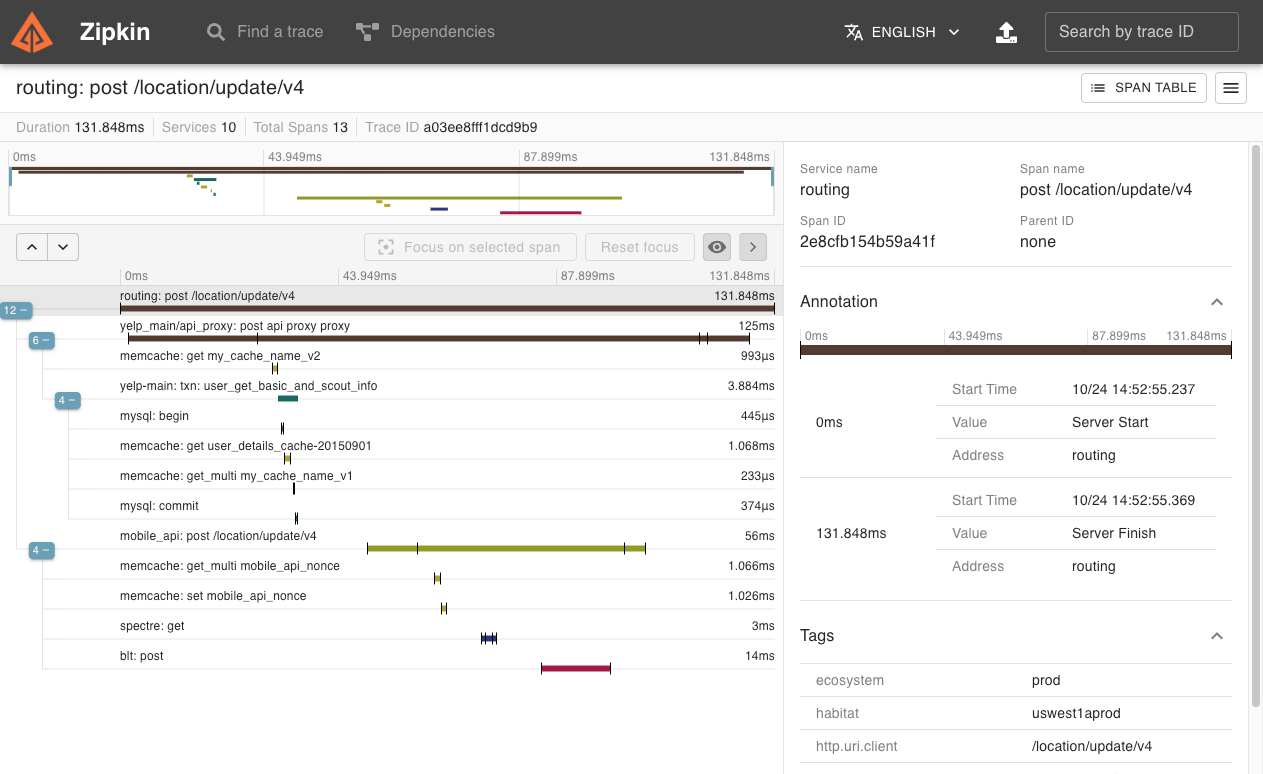
ELK Setup - Elasticsearch、Kibana、Logstash
摘要
ELK日志收集系统进阶使用,本文主要讲解如何打造一个线上环境真实可用的日志收集系统。有了它,你就可以和去服务器上捞日志说再见了!
ELK环境安装
ELK是指Elasticsearch、Kibana、Logstash这三种服务搭建的日志收集系统,具体搭建方式可以参考《SpringBoot应用整合ELK实现日志收集》。这里仅提供最新版本的docker-compose脚本和一些安装要点。
docker-compose脚本
version: '3'
services:
elasticsearch:
image: elasticsearch:6.4.0
container_name: elasticsearch
environment:
- "cluster.name=elasticsearch" #设置集群名称为elasticsearch
- "discovery.type=single-node" #以单一节点模式启动
- "ES_JAVA_OPTS=-Xms512m -Xmx512m" #设置使用jvm内存大小
- TZ=Asia/Shanghai
volumes:
- /mydata/elasticsearch/plugins:/usr/share/elasticsearch/plugins #插件文件挂载
- /mydata/elasticsearch/data:/usr/share/elasticsearch/data #数据文件挂载
ports:
- 9200:9200
- 9300:9300
kibana:
image: kibana:6.4.0
container_name: kibana
links:
- elasticsearch:es #可以用es这个域名访问elasticsearch服务
depends_on:
- elasticsearch #kibana在elasticsearch启动之后再启动
environment:
- "elasticsearch.hosts=http://es:9200" #设置访问elasticsearch的地址
- TZ=Asia/Shanghai
ports:
- 5601:5601
logstash:
image: logstash:6.4.0
container_name: logstash
environment:
- TZ=Asia/Shanghai
volumes:
- /mydata/logstash/logstash.conf:/usr/share/logstash/pipeline/logstash.conf #挂载logstash的配置文件
depends_on:
- elasticsearch #kibana在elasticsearch启动之后再启动
links:
- elasticsearch:es #可以用es这个域名访问elasticsearch服务
ports:
- 4560:4560
- 4561:4561
- 4562:4562
- 4563:4563
安装要点
- 使用docker-compose命令运行所有服务:
docker-compose up -d
- 第一次启动可能会发现Elasticsearch无法启动,那是因为/usr/share/elasticsearch/data目录没有访问权限,只需要修改/mydata/elasticsearch/data目录的权限,再重新启动;
chmod 777 /mydata/elasticsearch/data/
- Logstash需要安装json_lines插件。
logstash-plugin install logstash-codec-json_lines
分场景收集日志
这里为了方便我们查看日志,提出一个分场景收集日志的概念,把日志分为以下四种。
- 调试日志:最全日志,包含了应用中所有DEBUG级别以上的日志,仅在开发、测试环境中开启收集;
- 错误日志:只包含应用中所有ERROR级别的日志,所有环境只都开启收集;
- 业务日志:在我们应用对应包下打印的日志,可用于查看我们自己在应用中打印的业务日志;
- 记录日志:每个接口的访问记录,可以用来查看接口执行效率,获取接口访问参数。
Logback配置详解
要实现上面的分场景收集日志,主要通过Logback的配置来实现,我们先来了解下Logback的配置吧!
完全配置
在SpringBoot中,如果我们想要自定义Logback的配置,需要自行编写logback-spring.xml文件,下面是我们这次要使用的完全配置。
<?xml version="1.0" encoding="UTF-8"?>
<!DOCTYPE configuration>
<configuration>
<!--引用默认日志配置-->
<include resource="org/springframework/boot/logging/logback/defaults.xml"/>
<!--使用默认的控制台日志输出实现-->
<include resource="org/springframework/boot/logging/logback/console-appender.xml"/>
<!--应用名称-->
<springProperty scope="context" name="APP_NAME" source="spring.application.name" defaultValue="springBoot"/>
<!--日志文件保存路径-->
<property name="LOG_FILE_PATH" value="${LOG_FILE:-${LOG_PATH:-${LOG_TEMP:-${java.io.tmpdir:-/tmp}}}/logs}"/>
<!--LogStash访问host-->
<springProperty name="LOG_STASH_HOST" scope="context" source="logstash.host" defaultValue="localhost"/>
<!--DEBUG日志输出到文件-->
<appender name="FILE_DEBUG"
class="ch.qos.logback.core.rolling.RollingFileAppender">
<!--输出DEBUG以上级别日志-->
<filter class="ch.qos.logback.classic.filter.ThresholdFilter">
<level>DEBUG</level>
</filter>
<encoder>
<!--设置为默认的文件日志格式-->
<pattern>${FILE_LOG_PATTERN}</pattern>
<charset>UTF-8</charset>
</encoder>
<rollingPolicy class="ch.qos.logback.core.rolling.SizeAndTimeBasedRollingPolicy">
<!--设置文件命名格式-->
<fileNamePattern>${LOG_FILE_PATH}/debug/${APP_NAME}-%d{yyyy-MM-dd}-%i.log</fileNamePattern>
<!--设置日志文件大小,超过就重新生成文件,默认10M-->
<maxFileSize>${LOG_FILE_MAX_SIZE:-10MB}</maxFileSize>
<!--日志文件保留天数,默认30天-->
<maxHistory>${LOG_FILE_MAX_HISTORY:-30}</maxHistory>
</rollingPolicy>
</appender>
<!--ERROR日志输出到文件-->
<appender name="FILE_ERROR"
class="ch.qos.logback.core.rolling.RollingFileAppender">
<!--只输出ERROR级别的日志-->
<filter class="ch.qos.logback.classic.filter.LevelFilter">
<level>ERROR</level>
<onMatch>ACCEPT</onMatch>
<onMismatch>DENY</onMismatch>
</filter>
<encoder>
<!--设置为默认的文件日志格式-->
<pattern>${FILE_LOG_PATTERN}</pattern>
<charset>UTF-8</charset>
</encoder>
<rollingPolicy class="ch.qos.logback.core.rolling.SizeAndTimeBasedRollingPolicy">
<!--设置文件命名格式-->
<fileNamePattern>${LOG_FILE_PATH}/error/${APP_NAME}-%d{yyyy-MM-dd}-%i.log</fileNamePattern>
<!--设置日志文件大小,超过就重新生成文件,默认10M-->
<maxFileSize>${LOG_FILE_MAX_SIZE:-10MB}</maxFileSize>
<!--日志文件保留天数,默认30天-->
<maxHistory>${LOG_FILE_MAX_HISTORY:-30}</maxHistory>
</rollingPolicy>
</appender>
<!--DEBUG日志输出到LogStash-->
<appender name="LOG_STASH_DEBUG" class="net.logstash.logback.appender.LogstashTcpSocketAppender">
<filter class="ch.qos.logback.classic.filter.ThresholdFilter">
<level>DEBUG</level>
</filter>
<destination>${LOG_STASH_HOST}:4560</destination>
<encoder charset="UTF-8" class="net.logstash.logback.encoder.LoggingEventCompositeJsonEncoder">
<providers>
<timestamp>
<timeZone>Asia/Shanghai</timeZone>
</timestamp>
<!--自定义日志输出格式-->
<pattern>
<pattern>
{
"project": "mall-tiny",
"level": "%level",
"service": "${APP_NAME:-}",
"pid": "${PID:-}",
"thread": "%thread",
"class": "%logger",
"message": "%message",
"stack_trace": "%exception{20}"
}
</pattern>
</pattern>
</providers>
</encoder>
<!--当有多个LogStash服务时,设置访问策略为轮询-->
<connectionStrategy>
<roundRobin>
<connectionTTL>5 minutes</connectionTTL>
</roundRobin>
</connectionStrategy>
</appender>
<!--ERROR日志输出到LogStash-->
<appender name="LOG_STASH_ERROR" class="net.logstash.logback.appender.LogstashTcpSocketAppender">
<filter class="ch.qos.logback.classic.filter.LevelFilter">
<level>ERROR</level>
<onMatch>ACCEPT</onMatch>
<onMismatch>DENY</onMismatch>
</filter>
<destination>${LOG_STASH_HOST}:4561</destination>
<encoder charset="UTF-8" class="net.logstash.logback.encoder.LoggingEventCompositeJsonEncoder">
<providers>
<timestamp>
<timeZone>Asia/Shanghai</timeZone>
</timestamp>
<!--自定义日志输出格式-->
<pattern>
<pattern>
{
"project": "mall-tiny",
"level": "%level",
"service": "${APP_NAME:-}",
"pid": "${PID:-}",
"thread": "%thread",
"class": "%logger",
"message": "%message",
"stack_trace": "%exception{20}"
}
</pattern>
</pattern>
</providers>
</encoder>
<!--当有多个LogStash服务时,设置访问策略为轮询-->
<connectionStrategy>
<roundRobin>
<connectionTTL>5 minutes</connectionTTL>
</roundRobin>
</connectionStrategy>
</appender>
<!--业务日志输出到LogStash-->
<appender name="LOG_STASH_BUSINESS" class="net.logstash.logback.appender.LogstashTcpSocketAppender">
<destination>${LOG_STASH_HOST}:4562</destination>
<encoder charset="UTF-8" class="net.logstash.logback.encoder.LoggingEventCompositeJsonEncoder">
<providers>
<timestamp>
<timeZone>Asia/Shanghai</timeZone>
</timestamp>
<!--自定义日志输出格式-->
<pattern>
<pattern>
{
"project": "mall-tiny",
"level": "%level",
"service": "${APP_NAME:-}",
"pid": "${PID:-}",
"thread": "%thread",
"class": "%logger",
"message": "%message",
"stack_trace": "%exception{20}"
}
</pattern>
</pattern>
</providers>
</encoder>
<!--当有多个LogStash服务时,设置访问策略为轮询-->
<connectionStrategy>
<roundRobin>
<connectionTTL>5 minutes</connectionTTL>
</roundRobin>
</connectionStrategy>
</appender>
<!--接口访问记录日志输出到LogStash-->
<appender name="LOG_STASH_RECORD" class="net.logstash.logback.appender.LogstashTcpSocketAppender">
<destination>${LOG_STASH_HOST}:4563</destination>
<encoder charset="UTF-8" class="net.logstash.logback.encoder.LoggingEventCompositeJsonEncoder">
<providers>
<timestamp>
<timeZone>Asia/Shanghai</timeZone>
</timestamp>
<!--自定义日志输出格式-->
<pattern>
<pattern>
{
"project": "mall-tiny",
"level": "%level",
"service": "${APP_NAME:-}",
"class": "%logger",
"message": "%message"
}
</pattern>
</pattern>
</providers>
</encoder>
<!--当有多个LogStash服务时,设置访问策略为轮询-->
<connectionStrategy>
<roundRobin>
<connectionTTL>5 minutes</connectionTTL>
</roundRobin>
</connectionStrategy>
</appender>
<!--控制框架输出日志-->
<logger name="org.slf4j" level="INFO"/>
<logger name="springfox" level="INFO"/>
<logger name="io.swagger" level="INFO"/>
<logger name="org.springframework" level="INFO"/>
<logger name="org.hibernate.validator" level="INFO"/>
<root level="DEBUG">
<appender-ref ref="CONSOLE"/>
<!--<appender-ref ref="FILE_DEBUG"/>-->
<!--<appender-ref ref="FILE_ERROR"/>-->
<appender-ref ref="LOG_STASH_DEBUG"/>
<appender-ref ref="LOG_STASH_ERROR"/>
</root>
<logger name="com.macro.mall.tiny.component" level="DEBUG">
<appender-ref ref="LOG_STASH_RECORD"/>
</logger>
<logger name="com.macro.mall" level="DEBUG">
<appender-ref ref="LOG_STASH_BUSINESS"/>
</logger>
</configuration>
配置要点解析
使用默认的日志配置
一般我们不需要自定义控制台输出,可以采用默认配置,具体配置参考console-appender.xml,该文件在spring-boot-${version}.jar下面。
<!--引用默认日志配置-->
<include resource="org/springframework/boot/logging/logback/defaults.xml"/>
<!--使用默认的控制台日志输出实现-->
<include resource="org/springframework/boot/logging/logback/console-appender.xml"/>
springProperty
该标签可以从SpringBoot的配置文件中获取配置属性,比如说在不同环境下我们的Logstash服务地址是不一样的,我们就可以把该地址定义在application.yml来使用。
例如在application-dev.yml中定义了这些属性:
logstash:
host: localhost
在logback-spring.xml中就可以直接这样使用:
<!--应用名称-->
<springProperty scope="context" name="APP_NAME" source="spring.application.name" defaultValue="springBoot"/>
<!--LogStash访问host-->
<springProperty name="LOG_STASH_HOST" scope="context" source="logstash.host" defaultValue="localhost"/>
filter
在Logback中有两种不同的过滤器,用来过滤日志输出。
ThresholdFilter:临界值过滤器,过滤掉低于指定临界值的日志,比如下面的配置将过滤掉所有低于INFO级别的日志。
<filter class="ch.qos.logback.classic.filter.ThresholdFilter">
<level>INFO</level></filter>
LevelFilter:级别过滤器,根据日志级别进行过滤,比如下面的配置将过滤掉所有非ERROR级别的日志。
<filter class="ch.qos.logback.classic.filter.LevelFilter">
<level>ERROR</level><onMatch>ACCEPT</onMatch><onMismatch>DENY</onMismatch></filter>
appender
Appender可以用来控制日志的输出形式,主要有下面三种。
- ConsoleAppender:控制日志输出到控制台的形式,比如在console-appender.xml中定义的默认控制台输出。
<appender name="CONSOLE" class="ch.qos.logback.core.ConsoleAppender">
<encoder>
<pattern>${CONSOLE_LOG_PATTERN}</pattern>
</encoder></appender>
- RollingFileAppender:控制日志输出到文件的形式,可以控制日志文件生成策略,比如文件名称格式、超过多大重新生成文件以及删除超过多少天的文件。
<!--ERROR日志输出到文件-->
<appender name="FILE_ERROR"
class="ch.qos.logback.core.rolling.RollingFileAppender">
<rollingPolicy class="ch.qos.logback.core.rolling.SizeAndTimeBasedRollingPolicy">
<!--设置文件命名格式-->
<fileNamePattern>${LOG_FILE_PATH}/error/${APP_NAME}-%d{yyyy-MM-dd}-%i.log</fileNamePattern>
<!--设置日志文件大小,超过就重新生成文件,默认10M-->
<maxFileSize>${LOG_FILE_MAX_SIZE:-10MB}</maxFileSize>
<!--日志文件保留天数,默认30天-->
<maxHistory>${LOG_FILE_MAX_HISTORY:-30}</maxHistory>
</rollingPolicy>
</appender>
- LogstashTcpSocketAppender:控制日志输出到Logstash的形式,可以用来配置Logstash的地址、访问策略以及日志的格式。
<!--ERROR日志输出到LogStash-->
<appender name="LOG_STASH_ERROR" class="net.logstash.logback.appender.LogstashTcpSocketAppender">
<destination>${LOG_STASH_HOST}:4561</destination>
<encoder charset="UTF-8" class="net.logstash.logback.encoder.LoggingEventCompositeJsonEncoder">
<providers>
<timestamp>
<timeZone>Asia/Shanghai</timeZone>
</timestamp>
<!--自定义日志输出格式-->
<pattern>
<pattern>
{
"project": "mall-tiny",
"level": "%level",
"service": "${APP_NAME:-}",
"pid": "${PID:-}",
"thread": "%thread",
"class": "%logger",
"message": "%message",
"stack_trace": "%exception{20}"
}
</pattern>
</pattern>
</providers>
</encoder>
<!--当有多个LogStash服务时,设置访问策略为轮询-->
<connectionStrategy>
<roundRobin>
<connectionTTL>5 minutes</connectionTTL>
</roundRobin>
</connectionStrategy>
</appender>
logger
只有配置到logger节点上的appender才会被使用,logger用于配置哪种条件下的日志被打印,root是一种特殊的appender,下面介绍下日志划分的条件。
- 调试日志:所有的DEBUG级别以上日志;
- 错误日志:所有的ERROR级别日志;
- 业务日志:com.macro.mall包下的所有DEBUG级别以上日志;
- 记录日志:com.macro.mall.tiny.component.WebLogAspect类下所有DEBUG级别以上日志,该类是统计接口访问信息的AOP切面类。
控制框架输出日志
还有一些使用框架内部的日志,DEBUG级别的日志对我们并没有啥用处,都可以设置为了INFO以上级别。
<!--控制框架输出日志-->
<logger name="org.slf4j" level="INFO"/>
<logger name="springfox" level="INFO"/>
<logger name="io.swagger" level="INFO"/>
<logger name="org.springframework" level="INFO"/>
<logger name="org.hibernate.validator" level="INFO"/>
Logstash配置详解
接下来我们需要配置下Logstash,让它可以分场景收集不同的日志,下面详细介绍下使用到的配置。
完全配置
input {
tcp {
mode => "server"
host => "0.0.0.0"
port => 4560
codec => json_lines
type => "debug"
}
tcp {
mode => "server"
host => "0.0.0.0"
port => 4561
codec => json_lines
type => "error"
}
tcp {
mode => "server"
host => "0.0.0.0"
port => 4562
codec => json_lines
type => "business"
}
tcp {
mode => "server"
host => "0.0.0.0"
port => 4563
codec => json_lines
type => "record"
}
}
filter{
if [type] == "record" {
mutate {
remove_field => "port"
remove_field => "host"
remove_field => "@version"
}
json {
source => "message"
remove_field => ["message"]
}
}
}
output {
elasticsearch {
hosts => ["es:9200"]
action => "index"
codec => json
index => "mall-tiny-%{type}-%{+YYYY.MM.dd}"
template_name => "mall-tiny"
}
}
配置要点
- input:使用不同端口收集不同类型的日志,从4560~4563开启四个端口;
- filter:对于记录类型的日志,直接将JSON格式的message转化到source中去,便于搜索查看;
- output:按类型、时间自定义索引格式。
SpringBoot配置
在SpringBoot中的配置可以直接用来覆盖Logback中的配置,比如logging.level.root就可以覆盖<root>节点中的level配置。
- 开发环境配置:application-dev.yml
logstash:
host: localhost
logging:
level:
root: debug
- 测试环境配置:application-test.yml
logstash:
host: 192.168.3.101
logging:
level:
root: debug
- 生产环境配置:application-prod.yml
logstash:
host: logstash-prod
logging:
level:
root: info
🌟 Tips & Tricks
☀️ Quick Links
- https://github.com/bndynet
- https://www.npmjs.com/search?q=%40bndynet
- https://static.bndy.net/logos.html
- https://codepen.io/bndynet
- https://hub.docker.com/search?q=bndynet&type=image
- https://www.materialpalette.com/icons
- https://material.angular.cn/
AI
LangGraph