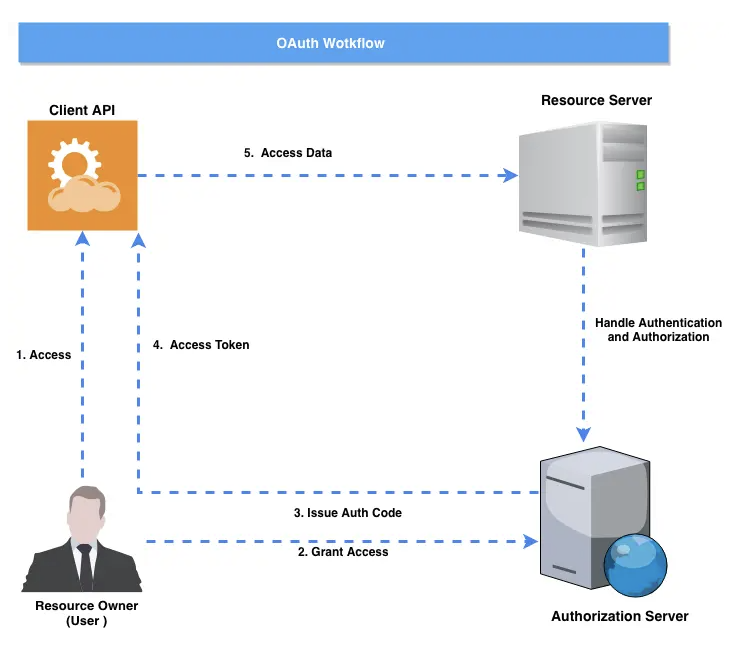
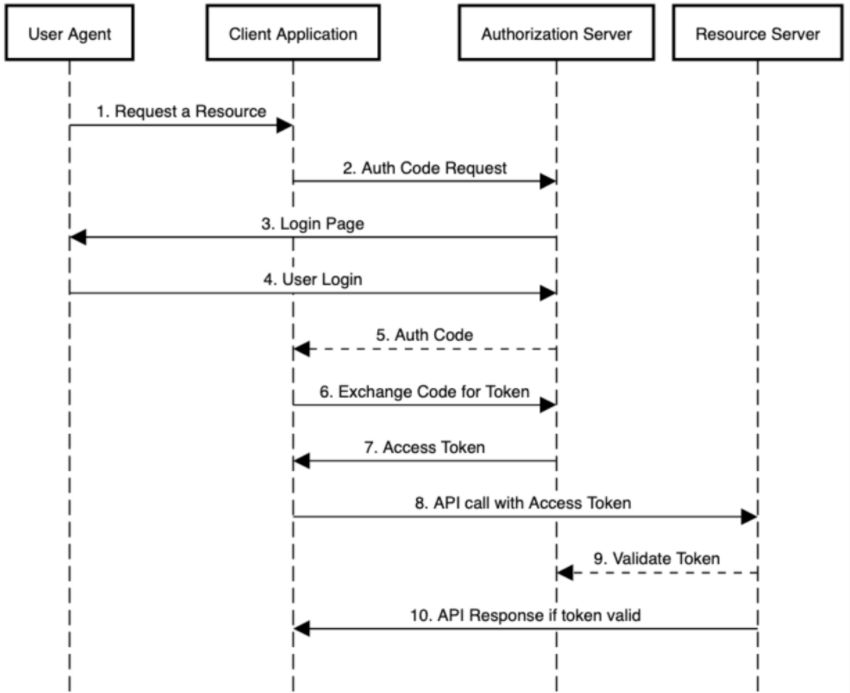
OAuth2
· 2 min read
<type>[optional scope]: <description>
[optional body]
[optional footer(s)]
type as below:
Under REST principles, a URL identifies a resource. The following URL design patterns are considered REST best practices:
Other commonly seen codes include:
List of magazines:
GET /api/v1/magazines.json HTTP/1.1
Host: www.example.gov.au
Accept: application/json, text/javascript
Filtering and sorting are server-side operations on resources:
GET /api/v1/magazines.json?year=2011&sort=desc HTTP/1.1
Host: www.example.gov.au
Accept: application/json, text/javascript
A single magazine in JSON format:
GET /api/v1/magazines/1234.json HTTP/1.1
Host: www.example.gov.au
Accept: application/json, text/javascript
All articles in (or belonging to) this magazine:
GET /api/v1/magazines/1234/articles.json HTTP/1.1
Host: www.example.gov.au
Accept: application/json, text/javascript
All articles in this magazine in XML format:
GET /api/v1/magazines/1234/articles.xml HTTP/1.1
Host: www.example.gov.au
Accept: application/json, text/javascript
Specify query parameters in a comma separated list:
GET /api/v1/magazines/1234.json?fields=title,subtitle,date HTTP/1.1
Host: www.example.gov.au
Accept: application/json, text/javascript
Add a new article to a particular magazine:
POST /api/v1/magazines/1234/articles.json HTTP/1.1
Host: www.example.gov.au
Accept: application/json, text/javascript