Docker Resource
· One min read
docker pull node:14
docker pull node:<version>-alpine
docker pull node:<version>-slim

docker run --rm -v "$PWD":/home/node/app -w /home/node/app -it node:14-slim /bin/bash -c "npm build"
docker pull node:14
docker pull node:<version>-alpine
docker pull node:<version>-slim
docker run --rm -v "$PWD":/home/node/app -w /home/node/app -it node:14-slim /bin/bash -c "npm build"
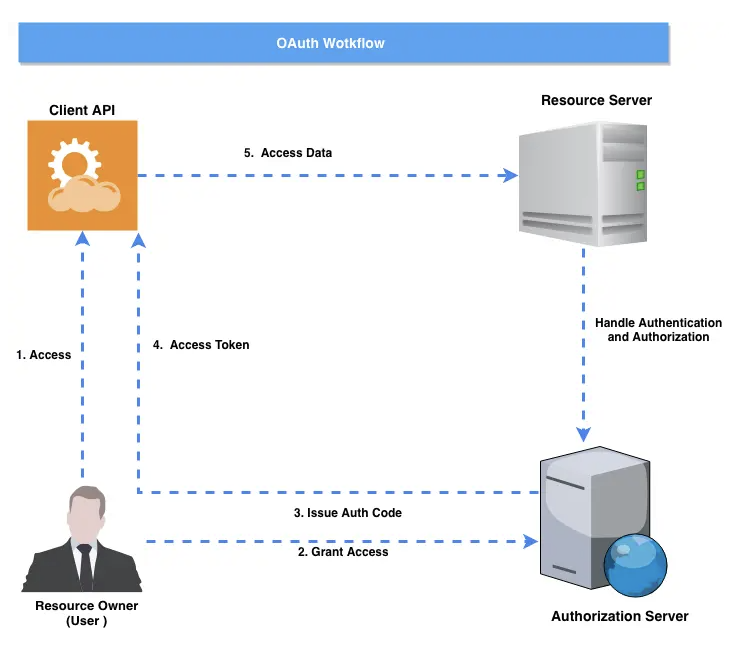
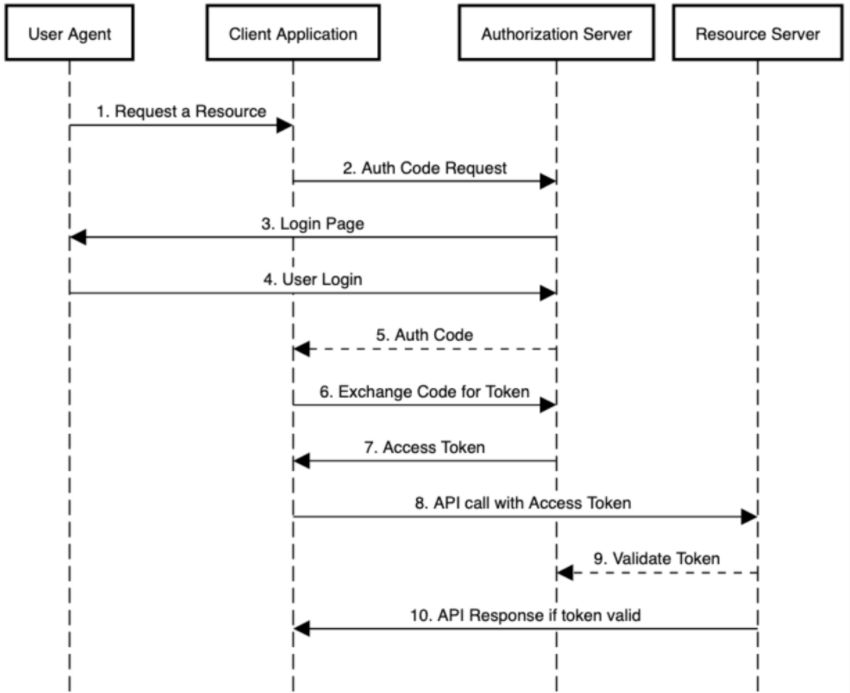
Let’s see how this Oauth2 workflow looks like:
$ npm install oidc-client-ts --save
import { UserManager } from "oidc-client-ts";

const mgr = new UserManager({
  authority: "https://idp.example.com",
  client_id: "your-client-id",
  redirect_uri: "https://app.example.com/auth/callback",
  post_logout_redirect_uri: "https://app.example.com/",
  response_type: "code",
  scope: "openid profile email api.read",
});

// Redirect to signin page
await mgr.signinRedirect();

// callback
const user = await mgr.signinRedirectCallback();
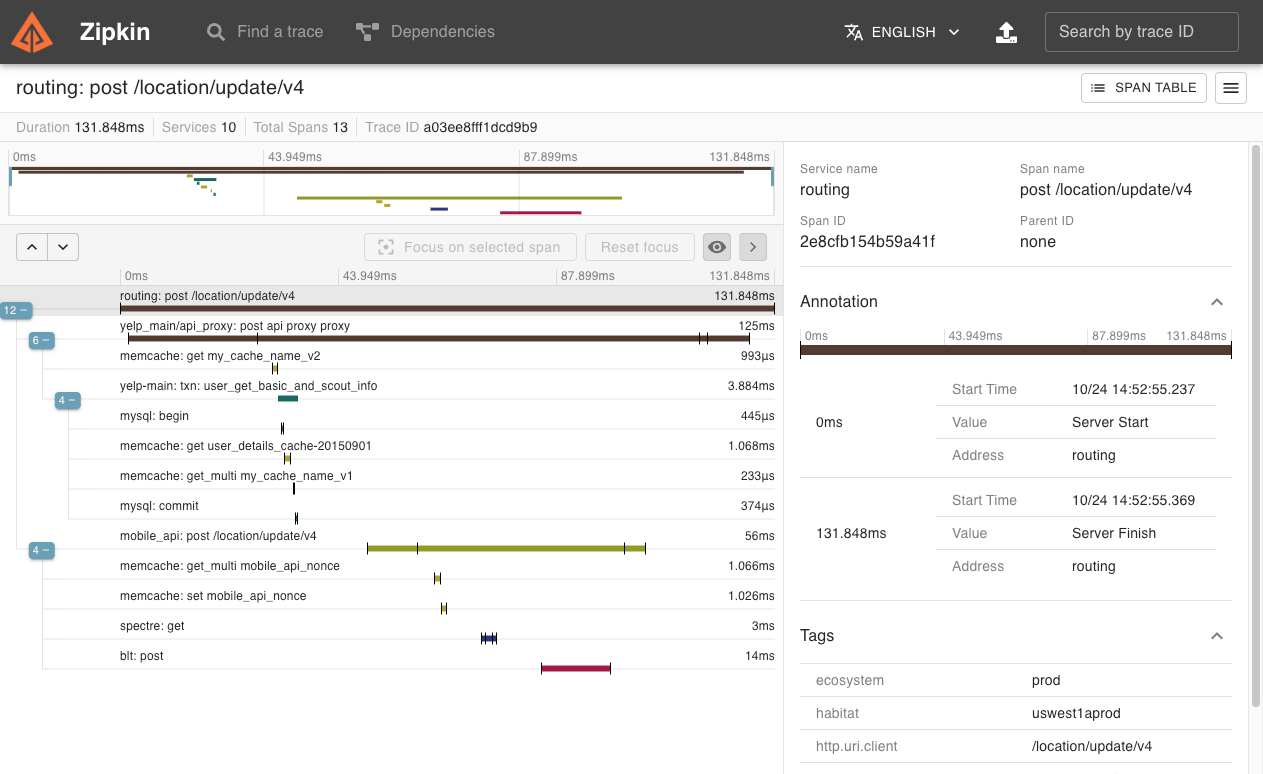
Zipkin is a distributed tracing system. It helps gather timing data needed to troubleshoot latency problems in service architectures. Features include both the collection and lookup of this data.
If you have a trace ID in a log file, you can jump directly to it. Otherwise, you can query based on attributes such as service, operation name, tags and duration. Some interesting data will be summarized for you, such as the percentage of time spent in a service, and whether or not operations failed.
@Injectable({
  providedIn: 'root',
})
export class AppService {

	constructor(
    private injector: Injector,
    // public status: StatusService, // do not do it if this leads to circular dependency issue
  ) { }

  // use below instead
  getStatusSerice() {
    return this.injector.get<StatusSerice>(StatusSerice);
  }
}
| Java SE Version | JDK Version | Class Version | Released Date |
|---|---|---|---|
| Java SE 6 (Mustang) | 1.6 | 50 | December 2006 |
| Java SE 7 (Dolphin) | 1.7 | 51 | July 2011 |
| Java SE 8 | 1.8 | 52 | March 2014 |
| Java SE 9 | 9 | 53 | September, 21st 2017 |
| Java SE 10 | 10 | 54 | March, 20th 2018 |
| Java SE 11 | 11 | 55 | September, 25th 2018 |
yum list *openjdk*
yum install java-<version here>-openjdk    # e.g java-11-openjdk
update-alternatives --config java    # choose the default java version
java -version
curl -s https://get.sdkman.io | bash
sdk list java
sdk install java <version>  // for example `sdk install java 11.0.12-open`

sdk current
sdk current java
import * as user from '../user';

// The assertion for a promise must be returned.
it('works with promises', () => {
  expect.assertions(1);
  return user.getUserName(4).then(data => expect(data).toEqual('Mark'));
});

it('works with resolves', () => {
  expect.assertions(1);
  return expect(user.getUserName(5)).resolves.toEqual('Paul');
});

// async/await can be used.
it('works with async/await', async () => {
  expect.assertions(1);
  const data = await user.getUserName(4);
  expect(data).toEqual('Mark');
});

// async/await can also be used with `.resolves`.
it('works with async/await and resolves', async () => {
  expect.assertions(1);
  await expect(user.getUserName(5)).resolves.toEqual('Paul');
});
Error handling
// Testing for async errors using Promise.catch.
it('tests error with promises', () => {
  expect.assertions(1);
  return user.getUserName(2).catch(e =>
    expect(e).toEqual({
      error: 'User with 2 not found.',
    }),
  );
});

// Or using async/await.
it('tests error with async/await', async () => {
  expect.assertions(1);
  try {
    await user.getUserName(1);
  } catch (e) {
    expect(e).toEqual({
      error: 'User with 1 not found.',
    });
  }
});

// Testing for async errors using `.rejects`.
it('tests error with rejects', () => {
  expect.assertions(1);
  return expect(user.getUserName(3)).rejects.toEqual({
    error: 'User with 3 not found.',
  });
});

// Or using async/await with `.rejects`.
it('tests error with async/await and rejects', async () => {
  expect.assertions(1);
  await expect(user.getUserName(3)).rejects.toEqual({
    error: 'User with 3 not found.',
  });
});
npm i --dev jest jest-preset-angular @types/jest
You need to add this entry to package.json
"jest": {
  "preset": "jest-preset-angular",
  "setupFilesAfterEnv": ["<rootDir>/src/setupJest.ts"]
}
You’re now ready to add this to your npm scripts:
"test": "jest",
"test:watch": "jest --watch",
Oh, one more thing. Forget about installing PhantomJS on your CI:
"test:ci": "jest --runInBand",
// timerGame.js
'use strict';

function timerGame(callback) {
  console.log('Ready....go!');
  setTimeout(() => {
    console.log("Time's up -- stop!");
    callback && callback();
  }, 1000);
}

module.exports = timerGame;
// __tests__/timerGame-test.js
'use strict';

jest.useFakeTimers();

test('waits 1 second before ending the game', () => {
  const timerGame = require('../timerGame');
  timerGame();

  expect(setTimeout).toHaveBeenCalledTimes(1);
  expect(setTimeout).toHaveBeenLastCalledWith(expect.any(Function), 1000);
});
While you can call jest.useFakeTimers() or jest.useRealTimers() from anywhere (top level, inside an it block, etc.), it is a global operation and will affect other tests within the same file. Additionally, you need to call jest.useFakeTimers() to reset internal counters before each test. If you plan to not use fake timers in all your tests, you will want to clean up manually, as otherwise the faked timers will leak across tests:
afterEach(() => {
  jest.useRealTimers();
});

test('do something with fake timers', () => {
  jest.useFakeTimers();
  // ...
});

test('do something with real timers', () => {
  // ...
});
test('calls the callback after 1 second', () => {
  const timerGame = require('../timerGame');
  const callback = jest.fn();

  timerGame(callback);

  // At this point in time, the callback should not have been called yet
  expect(callback).not.toBeCalled();

  // Fast-forward until all timers have been executed
  jest.runAllTimers();

  // Now our callback should have been called!
  expect(callback).toBeCalled();
  expect(callback).toHaveBeenCalledTimes(1);
});
// infiniteTimerGame.js
'use strict';

function infiniteTimerGame(callback) {
  console.log('Ready....go!');

  setTimeout(() => {
    console.log("Time's up! 10 seconds before the next game starts...");
    callback && callback();

    // Schedule the next game in 10 seconds
    setTimeout(() => {
      infiniteTimerGame(callback);
    }, 10000);
  }, 1000);
}

module.exports = infiniteTimerGame;
// __tests__/infiniteTimerGame-test.js
'use strict';

jest.useFakeTimers();

describe('infiniteTimerGame', () => {
  test('schedules a 10-second timer after 1 second', () => {
    const infiniteTimerGame = require('../infiniteTimerGame');
    const callback = jest.fn();

    infiniteTimerGame(callback);

    // At this point in time, there should have been a single call to
    // setTimeout to schedule the end of the game in 1 second.
    expect(setTimeout).toHaveBeenCalledTimes(1);
    expect(setTimeout).toHaveBeenLastCalledWith(expect.any(Function), 1000);

    // Fast forward and exhaust only currently pending timers
    // (but not any new timers that get created during that process)
    jest.runOnlyPendingTimers();

    // At this point, our 1-second timer should have fired it's callback
    expect(callback).toBeCalled();

    // And it should have created a new timer to start the game over in
    // 10 seconds
    expect(setTimeout).toHaveBeenCalledTimes(2);
    expect(setTimeout).toHaveBeenLastCalledWith(expect.any(Function), 10000);
  });
});
// timerGame.js
'use strict';

function timerGame(callback) {
  console.log('Ready....go!');
  setTimeout(() => {
    console.log("Time's up -- stop!");
    callback && callback();
  }, 1000);
}

module.exports = timerGame;
it('calls the callback after 1 second via advanceTimersByTime', () => {
  const timerGame = require('../timerGame');
  const callback = jest.fn();

  timerGame(callback);

  // At this point in time, the callback should not have been called yet
  expect(callback).not.toBeCalled();

  // Fast-forward until all timers have been executed
  jest.advanceTimersByTime(1000);

  // Now our callback should have been called!
  expect(callback).toBeCalled();
  expect(callback).toHaveBeenCalledTimes(1);
});
swapon -s
free -m

total       used       free     shared    buffers     cached
Mem:          3953        315       3637          8         11        107
-/+ buffers/cache:        196       3756
Swap:            0          0       4095
df -h

Filesystem      Size  Used Avail Use% Mounted on
/dev/vda1        59G  1.5G   55G   3% /
devtmpfs        2.0G     0  2.0G   0% /dev
tmpfs           2.0G     0  2.0G   0% /dev/shm
tmpfs           2.0G  8.3M  2.0G   1% /run
tmpfs           2.0G     0  2.0G   0% /sys/fs/cgroup
sudo dd if=/dev/zero of=/swapfile count=10240 bs=1MiB
ls -lh /swapfile

-rw-r--r-- 1 root root 4.0G Oct 30 11:00 /swapfile
sudo chmod 600 /swapfile

ls -lh /swapfile
-rw------- 1 root root 4.0G Oct 30 11:00 /swapfile

sudo mkswap /swapfile
Setting up swapspace version 1, size = 4194300 KiB
no label, UUID=b99230bb-21af-47bc-8c37-de41129c39bf

sudo swapon /swapfile
swapon -s
Filename                Type        Size    Used    Priority
/swapfile               file        4194300 0     -1

free -m
total       used       free     shared    buffers     cached
Mem:          3953        315       3637          8         11        107
-/+ buffers/cache:        196       3756
Swap:         4095          0       4095
Edit the file with sudo privileges in your text editor:
sudo nano /etc/fstab
At the bottom of the file, you need to add a line that will tell the operating system to automatically use the swap file that you created:
/swapfile swap swap sw 0 0
First create a new CentOS user account from the command line. For example, create the marlena user account, run:
adduser marlena
Set the password for marlena user by typing the following passwd command:
passwd marlena
A new user account was created. Verify it:
id marlena
In CentOS 8 Linux server all members of the wheel group have sudo access. So all you have to do is append user account to the wheel group using the usermod command command:
usermod -aG wheel marlena
User account marlena now have sudo privileges. Verify it by running the id command or grep command on /etc/passwd and /etc/group files:
id marlena
grep '^marlena' /etc/passwd
grep '^wheel' /etc/group
Below is to give sudo access to an existing user named vivek by adding the user to the wheel group:
usermod -aG wheel vivek
id vivek
userdel -r {userName}
**:s/foo/bar/g**Find each occurrence of 'foo' (in the current line only), and replace it with 'bar'.
**:%s/foo/bar/g**Find each occurrence of 'foo' (in all lines), and replace it with 'bar'.
**:%s/foo/bar/gc**Change each 'foo' to 'bar', but ask for confirmation first.
**:%s/\<foo\>/bar/gc**Change only whole words exactly matching 'foo' to 'bar'; ask for confirmation.
**:%s/foo/bar/gci**Change each 'foo' (case insensitive due to the i flag) to 'bar'; ask for confirmation.:%s/foo\c/bar/gc is the same because \c makes the search case insensitive.This may be wanted after using :set noignorecase to make searches case sensitive (the default).
**:%s/foo/bar/gcI**Change each 'foo' (case sensitive due to the I flag) to 'bar'; ask for confirmation.:%s/foo\C/bar/gc is the same because \C makes the search case sensitive.This may be wanted after using :set ignorecase to make searches case insensitive.